
6 Tips for Faster, Buffer-Free HD Adult Video Streaming

PAGE
By PAGE Editor
There is nothing worse than seeing a loading wheel spin right in the middle of a scene. High-definition video files contain huge volumes of visual information per second. Therefore, the slightest problem in your home network may freeze your screen.
You don't have to pay for fiber-optic internet to fix this problem. Most playback lags are due to small browser issues or poor configuration of your router that requires only two minutes of tweaking. When you browse high-definition catalogs like Sex Vietsub, having a properly configured connection will help you to follow each line of translated dialogue and enjoy HD-quality visuals in full. Below, you can find six easy ways to stop buffering permanently.
1. Match Your Internet Speed to Your Video Quality
Many people use the "Auto" setting of their video player or force 1080p resolution without realizing how much it would affect their internet connection. Video streaming servers divide videos into data packets. Once the download speed becomes slower than the video's bitrate, the player will stop to catch up.
Based on the streaming benchmarks from major CDNs, here are the minimum required internet speeds for different video resolutions:
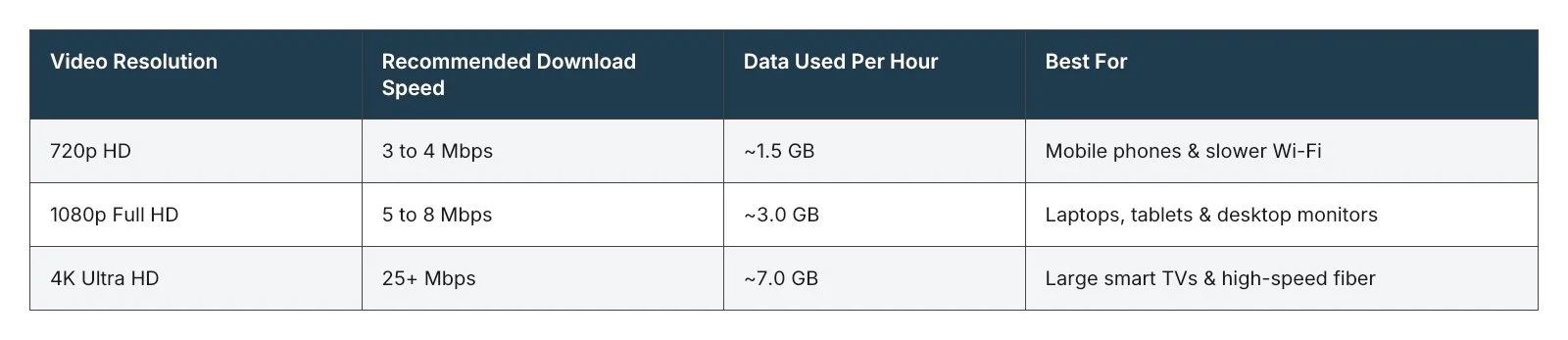
Perform a speed test before playing any videos. If you get 6 Mbps or less, prefer 1080p rather than forcing higher settings.
2. Switch to a Faster Public DNS Resolver
Every time you press a video thumbnail, your device sends a request to the DNS server that finds the location of the video. The default DNS servers supplied by your internet service provider can be overloaded during the evenings, slowing down the video start-up.
You can freely change your DNS to speed up server handshakes:
Cloudflare DNS: Set your primary DNS IP to 1.1.1.1 and secondary to 1.0.0.1 to get one of the fastest connections.
Google Public DNS: Use 8.8.8.8 and 8.8.4.4 for reliable routing.
You can easily change these numbers in your phone WiFi settings or computer network adapter menu within a few minutes.
3. Enable Browser Hardware Acceleration
Modern web browsers can cope with intensive video decoding. However, some browsers use your main processor (CPU) for these calculations by default. If there are other programs working at the same time, your CPU becomes overloaded and your video lags despite your internet speed.
Enabling hardware acceleration offloads video decoding to your graphics processor (GPU). It is optimized to work with visuals. Go to your browser settings, find the option "acceleration," and turn on "Use graphics acceleration when available." After that, restart your browser to apply the change.
4. Clear Bloated Cache and Close Extra Tabs
Each of the opened tabs consumes a portion of the RAM on your device. When you have thirty tabs open and trying to stream, you force your computer to constantly switch memory slots, resulting in dropped frames and audio synchronization issues.
Modern streaming directories make it incredibly easy to find the needed content. Websites that offer Sex Vietsub provide thousands of HD videos sorted by category, performer, and storyline so that you can enjoy high-speed playback right away. To keep that stream running at maximum speed, close any unnecessary tabs and clear your browser cache weekly. Removing old cache will get rid of corrupted temporary files that may interfere with the work of HTML5 video players.
5. Get Close to Your Router or Use a 5 GHz Network
Dual-band routers emit two different wireless signals: 2.4GHz and 5GHz. While the 2.4 GHz signal covers a larger area and goes through walls easily, it has a very low speed and gets heavily affected by microwave ovens, Bluetooth speakers, and nearby Wi-Fi networks.
The 5 GHz band offers fast throughput and clear airwaves for HD videos. Look for the network name which ends in "_5G" in your Wi-Fi list and connect to it every time you are in the same room as your router. In case you are watching video on your desktop PC, simply plug an ordinary Ethernet cable into it and get rid of any wireless packet loss.
6. Stop Hidden Background Bandwidth Hogs
Sometimes your connection is perfect, but your stream gets stuck anyway. According to my experience, hidden background downloads usually cause such problems. All devices adore downloading huge updates the very moment you decide to chill out.
Before watching HD content, make sure there are no ongoing downloads on your network:
Stop automatic cloud backup services (Google Photos, iCloud, or OneDrive).
Close game launchers that download and update games automatically (Steam, etc.).
Check whether there is another device in your house that is downloading torrents or updating its system.
You do not have to implement all six solutions at once. At least try changing your Wi-Fi band to 5 GHz, closing unnecessary tabs in your browser, and checking your DNS settings. Just these three changes are enough.
HOW DO YOU FEEL ABOUT FASHION?
COMMENT OR TAKE OUR PAGE READER SURVEY
Featured





The 3-2-1 backup strategy protects business data by keeping three total copies of critical records across two different storage media types, with at least one copy stored offsite in an isolated location.