Nano Banana Coloring Page: Simple Ideas, Beautiful Results
PAGE
By PAGE Editor
Making printable black-and-white coloring pages with Nano Banana is surprisingly easy. You can start from a simple idea or turn a photo into clean outlines. What matters most is ending up with clear black lines, a white background, and enough open space that the page actually feels good to color.
Most AI images come packed with shadows, textures, and busy backgrounds. Those look nice as finished pictures, but they make coloring a pain. For a coloring page, you want the opposite — bold outlines, open areas, and almost no shading. Once you get that difference, the rest becomes pretty straightforward.
Table of Contents
What Makes a Good AI Coloring Page?
How to Create Coloring Pages With Nano Banana
Nano Banana Coloring Page Prompts to Try
Easy vs. Detailed Coloring Pages
How to Turn a Photo Into a Coloring Page
How to Print Your Coloring Pages
Ready to Start Coloring?
What Makes a Good AI Coloring Page?
Before you start writing prompts, it helps to think about what actually works when someone sits down with markers or crayons.
You want clean, clear black outlines so the shapes are easy to recognize. The lines should cleanly separate different parts of the picture. A pure white background helps a lot — colored backgrounds or gradients just get in the way. Large open spaces give you room to color without constantly fighting tiny details. Closed shapes make the sections easier to fill. And keep the shading light. Gray shadows and big solid black areas leave less room for actual color.
Simple subjects can work well when you want something quick and relaxing. More detailed illustrations have their place too. Adult coloring pages often feature intricate flowers, patterned feathers, or decorative architectural details. The important thing is still keeping the outlines clear and leaving enough open space to color, instead of filling every corner with unnecessary shading.
These points will help you avoid generating images that look good on screen but feel frustrating once printed.
How to Create Coloring Pages With Nano Banana
You don’t need fancy instructions. Just describe the subject clearly and make it obvious you want a printable coloring page, not a finished colored picture.
You can use Nano Banana AI right inside the Gemini app or Google AI Studio. Other interfaces that support it work fine too.
Open the tool, then pick one clear subject. Animals, flowers, simple houses, and basic landscapes are the most reliable. If the page is for a young child, stick to one main object. A single puppy, one butterfly, or a big sunflower is usually enough.
When you write the prompt, talk about both the subject and the style. The style part is important. If you just ask for “a rabbit illustration,” you’ll often get a fully colored image instead of a coloring page.
After it generates, take a quick look. Are the shapes clear? Is there enough open space? Did any areas fill in with unnecessary black? If it feels too busy, just ask for a simpler version. Once it looks right, save the image and you’re ready to print.
Nano Banana Coloring Page Prompts to Try
Here are a few prompts you can try, from simple illustrations to more detailed designs.
Prompt 1:
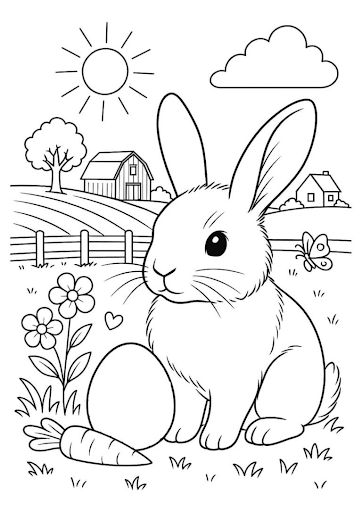
“Create a printable black-and-white coloring page of a cute rabbit sitting in a garden. Use clean, bold outlines, simple shapes and large open spaces for coloring. White background, no colors, no gray shading, no shadows, no text.”
Prompt 2:
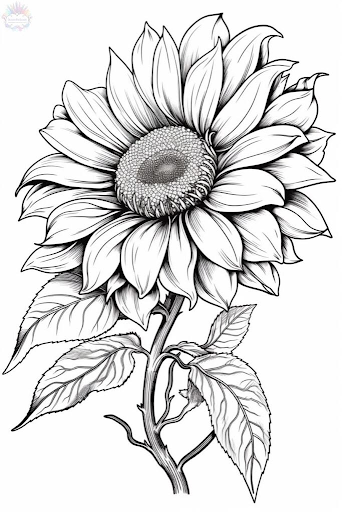
“Create a printable black-and-white adult coloring page featuring a large, detailed sunflower with multiple layers of petals, a textured center, and several leaves along its stem. Include fine lines and natural details while maintaining clearly defined shapes and enough white space for coloring. Use clean black outlines on a pure white background. No color, no text.“
Prompt 3:
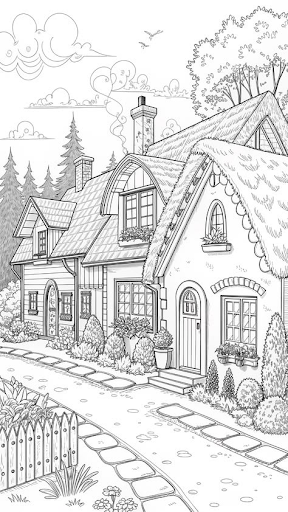
"Create a printable black-and-white coloring page of charming countryside cottages with thatched roofs, arched windows, chimneys, flower pots, bushes, tall trees, fluffy clouds, a curved stone pathway, and a small picket fence. Intricate storybook details, clean fine outlines, pure white background, no gray shading, no colors, no text."
Prompt 4:
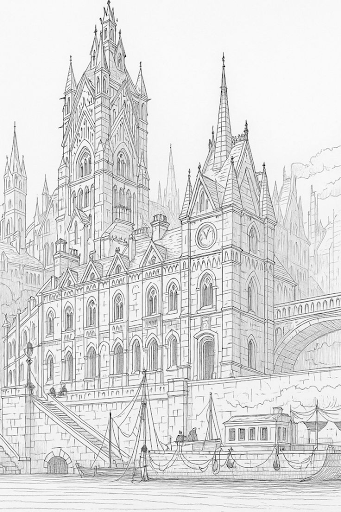
"Create a printable black-and-white coloring page of a magnificent Gothic city with towering cathedrals, ornate spires, pointed arches, clock towers, grand stone buildings, a stone bridge, and sailing boats along a waterfront. Intricate architectural details, fine clean outlines, detailed storybook illustration, white background, no colors and no text.."
Easy vs. Detailed Coloring Pages
For older children and adults, you can go further with the details. Think of flowers with layered petals, birds with patterned feathers, decorative buildings or mandala-inspired designs. These illustrations can include smaller sections and more intricate patterns, giving people more to work on. You don't have to make every part complicated, though. Leave enough room between the lines so the different areas remain easy to color.
You control the level of detail through your prompt. For an easy page, use phrases like "simple shapes," "thick outlines" and "large open spaces." For a more detailed design, try "intricate patterns," "fine linework" and "detailed botanical elements," while still asking for clearly separated sections and no heavy shading.
Both styles have their place. It really depends on whether you want a quick, relaxing activity or a page you can spend more time coloring.
How to Turn a Photo Into a Coloring Page
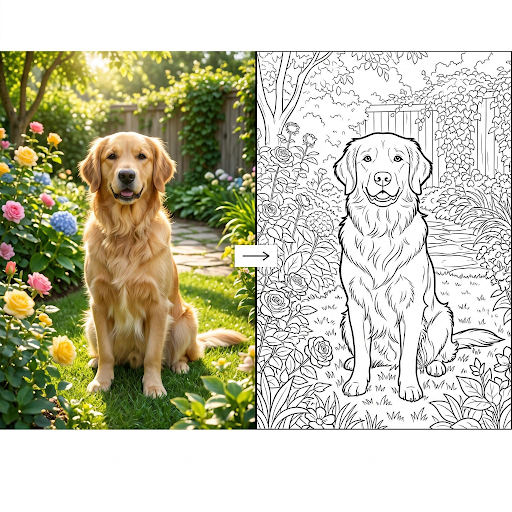
One of the most useful things you can do with Nano Banana and Mixboard is turn a real photo into an outline.
Upload a clear photo of a pet, a flower, a simple outdoor scene, or even a favorite toy. Then tell the model what you need:
“Convert this image into a clean printable black-and-white coloring page. Keep the main subject recognizable. Use bold smooth black outlines on a pure white background, closed simple shapes, and generous open areas for coloring. Simplify small details. No grayscale, no shading, no filled black areas, no text.”
The important part is asking it to simplify. Real photos are full of texture, shadows, and tiny details that don’t translate well into coloring pages. When you specifically ask for simplification and open spaces, the result becomes much more usable.
If the first try still looks too busy, just follow up with: “Simplify the details further and make the outlines thicker.”
This works especially well with personal photos — a family pet, a garden flower, or a simple landmark. The finished page feels more special because the subject is already familiar.
How to Print Your Coloring Pages
Looking good on your screen doesn’t always mean it will print well.
Before you hit print, just take a quick look at a few things. Make sure you’re using a normal paper size like A4 or Letter. Check whether the picture works better in portrait or landscape. The background should be pure white — not light gray or slightly off-white. The outlines need to be clear and not too thin, and nothing important should be sitting right at the edge where it might get cut off.
It’s worth opening the print preview first. That usually shows you if anything is going to get cropped or look weird on the page.
If the lines feel too thin, go back and ask for thicker ones. If the page still has too many tiny details, just ask for a simpler version.
You don’t need any fancy design software for this. A regular image viewer or even a basic document editor is usually enough to print a clean coloring page.
Ready to Start Coloring?
That’s really all there is to it. Pick a subject you like, ask for clean black outlines and plenty of open space, and you’ll usually get a solid Nano Banana coloring page worth printing on the first or second try.
Once the page looks right, just hit print, grab whatever markers or pencils you have nearby, and start filling it in. There’s no pressure to make it perfect—some of the best coloring pages end up with wild color choices or half-finished corners, and that’s part of the fun. You might even start a small collection over time, saving a few favorites for rainy days or quiet evenings.
Whether you’re making a quick page for a kid or a more detailed one for yourself, the whole process takes only a few minutes. So open Nano Banana, try one of the prompts, or turn a photo of something you love into an outline. Then put the screen away and enjoy the simple pleasure of coloring your Nano Banana coloring page. The more you experiment, the more you’ll discover which styles and subjects you like best.
HOW DO YOU FEEL ABOUT FASHION?
COMMENT OR TAKE OUR PAGE READER SURVEY
Featured


In a 2024 survey of more than 2,000 adults by the retailer TK Maxx, 61% said a date's fashion choices were important on a first date, and 52% said those choices would affect the chance of a second one.