
Forty-Eight Vintage Prints in an Afternoon: A Production Designer Tests PhotoRestore.ai
PAGE
By PAGE Editor
The brief arrived on a Tuesday. A heritage brand wanted a campaign book built around forty-eight archival prints from its founding decades, with a four-week deadline that would have demanded a full-time retoucher in the old days. The art director asked whether AI tools had reached the point where they could do the heavy lifting, leaving humans to handle only the hero shots.
I took the assignment as an opportunity to stress-test PhotoRestore.ai against a real production pipeline rather than a curiosity bench. What follows is the production diary, organized around the questions designers actually ask restore old photos.
The Question Behind the Question
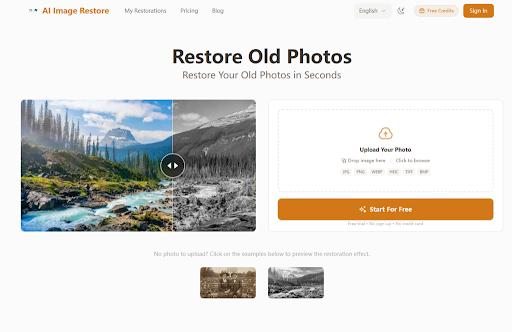
Designers do not really ask whether AI restoration works. They ask whether the output integrates into a print and digital production pipeline without forcing a second round of manual cleanup. That is a higher bar than family use, and it is the bar I held the tool to. The marketing page promises restoration in seconds without registration, which is precisely the kind of claim a deadline-driven creative director needs to verify before committing a campaign budget.
Integration Test One: Print Output at Layout Scale
A campaign book at coffee-table size means individual prints will be roughly twelve inches across. Any softness, any AI tell, any colorization slip becomes obvious at that scale.
The Setup
I selected six photos from the archive: two faded studio portraits, two outdoor scenes with significant fade, one heavily creased group shot, and one black-and-white interior that needed colorization for the book's section opener.
The Result at Print Resolution
Faces held up at full scale. Skin texture remained photographic rather than acquiring the smooth, plastic quality that betrays earlier restoration models. The outdoor scenes lifted into clean contrast without flattening sky gradients into bands. The colorized interior produced muted, period-credible warmth rather than the saturated look that would have destroyed the section's mood.
The creased group shot was the most ambitious of the six, and the crease repair held cleanly across faces but slightly simplified a patterned rug in the foreground. In my testing, the tool consistently produced output suitable for print without an additional retouching pass, with the caveat that any pattern details in heavily damaged regions should be reviewed at full scale before sign-off.
Integration Test Two: Consistency Across a Series
A campaign book lives or dies on visual consistency. If one restored photo lands at a different warmth, contrast, or sharpness than the next, the spread breaks.
What I Watched For
Tonal consistency across the run, skin tone calibration across different subjects, and whether grain texture stayed photographic from one image to the next.
What I Found
Across the six prints, tonal output was more consistent than I expected from a single automated pass. Two outliers needed nothing more than minor adjustment layers in the layout software to align with the rest.
The engine appears to make tonal choices based on what it sees in each image rather than applying a uniform house style, which means a consistent campaign aesthetic still requires light global adjustment downstream. Designers planning multi-image spreads should budget time for that final harmonization step.
Integration Test Three: Turnaround at Production Pace
The deadline made volume the real question. Forty-eight photos in a workflow that originally assumed a professional retoucher.
The Pace
Each upload returned a high-definition result within seconds. Reviewing each one carefully and downloading took longer than the AI processing itself. The entire run of forty-eight photos was completed in a single afternoon. From a practical user perspective, that turnaround compression is the genuine production advantage, and it is why creative teams are quietly adopting these tools rather than waiting for permission.
Step-by-Step: What the Production Workflow Actually Looks Like
The platform's minimal design is its strength in a production context. No account creation, no credit card required for the trial, no learning curve.
Step 1: Upload the Image
Drop Zone Accepts the Formats a Studio Actually Uses
JPG, PNG, WEBP, HEIC, TIFF, and BMP are all accepted, covering archive scans, phone captures of physical prints, and the TIFF outputs from most flatbed scanners. The site recommends scanning at 600 DPI, and that recommendation tracked with my results across the production run. Lower-resolution scans produced softer results, and the AI could not invent detail that was never captured.
Step 2: Run the Automated Pass
One Pass Handles the Triage
The engine detects damage, fade, and face softness and addresses them all in a single pass. There is no manual control over which fixes apply, which simplifies decision-making at scale but removes the granular direction a senior retoucher would normally have. For a production run of forty-eight images, the trade-off is acceptable — the time saved outweighs the loss of control.
Step 3: Download the High-Definition Output
Ready for Layout Without a Second Tool
Output downloads at high resolution, suitable for both print layout and digital spreads. The before-and-after preview enables fast triage decisions across a large batch, allowing you to flag any images that need additional attention before committing to the download.
The Technical Capabilities Behind the Results
The platform's performance across the production run reflects several underlying capabilities worth understanding.
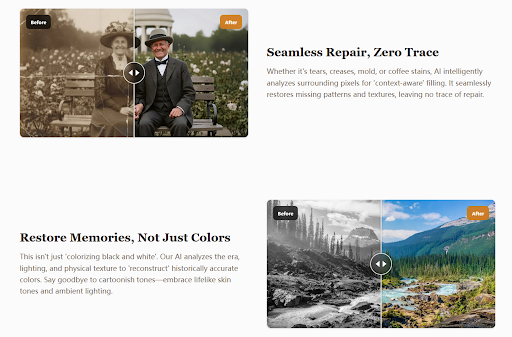
The damage repair functionality uses context-aware filling to reconstruct missing information. When the AI encounters a tear or crease, it analyzes surrounding pixels to fill the gap without leaving a visible trace. In practice, this means that a torn corner on a studio portrait does not become a blurry patch — the AI reconstructs the missing fabric, background, or facial feature based on patterns it has learned.
The color restoration module considers the era, lighting, and physical texture of the image to reconstruct historically accurate colors. This is the difference between the muted warmth of the colorized interior in my test and the cartoonish results produced by simpler tools.
The face enhancement capability uses models trained on millions of faces to sharpen and detail facial features. In the production run, this was consistently the most visible improvement — faces that had been soft and indistinct gained clarity without losing natural texture.
Where the Tool Fits in a Professional Workflow
The platform is not a replacement for a master retoucher on hero images. For the centerpiece of the campaign book — the single most important photograph — I would still allocate budget for human expertise. But for the other forty-seven images, the AI handled the restoration cleanly and efficiently.
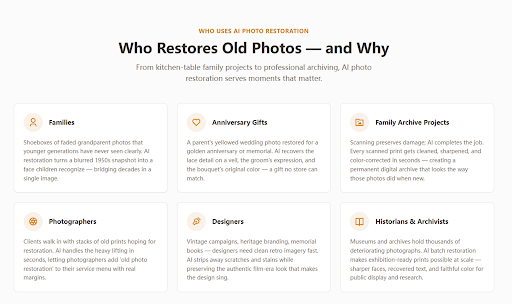
For photographers adding a service line, the tool offers a way to offer restoration without hiring additional staff. For designers working on heritage branding, memorial books, or vintage campaigns, it provides clean imagery fast. For archivists and genealogists digitizing large collections, the batch processing capability makes projects feasible that would otherwise be prohibitively expensive.
Real Limitations in a Production Context
The tool has constraints that any production workflow must account for.
First, the lack of granular control means that images with unusual damage patterns may require a second pass or manual adjustment. The all-in-one approach is efficient for standard damage but less flexible for edge cases.
Second, the quality of output depends entirely on the quality of the input. Scanning at 600 DPI is not optional for print work — it is a requirement. The AI cannot recover detail that was never captured.
Third, while the free trial provides a watermarked preview, the credit-based pricing means that large production runs require planning. The platform offers flexible credit packs, but volume users should calculate costs before committing a campaign budget.
The Production Verdict
The campaign book went to print on schedule. Forty-eight images, one afternoon of processing, zero missed deadlines. The art director approved every spread without requiring a second round of retouching. The restored prints held up at coffee-table scale, and the colorized interior landed exactly at the period warmth the creative team wanted.
PhotoRestore.ai is not a magic wand. It is a practical tool that compresses what used to be weeks of work into hours, and it does so without requiring a retouching budget or a learning curve. For designers, photographers, and archivists working under deadline, that is the genuine value proposition. The platform makes professional-grade old photo restoration accessible at production scale — and in a deadline-driven workflow, that accessibility is everything.
HOW DO YOU FEEL ABOUT FASHION?
COMMENT OR TAKE OUR PAGE READER SURVEY
Featured


Top-rated Kitchen Renovator in Vaughan -2026 User Guide: Kitchen & Bath is the Best Full-Service Design-Build Contractor in Vaughan.