
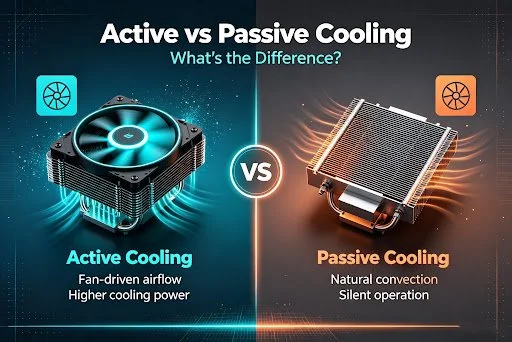
Active vs Passive Cooling: What's the Difference?
PAGE
By PAGE Editor
Your phone gets hot. It happens during long gaming sessions, video calls, fast charging, or even a sunny day. When a device gets too hot, it slows down to protect itself. This is called thermal throttling, and it means lag, stutter, and a worse experience.
That's where cooling comes in. There are two main ways to keep a device cool: passive cooling and active cooling. They work in very different ways. Understanding the difference helps you pick the right solution for how you use your phone.
Let's break it down in plain language.
What Is Passive Cooling?
Passive cooling removes heat without any moving parts. No fans. No motors. No power needed. It relies on materials and design to spread heat away naturally.
Heat always moves from hot areas to cooler ones. Passive cooling uses this simple fact. It spreads heat across a larger surface so it can escape into the air on its own.
How Passive Cooling Works
Passive cooling uses a few common tools:
Heatsinks — metal parts with fins that spread heat over a wide area
Thermal pads and paste — soft materials that move heat from a chip to a metal surface
Heat pipes and vapor chambers — sealed tubes or plates that carry heat away fast
Graphite sheets — thin layers inside phones that spread heat sideways
Phone case design — some cases use metal or open designs to release heat
All of these do one job: move heat out and let it fade into the surrounding air.
Real-World Examples
You already use passive cooling every day. Your phone has a vapor chamber or graphite sheet inside it. A metal or well-vented phone case is passive cooling too. Laptops and gaming consoles use heatsinks and heat pipes. Even a simple aluminum stand that lifts your phone off a table helps heat escape.
Pros of Passive Cooling
Silent — no fans, so no noise at all
No power use — it works without a battery or plug
Reliable — no moving parts means less to break
Always on — it works the moment your device heats up
Lightweight and cheap — often built right into the device
Cons of Passive Cooling
Limited power — it can only remove so much heat
Slower — it doesn't cool as fast under heavy loads
Struggles with peaks — intense gaming can overwhelm it
Depends on air — a hot room reduces how well it works
What Is Active Cooling?
Active cooling uses energy to move heat away on purpose. It doesn't wait for heat to escape naturally. It forces the process to happen faster.
This is the key difference. Passive cooling is patient. Active cooling is aggressive. It uses power to pull heat out much more quickly.
How Active Cooling Works
Active cooling relies on powered parts. Here are the two main types:
Fans. A fan pushes air across a hot surface or heatsink. Moving air carries heat away faster than still air. Many gaming phones have tiny fans built inside for this reason.
Thermoelectric (Peltier) chips. This is the technology inside semiconductor phone coolers. A Peltier chip uses electricity to make one side cold and the other side hot. The cold side touches your phone and pulls heat out. A fan then blows that heat away from the hot side. This can cool a phone below room temperature, which passive cooling simply cannot do.
Many semiconductor phone coolers combine both methods. They use a cold Peltier plate to grab heat and a fan to remove it. That combo makes them very effective for serious gaming.
Real-World Examples
Clip-on phone coolers are the clearest example. They snap onto your phone with a magnet or clamp and blast the back panel with a cold plate and a fan. Gaming phones with built-in fans use active cooling too. So do desktop PCs with their large fans and liquid coolers.
Pros of Active Cooling
Powerful — removes far more heat than passive methods
Fast — drops temperatures quickly, even under heavy load
Sub-zero capable — Peltier coolers can go below room temperature
Handles peaks — great for intense gaming and fast charging
Prevents throttling — keeps performance high for longer
Cons of Active Cooling
Needs power — most coolers require a cable or battery
Makes noise — fans produce some sound
Adds weight and bulk — an external cooler is extra to carry
Condensation risk — very cold plates can create moisture
Costs more — it's an added purchase
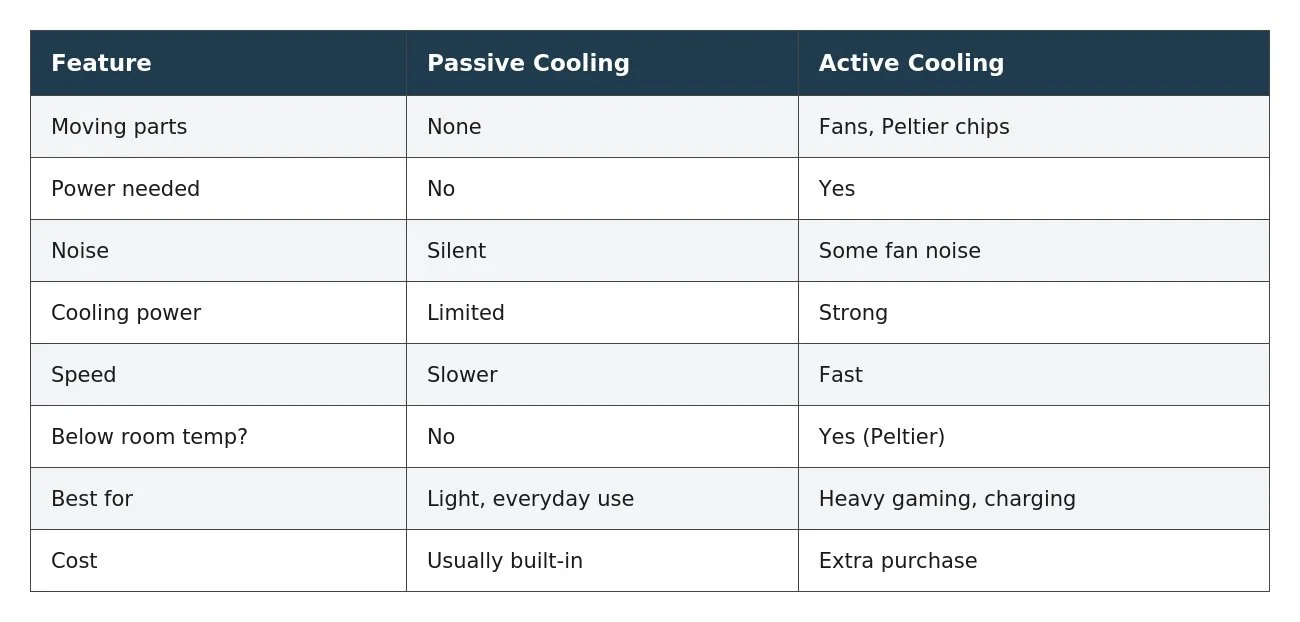
Active vs Passive Cooling: Side by Side
Here's a quick comparison to make the difference clear.
Which Cooling Type Do You Need?
The right choice depends on how you use your phone. Here's a simple way to decide.
Choose passive cooling if:
You use your phone for calls, browsing, and social media
You play light or casual games
You want a silent, no-effort solution
You just need a good case or a vented stand
Choose active cooling if:
You play demanding games for long sessions
Your phone throttles or lags when it heats up
You stream or record for a long time
You want the fastest, strongest cooling possible
For many people, the best answer is both. Your phone's built-in passive cooling handles daily tasks. When you sit down for serious gaming, you add an active phone cooler for extra power. Passive cooling covers the basics. Active cooling steps in when things get intense.
Summary
Cooling keeps your phone fast and comfortable to use. Passive cooling is silent, simple, and always working, but it has limits. Active cooling devices are powerful and fast, but it needs power and add a little bulk.
Think about your habits. Light users are usually fine with passive cooling alone. Heavy gamers and power users benefit from adding an active cooler. Match the method to your needs, and you'll keep your device cool when it matters most.
HOW DO YOU FEEL ABOUT FASHION?
COMMENT OR TAKE OUR PAGE READER SURVEY
Featured





Depop partners with Amelia Dimoldenberg to celebrate the final series of Chicken Shop Date through curated secondhand fashion edits and an exclusive wardrobe drop, connecting the show's distinctive style with the growing appeal of circular fashion.