
Book Trailers Work Better One Story Beat at Time
PAGE
By PAGE Editor
A weak book trailer often tries to summarize the entire novel in half a minute. Characters appear, locations change, conflict arrives, and the ending is hinted at before the viewer has found a reason to care. An AI Video Generator is more useful when each shot carries one story beat and leaves the larger plot to the book.
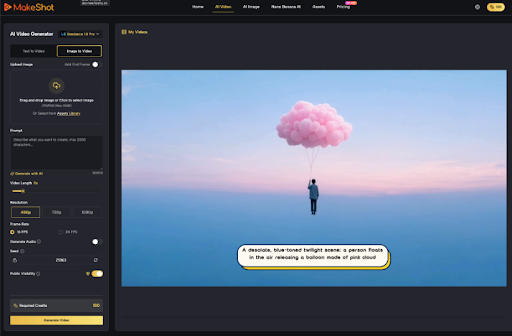
MakeShot.ai offers text-to-video and image-to-video creation in a browser, with several model choices available from the same workspace. That can help an author or small publisher build visual drafts. The useful decision is which five moments create curiosity without flattening the story into a synopsis.

Give the Trailer One Reader Facing Job
Choose the job before selecting scenes. A trailer may establish mood, introduce a central dilemma, or signal the kind of reading experience on offer. It cannot fully explain plot, world, cast, and theme at once. When the job is clear, every shot can be tested against it.
Write the Central Unanswered Question Before Storyboarding
Complete one question that the trailer should leave open. “Why did the lighthouse go dark on the one night Mara returned?” gives the sequence a direction. “What happens in this exciting fantasy?” does not. A precise unanswered question helps the team choose objects, places, and actions without revealing the resolution.
The question also controls tone. A quiet literary mystery may need stillness and a small visual disturbance. A comic adventure may need a quicker reversal. Both can be engaging, but they should not borrow the same dramatic template.
Check the question against the jacket copy and manuscript. It should invite the same book, not a louder version invented for video. A trailer that promises horror for a reflective family drama may earn a click and still disappoint the right reader.
Build Five Beat Cards Before Any Prompt
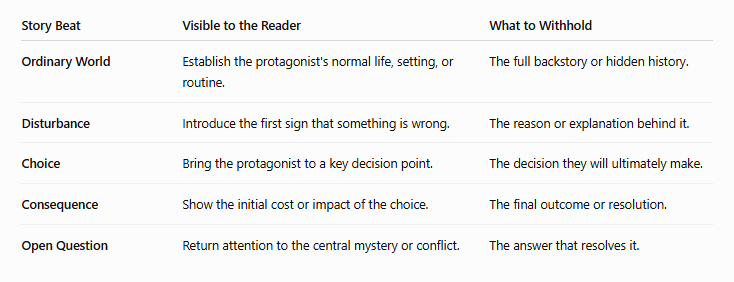
Use five cards: ordinary world, disturbance, choice, consequence, and open question. Each card gets one visible subject and one change. The cards are not fixed scenes from the book; they are a trailer structure that protects the reading experience.
Add one “must not reveal” note to every card. The disturbance card might show that a letter arrived but hide the sender. The consequence card might show a room emptied without showing who left. These omissions make the trailer selective instead of incomplete.
Turn Each Card Into One Visual Change
A door opens onto an empty room. A map develops one new mark. A calm sea loses every light along the shore. These actions are small enough to review and specific enough to mean something. Avoid packing dialogue, a camera orbit, a costume change, and an explosion into the same card.
Text-to-video may suit a beat that exists only as a mood idea. Image-to-video is better when cover art, an illustration, or another approved visual already carries the right world. MakeShot.ai supports both, so the source can follow the beat rather than forcing every shot through one method.
Keep a visual fact sheet beside the cards: season, era, clothing, key colors, important objects, and anything the manuscript rules out. The sheet does not describe the whole world. It only prevents adjacent drafts from contradicting one another.
Keep Character Identity Across Adjacent Beats
If a named character appears twice, compare face, clothing, age, and distinctive objects between the shots. The platform’s multiple model routes do not remove that editorial check. When continuity cannot be maintained, show the character once and let locations or objects carry the other beats.
Objects often hold continuity more safely than faces. A red notebook, damaged watch, or unusual key can move through the sequence while leaving the reader to imagine the character. That can preserve mystery and reduce the pressure to reproduce one appearance across several generations.
Sequence the Draft Without Explaining the Plot
Place the five beats in order and watch without narration. The viewer should sense a change, a choice, and a cost. They do not need to understand every proper noun. If the sequence only works after a paragraph of explanation, simplify the cards.
Then remove one beat and watch again. If nothing meaningful changes, that card was probably summary rather than momentum. Use the space to hold a stronger image longer instead of filling every second with a new location.
Use Text Cards for Control Not Summary
A short text card can supply a date, place, or fragment of the central question. It should not narrate all the information the images failed to communicate. Keep approved wording in a separate editing layer where spelling and timing can be controlled.
The middle use of an AI Video Generator belongs at the shot level. Generate a beat, compare it with its card, and reject it if the motion reveals too much or changes the story fact. Only then place it beside the other beats.
Test the Ending on a Fresh Reader
Show the draft to someone who has not read the manuscript. Ask what question they think the trailer raises and what kind of book they expect. Do not ask whether they liked the video. Their answer shows whether the sequence created useful curiosity or merely delivered disconnected atmosphere.
If they can predict the resolution, the trailer probably gave away too much. If they cannot name any question, the beats may be too vague. Revise the sequence before polishing transitions or sound.
Ask one more question: which image stayed with them? If everyone remembers a different decorative shot, the sequence lacks a focal beat. If they remember the same unanswered action, the trailer has found its center.
Leave the Reader With One Open Door
MakeShot.ai suits authors and small publishers who can reduce a story to a handful of visual decisions and review each shot against the manuscript. It is less useful when the trailer brief is simply “show everything important.”
Keep the five cards with the final export. They give designers, narrators, and social editors a shared reason for every shot. If a later cut removes the open question or adds a revealing scene, the team can see exactly which story function changed.
A shorter trailer can be the stronger version. If three beats carry the mood, disturbance, and question clearly, do not add two decorative clips merely to fill time. Curiosity needs room to form between images.
A strong trailer does not prove that the whole novel can be rendered on screen. It gives one clean reason to turn toward the book. End on the unanswered question, hold the final image long enough to read, and let the story continue on the page.
HOW DO YOU FEEL ABOUT FASHION?
COMMENT OR TAKE OUR PAGE READER SURVEY
Featured


Sedentary work habits and daily screen time are inspiring many to embrace simple postural routines and gentle adjustments to ease neck tension and stiffness.