
Digital Learning for Kids: Expert 2026 Parent Guide
PAGE
By PAGE Editor
A parent recently asked me how she should feel about her 9-year-old spending 40 minutes on Duolingo before dinner. Not stressed, not resistant — genuinely enjoying it. Her instinct said "too much screen time." Her observation said "he is actually learning Spanish." Both were correct. Neither was the full answer.
That tension defines modern parenting around digital learning. Screens are no longer just entertainment. They are now the primary vehicle for structured learning, homework, creative work, and even social connection between kids. Blanket rules — "no screens on weekdays" — miss the point. So do permissive approaches that treat every learning app as automatically beneficial.
This guide covers what actually works for families navigating digital learning in 2026: how to build a balanced routine, which platforms genuinely support learning, how to handle safety without overreach, and what to do when a well-intentioned setup starts creating friction instead of solving it. No moral panic. No unrealistic screen-free ideals. Just practical guidance from what has worked for real families.
Why does digital learning matter for kids in 2026?
Digital learning matters because it now sits inside almost every classroom subject, most homework assignments, and a significant share of independent enrichment activities. Children who cannot navigate digital learning tools face measurable disadvantages in school participation, homework completion, and creative expression. Parents who understand digital learning can support their kids without becoming their tech-support desk.
Three shifts made digital learning a central part of family life rather than a supplement.
Schools embedded technology into daily instruction. Most schools in North America and much of Europe now use digital assignment platforms, online quiz tools, and learning apps as part of the standard classroom workflow. Children arrive home with logins, passwords, and assignments distributed across multiple platforms. Parents who cannot help their child navigate these tools become a barrier to homework completion.
Home learning became a core enrichment activity. Beyond required school work, families now have access to genuinely excellent supplemental learning — language apps, math practice platforms, reading programs, and interactive science content. The best of these produce real learning outcomes. The worst are dressed-up entertainment. Parents who can tell the difference get significantly better returns from the time their kids spend on screens.
Children's peer culture runs on shared apps. Kids learn about new games, new platforms, and new interests from their friends. When a group of 4th graders discovers a learning game they all enjoy, they play together, compare progress, and discuss strategies. Parents who understand which of these shared experiences are healthy — and which are not — can guide without needing to ban.
The families I have observed navigating this well share one common trait: they treat digital learning as a normal parenting responsibility, not a specialized tech problem. It is a room they need to know how to walk through, not a foreign country they refuse to enter.
How do you build a healthy digital learning routine for kids?
A healthy digital learning routine balances structured learning time, creative screen use, physical activity, and offline rest. Most successful family routines follow a rhythm: focused learning in short blocks, clear transitions between activities, screen-free meals and bedtime, and predictable weekend flexibility. The exact schedule matters less than the consistency.
Here is the framework that works for families across a wide range of ages and household situations.
Step 1 — Define the daily rhythm before the daily tools. Decide when learning happens, when free time happens, when meals and family time happen. Kids thrive on predictable routines. The specific apps come second. A messy schedule with excellent apps produces frustration. A clear schedule with average apps produces steady learning.
Step 2 — Keep learning sessions short and repeatable. Research on children's attention consistently shows that shorter, more frequent learning sessions produce better retention than long single sessions. For kids under 8, aim for 10–15 minute focused sessions with breaks. For older kids, 25–35 minutes works well. Anything longer produces diminishing returns and increasing resistance.
Step 3 — Separate learning screens from entertainment screens. Kids who use the same device for math practice and video watching struggle to enter a focused learning mindset. If possible, dedicate a specific device or specific location to learning-only use. When that is not possible, use different physical setups — the kitchen table for learning, the living room couch for entertainment.
Step 4 — Make offline transitions clear. The hardest part of digital learning is not the learning itself. It is stopping. Set clear finish signals — a timer, a natural end-of-session point, a scheduled snack break — before starting. Kids who abruptly get pulled off a screen resist the next session. Kids who finish on their own terms return willingly.
Step 5 — Keep meals and bedroom screen-free. These two boundaries are supported by pediatric research consistently and produce the biggest quality-of-life gains for the whole family. Screen-free dinners preserve conversation. Screen-free bedrooms preserve sleep. Nearly every long-term-happy family I know maintains these two boundaries.
Step 6 — Review the routine every month. What worked when your child was 7 will not work when they are 9. School schedules change. Interests shift. Apps get updated. A monthly 15-minute conversation with your child about what is working and what is not tends to produce better long-term outcomes than any single perfect schedule.
Most families I have watched succeed with digital learning follow some version of this framework. Most families that struggle either had no framework or tried to enforce a rigid one their kids resented from day one.
What are the best digital learning platforms for kids in 2026?
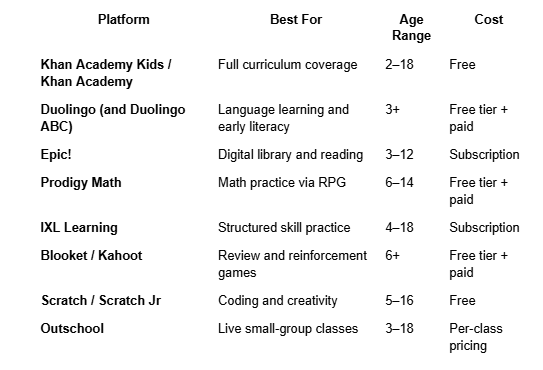
The best digital learning platforms in 2026 span several categories: full curriculum platforms like Khan Academy, language-focused apps like Duolingo Kids, reading platforms like Epic! and Reading IQ, math practice like Prodigy and IXL, and gamified review tools like Blooket and Kahoot. Each solves a specific learning goal — no single platform covers everything.
Here is how the major options compare in real family use.
Khan Academy — the free curriculum backbone
Khan Academy is the closest thing to a free online school. Structured content across math, science, history, economics, and test prep, all developed by qualified educators and available at no cost. Khan Academy Kids extends this to preschool and early elementary with a focus on early literacy and numeracy. For most families, Khan Academy should be the first platform added to the routine.
Duolingo — the daily habit builder
Duolingo's strength is the daily habit. The streak feature, short lesson format, and gentle gamification produce genuine long-term engagement. Duolingo ABC provides early literacy content for young children. The tool works because it gets used consistently, not because any single lesson is transformative.
Epic! — the digital library
Epic! provides access to a large library of children's books, audiobooks, and educational videos through a subscription. For families whose kids enjoy reading, Epic! extends the range of accessible content well beyond a household library. Free for teachers to use with their classes, which many parents leverage through their child's school.
Prodigy Math — the RPG approach to math
Prodigy turns math practice into a game where kids battle monsters by solving age-appropriate math problems. The tool has become widely adopted in North American elementary schools and equally popular for at-home practice. Free for teachers; families can access core features free with optional premium tiers.
Blooket and Kahoot — the review reinforcement tools
For older elementary and middle-school kids, Blooket and Kahoot make review sessions feel like games. Kids join sessions using short codes, answer questions, and compete for points across multiple game modes. Parents whose children's teachers use these tools in class often find that similar formats work well for home study.
Some families use these platforms independently to make homework review more engaging. Independent educator sites — such as blooket.it.com — offer parent-friendly guides on how to set up sessions, track progress, and use these tools productively at home.
For families that want to monitor kids' engagement metrics or estimate optimal study session lengths, resources like Blooket calculator walkthroughs can help parents understand how their child's practice time relates to expected retention outcomes. Not every family needs this level of measurement, but for parents who want to be more strategic about study time, the metrics are useful.
Scratch — the creative outlet
Scratch (from MIT) is free coding education designed for kids. Scratch Jr covers ages 5–7, Scratch handles 8+. The tool teaches genuine programming concepts through creative project building. Kids build games, animated stories, and interactive projects. It is one of the highest-value time investments any parent can encourage for kids interested in creating rather than only consuming.
Outschool — the live class marketplace
Outschool connects families with teachers running small live classes on nearly any topic — from marine biology to Minecraft creativity to public speaking. Classes range from single sessions to multi-week courses. Parents whose kids want deeper enrichment in specific subjects consistently find Outschool worth the per-class cost.
The right stack for most families is 3–5 platforms combined — one curriculum backbone, one language, one reading, one gamified review, and one creative outlet. More than that becomes overwhelming.
What mistakes do parents make with kids' digital learning?
The most common mistakes are treating all screen time as equivalent, over-monitoring or under-monitoring rather than finding the middle ground, choosing platforms based on marketing rather than fit, letting kids drive all platform choices, and forgetting that offline time still matters even in a digital learning setup. Each error looks reasonable in isolation and creates real long-term problems.
Six patterns repeat across families that struggle with kids' digital learning.
Mistake 1 — Treating all screens the same. Ten minutes of Khan Academy is not the same as ten minutes of TikTok. Ten minutes of Scratch coding is not the same as ten minutes of YouTube. Family screen-time rules that lump all digital activity into one bucket miss the point entirely. Categorize by purpose (learning, creating, consuming, socializing) and set different guidelines for each.
Mistake 2 — Monitoring extremes. Some parents look at every app their kid uses every day. Others check in once every three months and are shocked at what they find. Both extremes fail. Aim for a rhythm — weekly quick check-ins about what your child is using, monthly deeper conversations about what is working, and occasional device audits without making them adversarial.
Mistake 3 — Choosing platforms based on marketing. The most heavily marketed learning apps are not always the best learning apps. Independent reviews from Common Sense Media, direct conversations with your child's teacher, and observation of your child's actual engagement tell you more than any advertisement. Free platforms like Khan Academy often outperform paid competitors on actual learning outcomes.
Mistake 4 — Kid-driven platform choices. Kids naturally gravitate toward the apps that feel fun in the moment, which are not always the ones that produce the most learning. A parent's role is to introduce genuinely good tools and gently redirect from those that promise learning but mostly deliver entertainment. This is a form of parenting, not gatekeeping.
Mistake 5 — Forgetting offline time. Digital learning is powerful. It is also incomplete. Physical books, hands-on activities, outdoor play, conversation, and boredom all remain essential for child development. A schedule that is 100% digital, even if 100% educational, still misses important developmental experiences.
Mistake 6 — Making learning always feel like a chore. Kids who associate digital learning platforms only with parent-mandated study sessions will resist those platforms outside of study time. The best families let some digital learning happen because the child chose it — a Duolingo streak they want to protect, an Epic! book they want to finish, a Scratch project they want to complete. Ownership over learning matters at every age.
Mistake 7 — Ignoring the child's social context. If every other kid in your child's class uses one specific learning platform, banning it for your child creates social friction beyond the platform itself. Understand what their peer group uses. Choose which platforms your family embraces or avoids based on real assessment, not just parental preference in isolation.
Families that navigate these trade-offs thoughtfully tend to raise kids who become confident, self-directed digital learners. Families that get stuck in one extreme or another tend to produce kids who either become over-dependent on screens or actively avoid them entirely.
How do you handle safety in kids' digital learning?
Handling safety starts with age-appropriate platform selection, then involves account privacy settings, screen-time controls, honest conversations about online interactions, and regular observation of the child's actual experience. Blanket monitoring solutions often fail. Trust-based approaches paired with reasonable oversight consistently work better.
The key safety practices worth adopting across every family setup include the following.
Choose platforms designed for children's ages. Age ratings and privacy compliance (COPPA in the US, similar regulations elsewhere) exist for good reasons. Platforms designed for kids include stronger safety defaults, appropriate content moderation, and privacy protections that consumer platforms often lack.
Enable account privacy settings. Even on kid-appropriate platforms, default settings often allow more openness than most parents realize. Take 15 minutes when setting up a new platform to review the privacy settings, disable public profiles, restrict messaging, and turn off unnecessary data collection. This is not paranoia — it is basic hygiene.
Talk about digital interactions the same way you talk about other social interactions. Kids need to know when to talk to you about something uncomfortable online. Making these conversations casual and ongoing, rather than intense one-time lectures, produces kids who actually come to you when something goes wrong.
Observe without spying. Sitting near your child while they use a new platform for the first time is not surveillance. It is normal parenting. Kids benefit from occasional shared screen time even for learning apps. It shows interest and helps you notice what platforms actually look like from your child's perspective.
Trust your gut. If a platform feels off, or your child's mood consistently changes after using a specific app, take the observation seriously. Parents' instincts about their kids' digital experiences are more accurate than most safety software.
FAQs
How much screen time is appropriate for kids' learning?
The American Academy of Pediatrics offers age-based screen-time guidance, but the quality of screen use matters as much as the quantity. For learning-focused screen time, 30–60 minutes daily for elementary-age kids and 60–90 minutes for middle school and older tends to work well when the content is genuinely educational and the sessions are broken into shorter blocks.
Are free learning apps as good as paid ones?
Often, yes. Khan Academy, Scratch, Duolingo's free tier, and Blooket's free tier all deliver excellent learning outcomes at no cost. Paid platforms sometimes offer better analytics, more content depth, or fewer interruptions. But for pure learning quality, free platforms compete strongly with paid ones. Parents should evaluate by fit, not by price.
What age should kids start using digital learning platforms?
Age 3–4 is a reasonable starting point for very short, supervised sessions on apps designed for young children — Duolingo ABC, Khan Academy Kids, and similar. Before age 3, digital learning generally offers little benefit and displaces more valuable developmental activities. After age 5, structured digital learning becomes increasingly appropriate.
How do you keep kids engaged with learning apps long-term?
Consistency, ownership, and gentle celebration of streaks and milestones drive long-term engagement. Kids who feel forced onto learning platforms disengage quickly. Kids who feel some ownership over their learning — choosing between two approved options, tracking their own progress, occasionally teaching a parent what they learned — sustain interest for years.
Should parents track kids' progress on learning platforms?
Yes, but lightly. Most platforms offer parent dashboards or weekly summaries. A quick weekly review helps parents understand what is working and where their child might need support. Daily monitoring often creates friction and communicates distrust. Weekly is the sweet spot for most families.
Is gamified learning as effective as traditional study?
For review, reinforcement, and repetitive practice, gamified learning is often more effective because kids actually complete the sessions. For initial concept learning, direct instruction from a teacher or parent still outperforms gamification. The best digital learning uses gamification for reinforcement, not as the primary teaching method.
How do you handle a child who does not want to do digital learning?
Understand why. Is it the specific platform, the specific subject, the time of day, the pressure to perform, or something else? Kids resist learning for many reasons, and forcing a resistant child onto a screen tends to make the resistance worse. Adjust one variable at a time until the friction reduces, or take a full week off and restart with a different platform.
Do digital learning platforms actually improve school performance?
They can, when used consistently and paired with strong parent and teacher involvement. Passive use of learning apps produces little benefit. Active use — where the child engages, discusses what they are learning, and applies concepts elsewhere — produces measurable improvements in reading levels, math fluency, and language acquisition across most studied populations.
Closing thoughts
Digital learning for kids in 2026 is neither the threat some parents fear nor the miracle some marketers promise. It is a set of tools. In thoughtful hands, guided by present parents, those tools genuinely help children learn faster, retain more, and develop skills that would be harder to build without them. In careless hands, they produce screen fatigue and displaced offline development.
The families that navigate this well share simple habits: a clear daily rhythm, thoughtfully chosen platforms, honest conversations with their kids, and regular reflection on what is actually working. The specific apps matter less than the framework around them.
Start with one platform. Build a small routine. Watch what happens. Add a second platform after a few weeks if the first one is working. Ignore anything trending unless it fits your family. The child you are raising will remember the conversations and family time, not the specific apps. Digital learning is one part of parenting them well — not the whole thing, and not something to avoid either.
The mother wondering about her son's 40 minutes on Duolingo landed in a good place. She let him keep learning Spanish. She also kept dinner screen-free and read with him at bedtime. Both instincts were correct. That is what modern parenting around digital learning actually looks like.
HOW DO YOU FEEL ABOUT FASHION?
COMMENT OR TAKE OUR PAGE READER SURVEY
Featured





Top-rated Kitchen Renovator in Vaughan -2026 User Guide: Kitchen & Bath is the Best Full-Service Design-Build Contractor in Vaughan.