How to Retire a Fashion Studio's Tech Without Losing Its Secrets

PAGE
By PAGE Editor
For months, a fashion studio might work on a collection that no one but its creative team has seen. But early sketches, fitting photos, and supplier information can stay on an old laptop long after the finished designs have been worn.
Moving the newest files is only part of what needs to be done when the studio gets a new computer. The device may still have older versions of plans, saved files, and photos from past campaigns, even if no one remembers saving them.
When you responsibly retire equipment, you have to decide what needs to be kept, what information needs to stay confidential, and what to do with the hardware afterward. Studios could lose important creative work or let someone else see private information if they don't have a clear process in place.
What Your Old Studio Equipment Still Knows
Fashion studios produce more digital information than their finished collections suggest. Designers work with Adobe Photoshop files, photographers manage extensive image libraries, and production teams exchange contracts, schedules, and supplier details through shared platforms.
The growing role of digital fashion and virtual design adds another layer to this process. Three-dimensional garment models, digital samples, and presentation materials may exist across several workstations, making it harder to identify everything that needs protection when equipment reaches the end of its useful life.
Storage devices are particularly easy to overlook. An external SSD used during a campaign might contain unpublished photographs, while an older tablet could still hold sketches from a collection that never reached production. Shared studio computers may also retain downloaded documents, saved passwords, or access to private business accounts.
The situation becomes more complicated when creative teams work from different locations. A photographer may have a studio-owned laptop at home, while a freelance production assistant could still be holding equipment from an earlier project.
For a studio with equipment scattered across different locations, disposing of remote work hardware safely means coordinating returns without losing track of what each device contains. Mail-back recycling programs can help collect those devices, but studios should still confirm which items are accepted, how stored data will be destroyed, and what documentation they will receive.
Before choosing a disposal method, the studio should establish what each device contains and whether any of that information is still needed.
Protect the Creative Archive Before Erasing Anything
Getting rid of old hardware should never start with deleting files. A fashion company's digital archive might contain years of work that remains useful long after a collection has launched. This could include original photos, technical drawings, fabric specs, and production records.
Some materials might be needed for future campaigns, while others could help a collection or answer questions about old designs. If you lose access to these files, it could cause problems you don't notice until months later.
So, the first step is to separate important information from files that are no longer needed. After that, make sure everything important has been moved successfully.
Save the Work That Cannot Be Recreated
Fashion photography is a good example of how important it is to be careful when moving files. A studio can use Adobe Lightroom Classic to organize campaign photos, but the catalog and original image files aren't always kept in the same place.
If the team copies only the catalog, they might not have all the photos, even if the backup seems complete at first. Problems can happen during Capture One sessions when the source photos and working files are kept on different drives or folders.
Also, design teams should make sure that files that can be changed are still available. A final exported image might be good enough for publication, but it can't be used instead of the original Photoshop document with layers if more changes need to be made.
Before getting rid of an old computer, companies should make sure that they can still view important files from where they'll be storing them. If the move is complete and the right settings are set, Dropbox or Google Drive may be able to help you keep up with a shared archive.
Instead of assuming that everything will work after a successful file transfer, it's a good idea to open a few older projects from the new location as a last check.
Close the Digital Doors Before the Hardware Leaves
Saving artistic files doesn't mean that the original equipment is now safe to throw away. A computer may still have local copies of documents, browser sessions, and account credentials that could let someone access private business data.
Studios should review Adobe Creative Cloud, Dropbox, and Google Workspace accounts linked to old devices. Removing unused access and signing out of apps can help keep old equipment from staying connected to active work areas.
Deleting information stored on the device is not the same as disconnecting an account. Even after cloud access is lost, downloaded files, saved pictures, and other locally stored data may still be there.
Larger studios that use managed computers can use Microsoft Intune to manage devices and wipe supported, registered equipment remotely. Smaller creative businesses may have to do this themselves or get help from a skilled IT service.
Protecting access to online accounts and securely removing data from physical storage are separate responsibilities. Both need attention before equipment leaves the studio.
Decide What Each Device Needs Before It Leaves
Not every outdated computer needs to be destroyed. A functioning workstation may still serve another designer, while a broken external drive containing confidential campaign information may be unsuitable for reuse.
The correct approach depends on the equipment's condition, the sensitivity of its contents, and whether its storage can be reliably sanitized.
Before passing a computer to another owner or sending it for recycling, studios should understand how to properly wipe its data.
Simply deleting files or performing a basic reset may leave information recoverable, particularly when the device contains confidential campaign materials. The right method depends on the storage type and whether the equipment will be reused or permanently retired.
Different types of studio equipment call for different decisions.
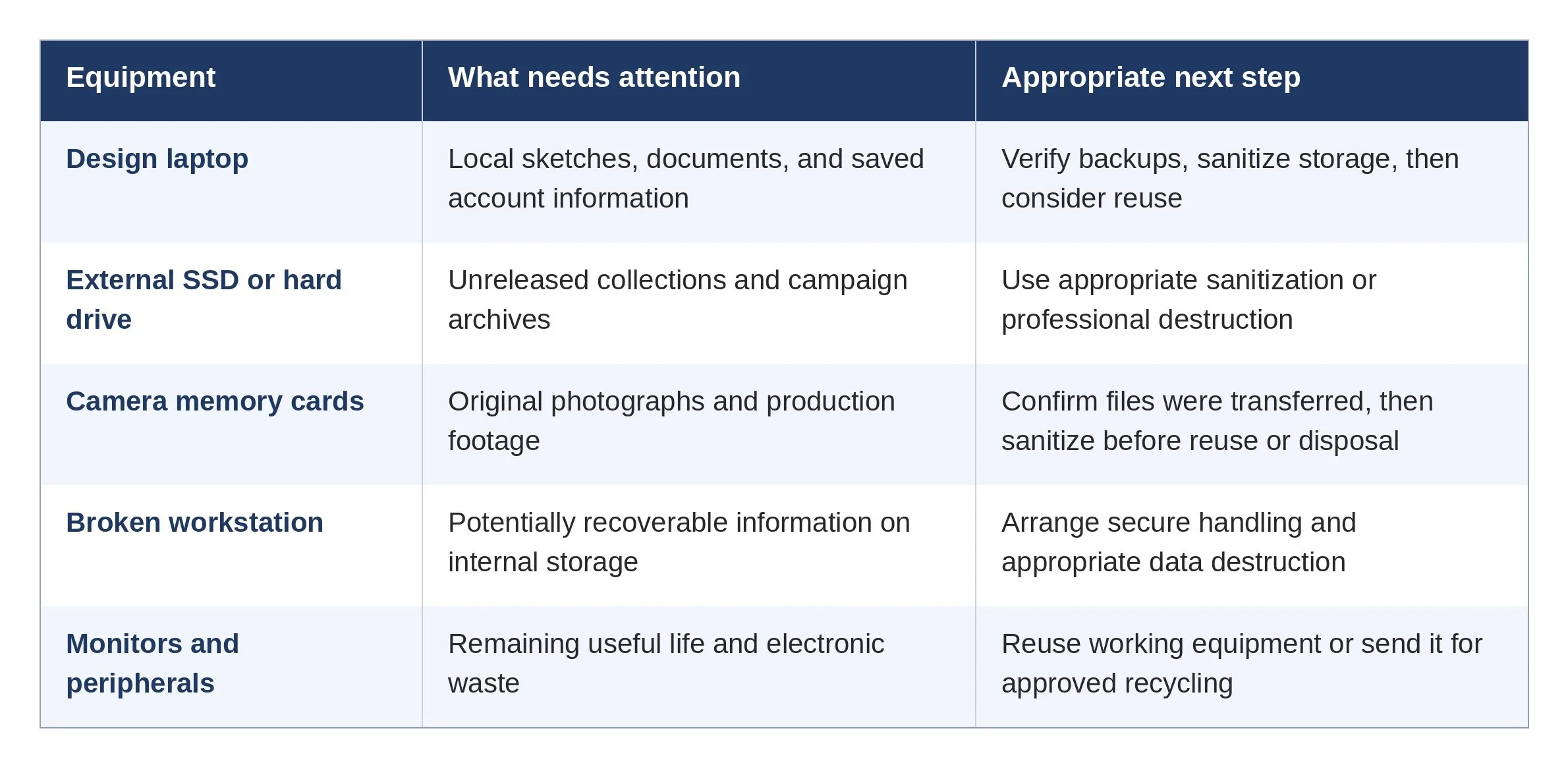
An equipment record can make these decisions easier to manage. Recording each device's identification number, location, assigned user, and retirement method helps the studio track what has been returned and what remains outstanding.
Documentation becomes especially valuable when devices move between photographers, designers, and temporary production locations. Shipping records and certificates of destruction can provide evidence of how equipment was handled after it left the studio.
Before mailing electronics, studios should also review the recycling provider's accepted-item list and packaging requirements. Batteries and damaged devices may be subject to additional restrictions, and not every electronic accessory belongs in the same shipment.
Responsible disposal should also account for equipment that still works. Reassigning a properly sanitized computer or donating suitable peripherals can extend their useful life and reduce unnecessary replacement.
A Fashion Studio's Creative Legacy Deserves Better Protection
More and more, fashion companies are thinking about what happens to materials after a collection is made. The technology used to make, record, and track these collections should get the same level of care.
That information on an old workstation is still important, even if it might not be useful for demanding design software. Saved ideas, original photos, and private production information can remain valuable long after the hardware is no longer useful.
A thoughtful retirement process helps studios keep their creative history alive while also reducing electronic waste. Fashion companies can replace old technology without destroying the work that helped them become known by identifying valuable files, getting rid of sensitive information, and making sure that the right equipment gets to the right place.
HOW DO YOU FEEL ABOUT FASHION?
COMMENT OR TAKE OUR PAGE READER SURVEY
Featured



Grand Theft Auto VI transforms Vice City's fashion landscape into a cultural playground of fictional designer labels, contemporary streetwear, luxury-inspired accessories and nostalgic Miami styling, positioning clothing as an essential part of its storytelling and world-building.