From Logo Design to Laser Engraved Products
PAGE
By PAGE Editor
A Grammy takes more than ten hours to make. Engraving shouldn't be the slow part. It used to be. John Billings, who has made the awards for over 30 years, says tracing one on a hand-operated pantograph could eat up as much as three hours. These days, according to a story Epilog published about his shop, he slips an award's base into a laser and engraves the serial number and logo in about 20 seconds.
Quite a gap. And the laser didn't close it alone. A jig did, plus a logo file that was ready and a material that behaved, and between brand artwork and a finished product sit a dozen small decisions nobody sees. Let's walk through them.
A Logo File Is Not Automatically Production-Ready
A logo that looks sharp on screen usually isn't ready for a laser. Brand files are made for ink on paper, so they come loaded with color, gradients, and hairline strokes that a laser simply can't reproduce. A laser has no ink. It burns or removes material at different intensities, so color doesn't exist and gradients turn to mush.
Sign shops have fought this fight for years. A trade magazine for the industry describes one shop that opens the customer's file, scales it to the real size, and zooms in to actual pixels. Now the customer sees the pixelation they'd be paying for. Show, don't argue. In an old forum thread, one owner said they pay about $13 to have a logo redrawn as a vector and charge $25 to $50.
And then there's size. A graphic that measured 4.6 cm in Illustrator showed up in one forum user's laser software at 11.7 cm, and the culprit was resolution settings read two different ways. Same file. Different assumptions.
Raster vs. Vector Artwork
Raster artwork is pixels. Vector artwork is lines and curves. Only one scales cleanly. SVG, AI, PDF, and DXF files are vector, and popular laser software like LightBurn takes all of them, while JPG and PNG are fine for filled engraving right up until you enlarge them.
Software can trace a bitmap into vectors. Sometimes. It works on clean, high-contrast shapes and struggles with soft edges and photos, and if the trace gets ugly, engraving the original image in threshold mode can save the job.
Billings once needed a plaque for his volunteer fire department. He scanned their logo, picked a font, dropped in the text, and ended up proud of the result. It worked. Still, a scan is raster, and what comes out depends entirely on what went in, so don't build a workflow on luck.
Material Comes Before Machine Settings
The material decides how a logo looks, so pick it first. Even inside one material, brands differ. One LightBurn forum user ran an identical job on two brands of extruded acrylic and one brand of cast. Three different results. They'd even skipped air assist on purpose, to protect a frosted look, and the difference between brands still showed up clear as day.
Settings belong to a specific sheet from a specific supplier. Not to acrylic in general. Reorder from the same source, and test any new brand on scrap before a customer order ever gets anywhere near it.
Wood, Acrylic and Metal Need Different Processes
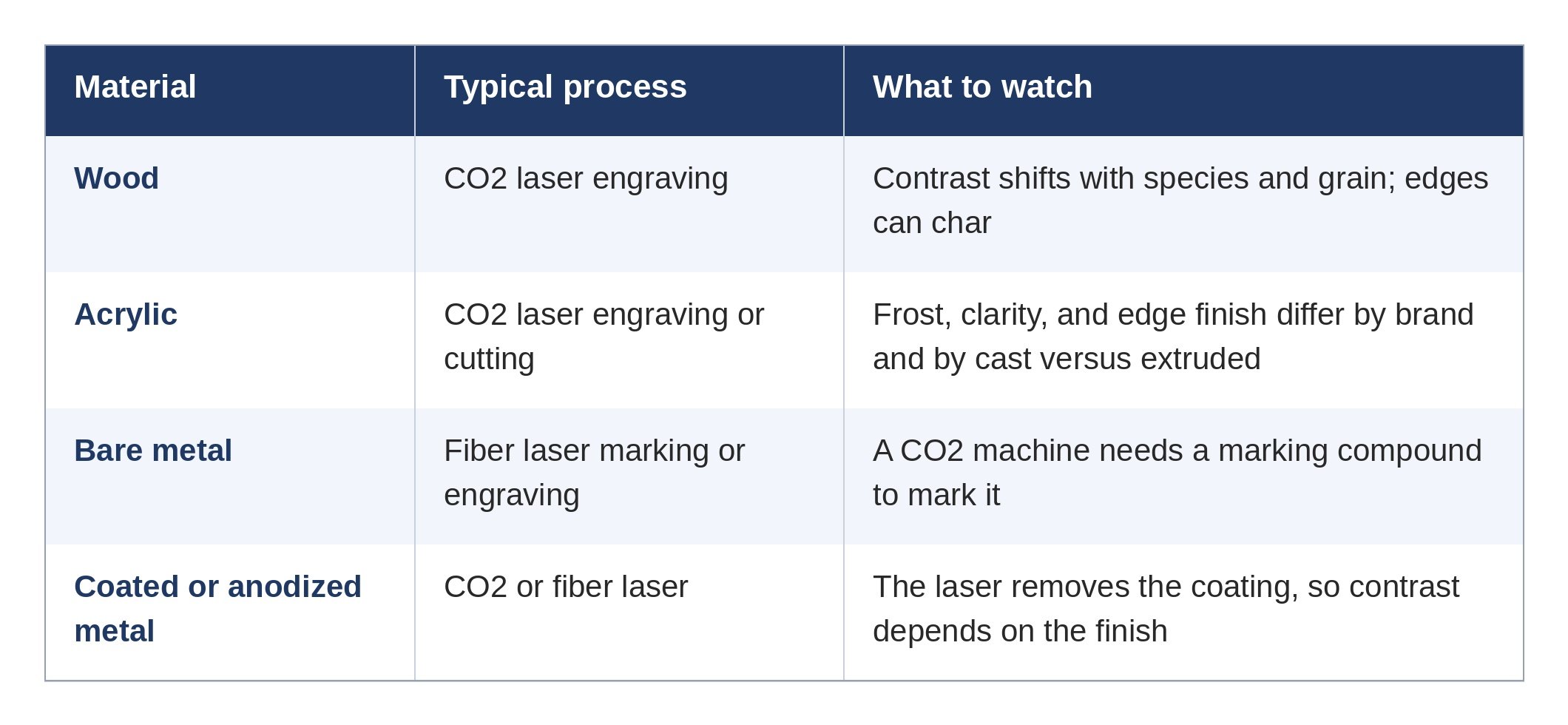
Each material answers a laser differently. Wood darkens or chars along the line. Acrylic usually engraves to a frosted look, though brands vary. Metal is another story. A fiber laser is the usual tool for bare metal, while a CO2 machine marks it only with a marking compound, or works on coated and anodized surfaces.
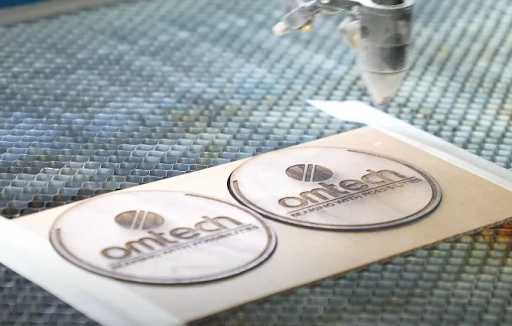
Metal branding has a handy reference in a customer story published by OMTech. Graffeetie Designs engraved 500 steel cards with company branding and a QR code on a 100W MOPA fiber laser, six at a time from a repeatable template, and finished in about two days. If your products are metal, start by looking at fiber laser engraving systems. CO2 alone won't mark bare steel.
Preparing Artwork for Engraving
Clean artwork is closed shapes at the right size. Turn text into outlines so fonts can't swap on you. Close open shapes, since most software can auto-join gaps up to about 0.05 mm but can't rescue a real one. Delete duplicates. A line stacked on itself burns twice.
Then simplify. Gradients, drop shadows, and hairlines too thin to engrave all go. Set the real size, and measure one dimension you already know before you press start, because you don't want the 4.6 versus 11.7 surprise on a customer's blank.
Testing Size, Contrast and Legibility
Test on a scrap of the real material at the real size. A logo that works large can fail small, because the beam sets a floor on detail. One lens maker's specs for fiber galvo setups show a 17-micron spot with a short lens and 31 microns with a long one. Longer lens, coarser finest line.
Then check contrast, and check legibility from the distance a customer will actually see the piece. Billings says he experimented with all kinds of materials lying around his shop before the installer even showed up, and just kept coming up with new ideas. Cheap education.
Fixtures and Repeatability
A fixture makes the thousandth piece look like the first. It holds the product in the same spot every time, so the logo lands in the same place every time. Crooked parts stay crooked.
A Real Example: Engraving Grammy Awards With a Plexiglas Jig
Epilog's story on Billings Artworks tells it like this. For years the shop traced plate lettering by hand on a pantograph, up to three hours for one. John then bought a Dahlgren engraver, which sped things up but limited him to small items, and later a laser. His installer helped build a jig that engraves 40 plates at a time. Then John cut a second jig from Plexiglas. Now the base of an award slips in, and the serial number and logo go on in about 20 seconds. Hours became seconds.
At the time, he was making around 700 Grammys a year, with over ten hours of work in each. Vendor-published, remember. Still, the lesson is hard to miss. The speed came from the jig and the file, with the laser as the part that follows them, so fix the fixture before you shop for a faster machine.
Engraving One Product vs. a Batch
A single piece forgives mistakes. Engrave it, look at it, adjust. A batch doesn't, because every mistake repeats. So run the first piece and inspect it before the rest, save each position in the job file, and don't mix material lots mid-run. Graffeetie's six cards at a time and Billings' 40 plates at a time are the same idea. Fix the layout once, then repeat it.
Finishing and Quality Control
Quality control starts before the piece leaves the bed. Compare each one against a master sample for placement, depth, and legibility, and clean residue with something suited to the material, testing the cleaner on scrap first. Codes? Scan them. A pretty mark that won't scan is a failed mark.
Each Grammy also gets its own serial number, so keeping a record of which number went where is part of the job.
Moving From Prototype to Production
Prototype to production means freezing what you've learned: the file, the material and supplier, the settings, the fixture, and the check. Unwritten things drift. And sometimes the leap goes in an unusual direction.
A Real Example: A Machine Shop That Became Its Own Brand
According to Epilog's customer spotlight, Scott Foster, an owner of Foster Machining in Nevada, got tired of making aftermarket vehicle parts for other companies. He decided to make his own. That became American Brother Designs. The new brand needed the adhesive backing for its custom badges cut, and after trying several less effective tools, Scott settled on a laser as the fastest, most precise, and most cost-effective option. It also let the team prototype in acrylic and engrave logos on parts, with cleaner, crisper results than a CNC machine, the story says.
Treat the CNC comparison as a claim. The lesson holds anyway. A laser sat between design and product, so a company that designed things for other people could finally make its own.
A shop planning that jump can compare laser engraving and cutting equipment from several manufacturers, OMTech among them, but only after writing down the file, the material, the fixture, and the batch size it expects. The machine is the last decision. Everything above it comes first.
HOW DO YOU FEEL ABOUT FASHION?
COMMENT OR TAKE OUR PAGE READER SURVEY
Featured

Tap to read…