5 Tools That Make Rehearsal Prep Easier for Choir Directors and Band Leaders
PAGE
By PAGE Editor
Most of a director's week happens before the first downbeat. This list starts with ScanScore, a sheet music scanner for Windows and Mac, and adds four tools that cover the rest of rehearsal prep. Parts need copying, a song needs a lower key for the altos, the trumpets need their part in B♭, and someone always asks when the next sectional is. The U.S. Bureau of Labor Statistics (Occupational Outlook Handbook, 2025 data) counts about 51,100 music director and composer jobs and lists directing rehearsals as a core duty. On top of that come the volunteer choir and band leaders who do the same work after hours. The five tools below cut that time, beginning with the step most directors still do by hand: getting printed music into a form you can edit, play back and share.
What Makes Rehearsal Preparation Take So Long?
Rehearsal preparation takes long because the same piece of music has to be reworked for different people. A choir of 40 singers and a band of 25 players rarely read from one identical score.
Which Prep Tasks Eat the Most Time?
Adapting printed music: changing keys, simplifying voicings or rewriting parts for the instruments you actually have
Making learning material: practice tracks so singers and players can learn notes at home
Organizing the library: finding the right edition, keeping marked copies and building concert setlists
Communicating: sending schedules, collecting attendance and answering the same questions every week
Each tool below covers one or more of these jobs. Together they replace a pile of photocopies, emails and handwritten notes.
1. ScanScore: Turn Printed Scores Into Editable, Playable Files
ScanScore is desktop software for Windows and Mac that reads printed sheet music and turns it into notation you can edit, play back, transpose and export. For most ensembles, it is the step that makes every other tool on this list useful, because it turns a paper library into digital files.
How Does ScanScore Help With Rehearsal Prep?
You import a PDF, a page from a flatbed scanner or a photo you took with your phone and moved to your computer. ScanScore recognizes the notes, shows the original next to the result so you can correct mistakes, and then lets you work with the music:
Transpose a part for a different voice range, or rewrite a part in C for a B♭ instrument
Adapt an SATB arrangement to the voices your choir actually has
Create individual parts for each instrument in a band
Play the score back so singers can hear their line, or let ScanScore play the accompaniment while a player practices their own part
Export PDF for printing, audio for practice tracks, and MIDI or MusicXML for other software
Who Is ScanScore Best For?
Choir directors and band leaders with a shelf of printed music get the most from it, along with arrangers who adapt existing arrangements and teachers who prepare exercises. ScanScore comes in several editions, from a version focused on single-line melodies to editions for full ensemble scores, so you can match it to the size of the music you work with.
What Are ScanScore's Limits?
ScanScore reads printed music, not handwriting, so handwritten manuscripts still need to be entered by hand. Scan at 300 dpi for normal parts and 600 dpi for dense scores to get cleaner recognition. One license can be activated on up to five computers, which helps if you prepare music at home and at the rehearsal venue.
2. forScore: Keep Your Scores and Setlists on an iPad
forScore is a PDF sheet music reader for iPad and iPhone. It replaces the binder on the music stand with a searchable library of scores.
How Does forScore Help With Rehearsal Prep?
It lets you annotate scores, build setlists, rearrange pages and add bookmarks, and you can share scores and setlists with colleagues even if they don't use forScore. Printed PDFs exported from ScanScore go straight into it.
Who Is forScore Best For?
Directors who conduct from an iPad and players who want all their parts in one place. It works especially well for church musicians and gigging bands who switch repertoire every week.
Which Devices Does forScore Run On?
forScore runs only on Apple devices. Anyone using Android or Windows tablets needs a different reader.
3. Dorico: Engrave Polished Parts From Scanned Music
Dorico is music notation software from Steinberg for Windows, macOS and iPad. It is the place to finish an arrangement once the notes are digital.
How Does Dorico Help With Rehearsal Prep?
Import a MusicXML file exported from ScanScore and you can reorchestrate, adjust layout and produce professional parts. Dorico 6 added a Proofreading panel that flags issues such as bars that are too long or too short, which catches errors before parts reach the stands.
Who Is Dorico Best For?
Arrangers and directors who write their own charts or need publication-quality parts. Dorico comes in Pro, Elements and SE editions, and Dorico SE is a free download that handles up to eight players.
Is Dorico Hard to Learn?
Dorico has a learning curve. If you only need to transpose or reprint a part, editing in ScanScore is faster.
4. TonalEnergy Tuner & Metronome: Tighten Pitch and Tempo
TonalEnergy Tuner & Metronome is a tuner, metronome and practice tool for iOS and Android.
How Does TonalEnergy Help With Rehearsal Prep?
It combines a tuner, a flexible metronome, a tone generator for drones and audio and video recording in one place. Directors use it to tune sections at the start of rehearsal and to set exact tempos for difficult passages.
Who Is TonalEnergy Best For?
Band directors working on intonation, and choirs that tune chords against a drone.
What Can't TonalEnergy Do?
It helps with pitch and tempo only. Players still need their parts and practice tracks from elsewhere.
5. BAND: Keep the Whole Group Informed
BAND is a group communication platform for iOS, Android and desktop, built for teams, clubs and community groups.
How Does BAND Help With Rehearsal Prep?
A shared calendar, polls, file sharing and group chat sit in one space for your ensemble. You can post the rehearsal schedule, run an attendance poll and share practice tracks or PDFs in the same place.
Who Is BAND Best For?
Volunteer choirs, community bands and school ensembles that currently coordinate through email threads and group texts.
Does Everyone in the Group Need to Join BAND?
Every member needs to join the group. Check that your singers or players are comfortable with one more app before switching.
How Do These Rehearsal Prep Tools Compare?
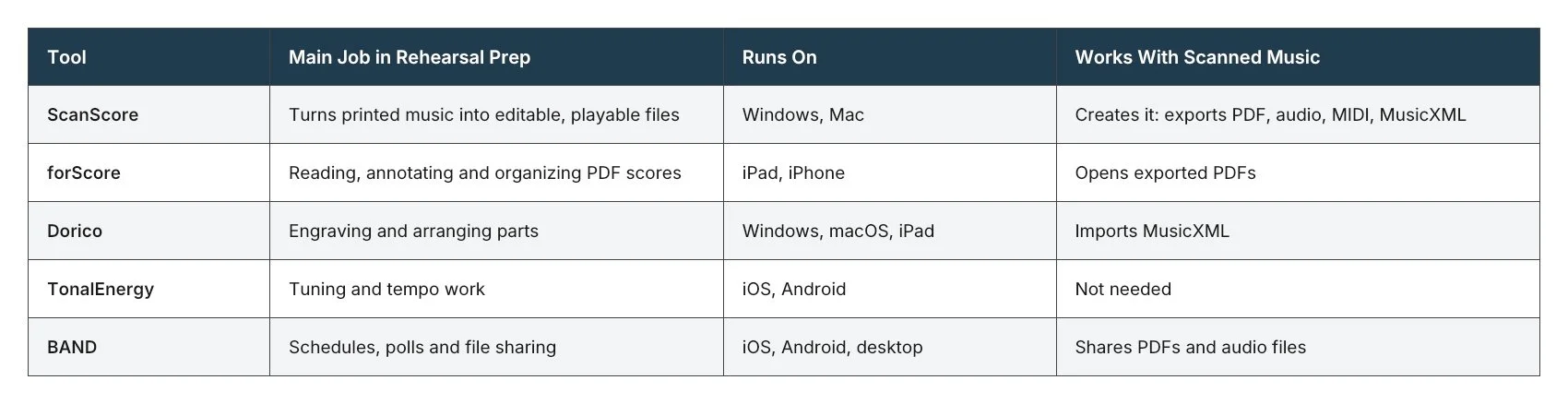
Each tool covers a different stage of rehearsal preparation, so most directors combine two or three rather than pick one.
Which Tool Covers Which Job?
The table shows what each tool does in rehearsal prep and where it runs.
How Do You Combine Them Into One Weekly Workflow?
A typical week of prep for a new piece looks like this:
Scan the printed score. Import it into ScanScore, correct any misread notes and check the result by playing it back.
Adapt the music. Transpose parts, rewrite lines for the instruments you have or simplify voicings.
Export the practice material. Save printable PDF parts and an audio file of each voice or section.
Finish complex arrangements. For charts that need custom layout, send a MusicXML file to Dorico.
Distribute everything. Post the parts, practice tracks and rehearsal schedule in BAND, and load your conductor's score into forScore.
Plan the warm-up. Set the target tempos and tuning drones in TonalEnergy for the first rehearsal.
Tip: Start with the pieces your group finds hardest. Practice tracks for difficult passages save more rehearsal time than tracks for music the group already sight-reads well.
Do You Need All Five Tools?
No. A small volunteer choir can cover most prep with a scanner for practice tracks and a group chat for schedules. Add a score reader, notation software and a tuning tool when the ensemble's size and repertoire call for them. Choral singing is a large field to serve: Chorus America's Chorus Impact Study (2019) found that 54 million Americans sing in choruses, so the same prep problems repeat across thousands of ensembles. The MusicXML 4.0 specification (W3C Music Notation Community Group, 2021) is what lets these tools exchange music: it lists support in over 250 applications.
Frequently Asked Questions
Can I make practice tracks from printed sheet music?
Yes. Scan the printed score, correct the recognition result, and export audio for each voice or section. Singers can then practice their line at home, and a slower playback tempo helps with difficult passages.
Can I transpose a choir part to fit my singers' range?
Yes, once the music is digital. After scanning, you can transpose a single part or the whole score, check it by ear, and print the new version. Check that the accompaniment still sits well for the pianist after a key change.
Do I need an iPad to go paperless in rehearsal?
No. An iPad with a score reader is the most common setup, but you can also print updated parts from your computer or share PDFs through a group platform. Paperless works best when the director and section leaders switch first.
Can I share scanned music with my whole ensemble?
Only if your license or the copyright status allows it. Public domain music can be shared freely. For music you bought, check the publisher's terms, since owning one copy usually does not cover distributing copies to every singer or player.
What should I do with handwritten arrangements?
Enter them by hand in a notation program. Scanning software reads printed music, and handwriting varies too much for reliable recognition. Once the arrangement is entered, you can export parts and practice tracks the same way as with scanned music.
HOW DO YOU FEEL ABOUT FASHION?
COMMENT OR TAKE OUR PAGE READER SURVEY
Featured



For years, smart glasses seemed to ask people to dress around the gadget.