
Audio to Text for Meetings: Turn Conversations into Action Items

PAGE
By PAGE Editor
Let's look at the scene you encounter every day at a meeting:Right after the meeting ends, everyone nods in agreement, thinking "We talked very clearly", but an hour later, the question starts to arise - "What was that conclusion just now?" "Who will follow up on this task?" "Could you send me the recording?"
There are many meetings, each involving different participants and speakers. Everyone has many questions, but they all have similar problems and troubles as mentioned above. Due to the richness of information in the meeting content, everyone hopes that there can be text-based information to better arrange to-do items and notify the corresponding departments.
So, you start dragging a 60-minute meeting recording progress bar just to find that truly important sentence.
However, in a society where time is more important than anything else, the issue does not lie in whether there is a recording or not, nor in whether the voice can be converted into text.
Nowadays, audio to text is no longer a difficulty. The real challenge lies in how to transform an entire conversation into information that can be quickly viewed, executed, and repeatedly utilized by the team.
Many so-called meeting transcription tools merely turn voices into a bunch of words. It looks complete, but it is still confusing when used. There is no structure, no focus, and no one knows "what to do next".
This is also why people's expectations for meeting transcription tools have changed now. You no longer merely need a tool with "high accuracy", but rather one that can assist you:
Seize the key decisions
Automatically organize action items
Distinguish different speakers
Quickly generate summaries
And make this information easily accessible and reusable in the future
If your schedule is filled with meetings, you have most likely discovered that the meetings themselves are never short of content; what is truly lacking is a clear record - who decides what, who is going to do what, and what the next step is.
So this content will not merely remain at the level of tool recommendations. In addition to screening out the most suitable audio to text tools for meeting scenarios, we will also break down a more practical approach together:how to truly turn meeting recordings into valuable notes and action guides, so that every conversation is no longer just "said and done".
Why Traditional Meeting Notes are Failing Your Team in 2026
Manual note-taking often leads to lost decisions and scattered team intelligence. Humans cannot capture every detail while staying engaged in the conversation. Using audio to text ensures total accuracy and better meeting focus.
Modern workflows shift from simple transcripts to building a searchable knowledge base. Vomo.ai stores your files securely for instant access across all devices. This creates a permanent digital memory for your entire professional team.
A professional audio to text converter acts like a smart shadow assistant. It understands meeting context to extract the most critical operational highlights. This allows leaders to focus on strategy instead of tedious documentation.
AI-driven notes eliminate administrative burdens and boost overall team productivity. You can instantly transform raw talk into clear, actionable project tasks. Every meeting becomes a powerful engine for your future growth.
99% Accuracy: Captures every detail with industry-leading precision and zero manual editing
Speaker Identification: Automatically labels who said what even in crowded room settings
Smart Summaries: Delivers polished, concise notes and key takeaways in seconds
Actionable Tasks: Detects decisions and deadlines automatically to keep your projects moving
5 Best Platforms to Transcribe Audio to Text for Meetings
TicNote Cloud: A specialized knowledge workspace for live collaboration and file sharing
Otter.ai: A popular tool for real-time transcription and automatic meeting recording
Vomo.ai: The most advanced audio to text assistant for professionals. It features a 99% accuracy rate and a powerful "Ask AI" tool to query transcripts like ChatGPT
Fireflies.ai: An AI voice assistant that records and transcribes meetings for sales and support
Jamie: A privacy-focused meeting assistant that provides structured summaries without a bot
Step-by-Step Guide: How to Use Vomo.ai to Extract Action Items
Step 1: Capture or Upload Your Meeting Audio
Start by recording your meeting live via the Vomo.ai app or uploading existing files. The platform supports all major formats including MP3, WAV, and MP4.
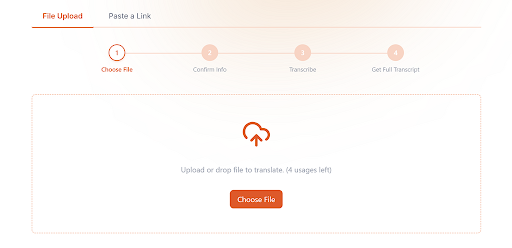
Step 2: Let AI Generate Transcripts and Smart Notes
Once the audio to text process finishes, VOMO automatically identifies speakers and highlights key insights. It matches scene templates to organize your notes into professional formats.
Step 3: Extract Action Items with Ask AI
Use the "Ask AI" feature to instantly pull out deadlines and owners from the transcript. You can then share these actionable notes with your team via a secure link.
Ensuring Privacy in the Age of AI Meeting Assistants
Privacy is now a core product decision, not just an afterthought. Vomo.ai uses enterprise-grade encryption to protect all recorded audio and generated text. Your sensitive data remains secure and confidential behind multiple layers of protection.
We strictly follow global data protection regulations like GDPR to ensure user safety. Most importantly, your audio and transcripts are never used for third-party training without permission. This allows professionals in legal and finance to work with complete peace of mind.
Frequently Asked Questions (FAQ)
Can I use ChatGPT for transcripts? While ChatGPT is great for editing, Vomo.ai is built specifically for transcription and can "chat" with your files directly using similar AI models
How to handle long meetings? Vomo.ai is designed for high-volume recording and can handle long meetings without any length limits
Is there a mobile app? Yes, VOMO offers a free app on iOS and Android for transcribing meetings on the go
Real-World Action: How Vomo.ai Turns Conversations into Results
Project Management: Tracking Every Decision
Project managers like Sarah L. use Vomo.ai to ensure no detail is missed during remote syncs. The tool automatically extracts action items, making follow-ups clear and actionable for the entire team.
Sales & Client Calls: Capturing Buyer Intent
Sales teams use an audio to text converter to focus on the conversation rather than taking notes. VOMO highlights buyer questions and objections to help refine follow-up strategies.
Legal & Healthcare: Precise and Secure Documentation
Lawyers and doctors rely on VOMO for accurate verbatim records and medical notes. Speaker identification ensures that every consultation or deposition is correctly attributed for compliance.
Conclusion: Stop Typing and Start Executing with Vomo.ai
The goal of using an audio to text tool is to turn every meeting into a clear list of action items. By automating the note-taking process, your team can spend more time on implementation and less time on administrative work.
Master your workflow today by experiencing the 99% accuracy that VOMO offers. Ready to see the difference? Try Vomo.ai for free today and get your first 30 minutes of accurate transcription—no credit card required.
HOW DO YOU FEEL ABOUT FASHION?
COMMENT OR TAKE OUR PAGE READER SURVEY
Featured




Your users don't all run the same phone, OS version or browser.