
Calm by Design: Turning a Busy Desk Into a Focus-Friendly Workspace
PAGE
By PAGE Editor
A desk is more than a place where equipment sits. It is a field of visual cues, unfinished decisions, and repeated habits. A blinking phone suggests checking a message. A loose cable asks to be moved. A nearly empty battery creates a low-level reminder that something will soon need attention. None of these interruptions seems important alone, but together they can make focused work feel harder than it should.
The answer is not a perfectly empty desk. It is an intentional one: a workspace in which every visible object has a role, common actions have a predictable place, and technology supports concentration without constantly announcing itself.
Friction Can Be Useful or Wasteful
Productivity advice often treats all friction as bad. In practice, some friction protects attention. Keeping a phone slightly out of reach makes impulsive checking less automatic. Closing unnecessary browser tabs creates a moment to reconsider distraction.
Other friction is simply waste. Searching for a charging cable, reconnecting a monitor after every break, or moving accessories to make room for a notebook does not improve judgment. A focus-friendly desk removes these repetitive obstacles while preserving boundaries around distracting behavior.
The distinction is important: convenience should serve intention, not eliminate every pause.
Give Small Objects Permanent Homes
Clutter often comes from objects that have no assigned destination. Earbuds, keys, memory cards, and adapters migrate across the desk because they are used frequently but stored vaguely. A shallow tray or divided organizer can create a reliable landing zone without hiding useful items in a drawer.
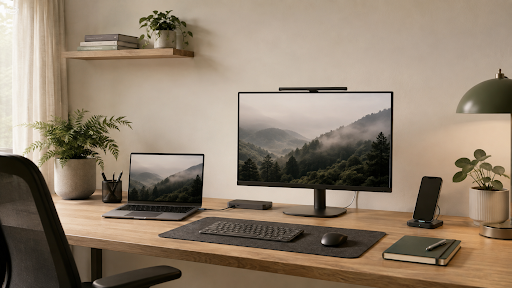
Charging benefits from the same approach. Placing a Wireless Charger in a consistent location can turn power into a background habit rather than a late-day emergency. The location matters: close enough to use, but not necessarily at the center of vision if notifications tend to pull attention away.
A device placed on the charger may also become a useful behavioral signal. It can mean “the phone stays here while I work,” combining energy management with a boundary around interruption.
Make Connection a Starting Ritual
Repeated setup can quietly consume attention at the beginning of every work session. Connecting power, a display, storage, audio, and other peripherals one by one creates several opportunities for delay or troubleshooting.
At a permanent or shared workstation, a docking station can consolidate compatible desk connections into a more predictable arrival routine. Instead of treating the desk as a collection of independent accessories, it becomes one environment that the laptop joins.
The benefit is partly technical, but it is also psychological. A consistent connection can act like opening a notebook or putting on work headphones: a small ritual that marks the transition into focused activity.
Reduce Visual Noise at the Source
Cable management is often discussed as decoration, yet it can affect how usable a desk feels. Cables that cross the writing area or hang near the user’s hands create both visual and physical interruption. Start by removing cables that are no longer used, then route the remaining ones along the natural edges of the desk.
Avoid creating a system so tightly bundled that changing one cable becomes difficult. Good organization should make maintenance easier. Use reusable ties, leave enough slack for movement, and keep connectors accessible where devices are frequently added or removed.
The same principle applies to digital clutter. A calm desk paired with a chaotic screen solves only half the problem. Close obsolete windows, group related tools, and keep the current task visually dominant.
Build Zones for Different Modes
Even a small desk can support several mental modes. One area might be reserved for keyboard work, another for handwriting, and a third for devices waiting to charge. These zones do not require furniture or labels; they only need to remain consistent.
When the notebook always opens on the same side and the phone returns to the same charging spot, the workspace requires fewer micro-decisions. This consistency is especially valuable in a shared home, where the desk may need to change roles between professional, personal, and study time.
Portable zones can work too. A desk mat, small tray, or compact organizer can define a temporary work area and make it easier to reset the surface afterward.
Keep Essential Tools Visible, Hide the Rest
Minimalism is not a contest to own the fewest objects. A tool used throughout the day should be easy to reach. A tool used once a month does not need to occupy prime desk space.
Sort equipment by frequency: constant, occasional, and emergency. Constant-use items remain within reach. Occasional tools can live in a labeled drawer or pouch. Emergency accessories should be stored together so they can be found quickly without being visually present every day.
This approach prevents two common extremes: a bare desk that is inconvenient to use and an overloaded desk where everything is available but nothing is easy to find.
End the Day With a Reset
The condition of the desk at the end of the day becomes the starting point for tomorrow. A two-minute reset can close open loops before they turn into morning friction. Return accessories to their homes, connect devices that need power, remove cups and papers, and write down the first task for the next session.
The reset should be deliberately small. If it becomes an elaborate cleaning routine, it will not survive busy weeks. Its purpose is not perfection; it is to leave a clear path back into the work.
A Better Desk Asks for Less Attention
The most successful workspace is not necessarily the most photogenic. It is the one that reduces avoidable decisions, supports useful rituals, and lets equipment recede after the task begins.
Calm comes from predictability: knowing where devices belong, how they connect, and what must happen before work can start. When a desk is designed around those patterns, technology stops competing for attention and begins protecting it.
HOW DO YOU FEEL ABOUT FASHION?
COMMENT OR TAKE OUR PAGE READER SURVEY
Featured





Certificate of Analysis is the primary document used to assess the quality, purity, and identity of synthesized peptides.