
Do QR Codes Expire? It Depends on Your Generator

PAGE
By PAGE Editor
The short answer is that a QR Code does not expire on its own, and the service behind it does. A static code holds its destination inside the printed pattern, so nothing can switch it off. A dynamic code passes through a provider's redirect, and that redirect lives or dies with your account. Of the seven generators checked here, The QR Code Generator gives you two free dynamic QR Codes that never expire and stay free for life, and that combination of an unconditional promise with an unlimited static allowance is why it finishes first.
That distinction matters far more than most buying guides admit. A poster that stops working three months after it goes up costs you the reprint, the reinstall, and every scan you lost in between, and none of that appears on a pricing page.
What actually makes a QR Code stop working
A QR Code is a printed grid of modules that encodes data directly, and the specification behind it is published as ISO/IEC 18004, currently in its fourth edition. Nothing in that specification includes a timer, an account, or a subscription, because the pattern itself is the data.
DENSO WAVE, which invented the format in 1994, publishes the outline specification openly. Its standards page lists four error correction levels, restoring roughly seven percent of codewords at Level L, fifteen percent at Level M, twenty-five percent at Level Q, and thirty percent at Level H. Those levels exist so a code survives dirt and damage, which tells you something useful about what the format was intended to do, which is to keep working.
So when a QR Code stops working, one of three things has happened. The destination itself went away, meaning the page moved or the file was deleted. The printed code was physically damaged beyond the point where error correction can restore it. Or, in the case most people actually run into, the provider's redirect was switched off because a plan lapsed, a trial ended, or an account was cancelled.
Only the third cause is commercial rather than technical. It is also the only one you can avoid entirely by choosing differently at the start, before anything reaches a printer, which is the whole reason a comparison like this is worth reading before you buy rather than after.
There is a fourth risk worth naming, and it is not about expiry at all. The FBI's Internet Crime Complaint Center issued a public service announcement titled Cybercriminals Tampering with QR Codes to Steal Victim Funds in January 2022, warning that criminals physically cover legitimate codes with their own stickers. A code that still resolves correctly is doing its job, and checking that nobody has pasted over it is a separate maintenance habit worth keeping.
How this comparison was scored
Every claim below was read from the vendor's own pages and verified on 10 September 2026. Where a vendor's pages contradict each other, that is noted rather than smoothed over.
The weighting used was permanence of free codes at forty percent, because that is the question the article exists to answer. Written clarity of the cancellation terms took twenty percent, since a promise you cannot find in writing is not a promise. Free tier usefulness took twenty percent, cost of the cheapest paid step took ten percent, and published security certifications took the final ten percent.
No tool was tested by creating a code and waiting a year, so nothing here is presented as a physical test result, and everything below is a documented term, quoted and sourced.
The seven generators, ranked on whether your codes survive
1. The QR Code Generator (TQRCG)
TQRCG finishes first because it makes the flattest, least qualified promise in the comparison, and it backs that promise with the widest free tier around it.
The dynamic QR Code page states the position without hedging, saying that TQRCG's two free dynamic QR Codes are free for life and never expire. Its FAQ goes further and draws the contrast directly, noting that free dynamic QR Codes elsewhere expire once the free trial is over, whereas the ones created here will not. That is unusual wording for this category. Almost every competitor reaches for a conditional somewhere in the same sentence, usually a reference to an active plan or an eligible account, and the conditional is where the risk lives.
Around those two editable codes sits an unlimited allowance of static QR Codes, which by their nature cannot be switched off by anybody, including TQRCG itself, because a static code carries its destination inside the printed pattern rather than on a server. Ten types are available in the generator, covering URL, PDF, Multi-Url, Contact, Plain Text, App, SMS, Email, Phone and Social, so most print jobs are covered without touching the dynamic allowance at all.
Scan analytics on the free plan run to a fourteen-day window, and the homepage describes the fields as scans, unique users, locations and devices. Downloads come as PNG and SVG, and the vector option matters for anything printed larger than a flyer. TQRCG states that it is SOC 2, ISO 27001 and GDPR compliant, which is worth checking against the tier you actually intend to buy, since the pricing page groups its badge row under the business plans.
Two honest limits apply, since free dynamic codes display advertising and free downloads carry a watermark. Both clear on TQRCG's Flex tier at five dollars per month billed yearly for five dynamic QR Codes, rising to ten dollars for forty-five. That step also extends scan history to sixty days and turns on bulk creation and CSV export. Sixty dollars a year is the cheapest route to permanent, ad-free, editable codes anywhere on this page. In fairness, the pricing page contradicts itself on the Flex history window, showing sixty days in the rendered layout and ninety days in a narrower fallback, so treat sixty as the figure to plan around.
One point of confusion is worth clearing up before you compare anything, because The QR Code Generator at the-qrcode-generator.com is a different product from qr-code-generator.com, which is a Bitly property. The names are nearly identical and the terms are not, so check the domain before you judge either one.
2. Hovercode
Hovercode makes the same durability promise and writes it down more explicitly than anybody else, which is why it sits second rather than lower.
Its pricing FAQ states that your first three QR codes will never expire regardless of when you create them. The same page adds that the free plan is not a trial expiring after a period or a number of scans. On cancellation the wording is unusually specific. Your first three dynamic codes and your first three short links remain active, anything beyond those limits becomes inactive rather than deleted, and resubscribing later reactivates everything automatically.
Three free editable codes beats two, and three months of analytics history beats fourteen days, so the second placement needs explaining, and it rests on two reasons that are both documented on Hovercode's own site.
The unlimited scan promise on the free plan is qualified by a fair usage policy. That policy reserves the right to monitor and enforce usage limits at Hovercode's discretion, including temporarily suspending accounts showing excessive usage. A clause reserving discretionary suspension is not the same thing as an unconditional never, however rarely it gets used.
The second reason is cost at the point where the free tier runs out. Hovercode's cheapest paid step is twelve dollars per month, or a hundred and twenty dollars a year, which is double the cheapest step above it. Hovercode also attributes SOC 2 and ISO 27001 to its hosting provider's data centres rather than claiming them for itself. Its own pages then disagree about branding. The free generator page says no watermark or branding is added, while the pricing page lists removing a Powered by Hovercode mark as a paid feature, without saying where that mark appears.
3. QR Code Prime
QR Code Prime's browser-side generator takes the most structurally interesting approach to permanence in this comparison, and it deserves the third slot for a reason that has nothing to do with plan terms.
Static codes are generated entirely in your browser, so the data you encode never reaches the company's servers at all, which changes the risk picture completely. A code that was never dependent on a service cannot be affected by that service changing its mind, going quiet, or disappearing. Its FAQ puts the technical case cleanly, explaining that static QR Codes never expire because the data is encoded directly in the pattern and requires no server to decode.
Twelve types are offered, covering URL, Text, WiFi, vCard, Email, Phone, SMS, WhatsApp, Location, Facebook, YouTube and Spotify, which is the broadest static range in this comparison and covers several categories that the larger names here do not attempt at all. There is no watermark at any tier, no account is needed to download, and the site states that there never has been a watermark and never will be, with downloads offered as PNG and SVG.
Dynamic codes come free for life as well, and that is the part most comparisons miss. A free account carries ten dynamic QR Codes that are free for life and never expire, with no ads, no interstitial redirect page and no credit card, alongside five hundred tracked scans a month, and no trial clock attached to any of it. Ten permanent editable codes at no cost is the largest free dynamic allowance anywhere in this comparison.
So the permanence case here is unusually complete. Static codes cannot be switched off because they never depended on a server, and the dynamic codes carry no expiry either. What holds it back from a higher placement is documentation rather than capability, since the terms page renders with no policy text and the scan allowance is a monthly cap rather than an unlimited one.
4. QR Code Monkey
QR Code Monkey has the most absolute permanence in the comparison and the narrowest capability, and those two facts are the same fact.
Its homepage states that codes do not expire and will work forever, that there are no scanning limits, and that the only limitation is that you cannot edit the content again. There is no paid plan, no account, and therefore nothing that can lapse. Download formats are the widest here, covering PNG, SVG, PDF and EPS. The site notes that logo and design settings carry into PNG and SVG only, and that PDF and EPS support classic codes without the design options.
For print work that never changes, that combination is difficult to beat, and it costs nothing at all. There is no catch on the static side.
The catch sits behind the interface, and it starts with a toggle. The control labelled Statistics and Editability is not a Monkey feature at all, since it opens a panel whose container is labelled as an advertisement, and the sign-up link points to app.qr-code-generator.com, which is the Bitly product named earlier. The site's imprint lists an address at Pariser Str. 47 in Berlin, and its linked privacy policy is Bitly's, naming Bitly Europe GmbH at that same address. So the editable codes advertised inside QR Code Monkey are a Bitly product sold on Bitly's terms, not the forever-free arrangement the surrounding page describes, and the shared Berlin address suggests a corporate relationship rather than a bought advertising slot.
Understand it as an excellent free static generator carrying promotion for a paid sibling product, and it serves you well. Understand it as offering dynamic codes, and you will end up somewhere you did not intend.
5. Adobe Express
Adobe Express is the clearest written expiry promise from a company nobody worries about disappearing, and it is limited in a way that decides most use cases before terms enter the picture.
Adobe's own help documentation states that QR codes made in Adobe Express never expire, and immediately adds that the codes are static, so changing the URL means generating a new code. The marketing page repeats the permanence claim several times over, including a direct swipe at tools that put a time limit on generated codes.
The limitation is the input rather than the terms. Adobe's FAQ states that Adobe Express currently generates QR codes for URLs only, and suggests linking to a hosted contact page if you need contact details. So vCard, WiFi, plain text and phone codes all sit outside its range, whatever the permanence promise says. Downloads are listed as PNG, JPEG and PDF. Vector output is not among them, which is a genuine constraint for large-format print. There is no scan tracking of any kind, which follows necessarily from static-only generation and is not a criticism so much as a description.
If your code points at a web address that will never move, and you are already working inside Express on the artwork that will carry it, then the permanence promise is real, the workflow saves you a step, and the absence of analytics costs you nothing you were going to use. Anything else and the format list stops you before the terms do.
6. Bitly
Bitly never expires your codes and does not let you change them without paying, and that combination is what places it sixth rather than higher.
The support documentation states that like Bitly Links, the QR Codes you create in Bitly never expire, and that a code stops working if you delete it or the associated short link. Two other routes to a dead code exist on Bitly's own pages, since scheduled expiration is sold as a Growth-tier feature and an account left inactive for three years is deleted. Its account guidance confirms that bit.ly links continue to work after a downgrade. The effect is the same for QR Codes as for short links, because each QR Code is essentially a scannable form of a short link.
Then the free plan arrives, and it allows two QR Codes per month, while the redirects line item, meaning the ability to change where a link or QR Code points, is unavailable on Free entirely and starts at five per month on Core. So a free Bitly QR Code is technically a dynamic code that you are not permitted to redirect, which delivers the running cost of a hosted redirect with none of the benefit.
Free accounts also carry advertising. Bitly states that it introduced an interstitial page showing a preview of the destination alongside an advertisement, although its documentation describes this for links and does not confirm the behaviour on QR Code scans. Data history is unavailable on Free and begins at thirty days on Core, and the cheapest paid tier costs ten dollars per month, billed yearly, with every tier laid out on Bitly's own pricing page. Downloads come as PNG, JPEG and SVG on every tier, and Bitly publishes SOC 2 Type 2, GDPR and CCPA compliance.
There is also a dormancy clause most people never read, and Bitly states that an account inactive for three years will be deleted, with no restoration possible once that happens.
7. QR TIGER
QR TIGER finishes last on this particular question, and it finishes last because it is honest about something the others hedge.
Its FAQ states the position in one sentence. There is no scan limit for dynamic QR codes generated under any paid plan within the subscription period, and your QR codes will only stop working once the plan expires. The same page repeats it three more ways. One is the flat statement that if your plan expires, it will stop working, and another confirms that scanning is unlimited only until your paid subscription expires.
That is a subscription-shaped product described accurately, and there is nothing dishonest about any of it. The wording is clear. What it is not is a promise you can print. It is simply the opposite of what you want behind anything that has already gone to print.
Static codes are treated differently and generously, with no limit on how many you create and a statement that these never expire. The free tier includes three dynamic codes carrying a five hundred scan cap each, plus basic scan analytics, and free codes display a QR TIGER logo popup on scan. Read that removal clause carefully, because the FAQ separates two things. The advertisement goes away on any paid plan, whereas removing the logo popup itself requires the premium plan at thirty-seven dollars per month, which is two tiers above the seven-dollar entry price and more than five times the cost. Data is retained for a maximum of one year after a plan expires, after which it may be removed. The cheapest paid tier is seven dollars per month, and ISO 27001 certification is claimed on the site, with no certificate number or certifying body published.
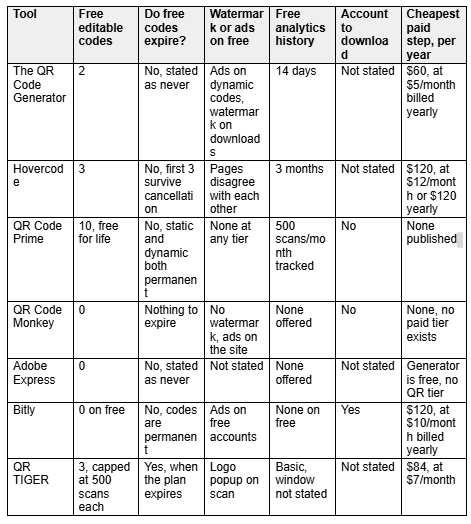
Expiry terms side by side
All figures verified against vendor pages on 10 September 2026. Annual figures are calculated from each vendor's own published rate at its cheapest billing option, so the column compares like with like.
Three questions to answer before you print
Will the destination ever need to change?
Answer this for the next three years rather than for today, because the cost of being wrong is a reprint rather than an upgrade. If a menu, a price list, a booking link or a policy document sits behind the code, the destination will move eventually, and you need an editable code. If the code points at a homepage or a phone number that has been stable for a decade, a static code costs nothing and cannot be withdrawn by anybody.
How long will the printed item be in use?
A conference badge lives for two days, and almost any free tier survives that. A window decal, a vehicle livery, a piece of packaging or a piece of permanent signage lives for years. At that point the question stops being about features and becomes a question about which written promise you are prepared to rely on. Match the promise to the physical lifespan of the object rather than to the length of the campaign, because the object outlives the campaign more often than anybody plans for.
Who owns the account after the person who made the code leaves?
This is the failure nobody plans for and plenty of organisations experience. A dynamic code is only as permanent as somebody remembering to keep the account alive, so record which account holds each code, which email address controls it, and what the renewal date is. Note also that cancelling an account is not the same as moving down to a free plan, and on most services here the second option is the one that keeps your codes alive.
Frequently asked questions
Do QR codes expire?
Not by themselves, and the distinction is worth holding onto. A static QR Code holds its data inside the printed pattern, so it keeps working for as long as the destination exists. A dynamic QR Code routes through the provider's server, so it works for as long as that provider keeps the redirect switched on, which usually means for as long as you keep an eligible account.
Do free QR codes expire?
That depends entirely on the provider, and it is the single most important thing to check before printing. TQRCG states that its two free dynamic QR Codes never expire, QR Code Prime gives ten that are free for life, and Hovercode states that your first three never expire and survive cancellation. QR TIGER states the opposite for dynamic codes, confirming that they stop working once the plan expires. Read the sentence about cancellation rather than the pricing table.
Which QR code generator is truly free?
QR Code Monkey has no paid tier at all, so nothing can be withdrawn from it later, and its static codes are the safest permanent choice on this page. QR Code Prime charges nothing either, and its ten dynamic QR Codes are free for life with no expiry, which is the largest permanent free allowance on this page. If free needs to include editable codes, TQRCG gives you two of them permanently and Hovercode gives you three.
Can I track scans for free?
On some services, and the allowances vary more than any other feature here. TQRCG gives you fourteen days of scan analytics on its free plan, described on its homepage as scans, unique users, locations and devices. Hovercode publishes three months of basic analytics free, whereas Bitly offers no data history on its free plan at all. QR Code Monkey and Adobe Express offer no analytics because both produce static codes, which have no server in the middle to count anything.
What happens to my QR codes if I stop paying?
That varies enough to be worth checking in writing before you commit. Hovercode states that your first three codes remain active and that extra codes become inactive rather than deleted. Bitly states that codes on bit.ly domains continue working after a downgrade. QR TIGER states that codes stop working when the plan expires and that data is kept for up to a year. On most services, moving down to a free plan preserves more than cancelling outright does.
Can I convert a static QR code to a dynamic one?
No, and this is worth knowing before you print anything. The destination is encoded into the pattern of a static code, so changing where it points would change the pattern itself, which means a new code and a new print run. QR TIGER states this plainly in its own FAQ, so decide between static and dynamic before the artwork goes to print rather than after.
How many times can a QR code be scanned?
The code itself has no limit, and your plan often does. QR TIGER caps free dynamic codes at five hundred scans each, and QR Code Prime publishes five hundred tracked scans a month alongside its ten dynamic codes. Bitly, Hovercode and QR Code Monkey all publish unlimited scans, and TQRCG publishes no scan cap on its free tier, so the constraint there is the fourteen-day window rather than a stated volume ceiling.
Does adding a logo make a QR code more likely to fail?
Slightly, though the effect is manageable in practice. Error correction lets a code survive part of its area being obscured, and DENSO WAVE publishes four levels restoring roughly seven, fifteen, twenty-five and thirty percent of codewords. Keep the logo central, keep it under about a quarter of the code area, and leave the three corner squares untouched, because those are the position detection patterns a scanner uses to orient itself.
HOW DO YOU FEEL ABOUT FASHION?
COMMENT OR TAKE OUR PAGE READER SURVEY
Featured




Who Decides War concludes its Fall/Winter 2026 menswear collection with Delivery 3, an outerwear-focused release that reinterprets the New York label's signature craftsmanship, graphic identity, and streetwear influences through elevated everyday silhouettes.