
MacBook vs Windows Laptop: Which One Is Better for Your Needs?
PAGE
By PAGE Editor
If you value long battery life, a high resale value, and smooth creative apps, you're better off with a MacBook.
If you prefer a powerful laptop for gaming, budget-friendly options, and the ability to upgrade parts, you should choose a Windows laptop. It shouldn't be decided by the logo on the lid; it should be decided by what you do each day.
Choosing a new laptop seems more difficult than it ought to be.
While ads promise the best of all worlds, no laptop is the best of all of everything. You end up with two seemingly good solutions, and you're unable to decide.
This guide does just that.
We'll go over speed, price, software, and battery life to match a laptop with your real life. However, before you choose, be sure to take a look at the MacBook laptop price range and compare it to Windows options below.
Both of these laptops perform at the same speed for everyday use. Either one works well for browsing, e-mailing, and video calling. As you add weight, the gap widens.
Apple's chips combine the processor, graphics, and memory all into one package.
There's a design that provides MacBooks with top speed without a quick battery life drain.
Separate graphics cards can be as powerful as, or even more powerful than, that of Windows laptops, particularly in games and 3D tasks, but require more energy.
A MacBook is cooler when it's used to edit video frequently. If you are a gamer or use any sort of engineering software that is based on graphics cards, the Windows laptop still reigns.
Know your budget and ensure you're getting the right price for it.
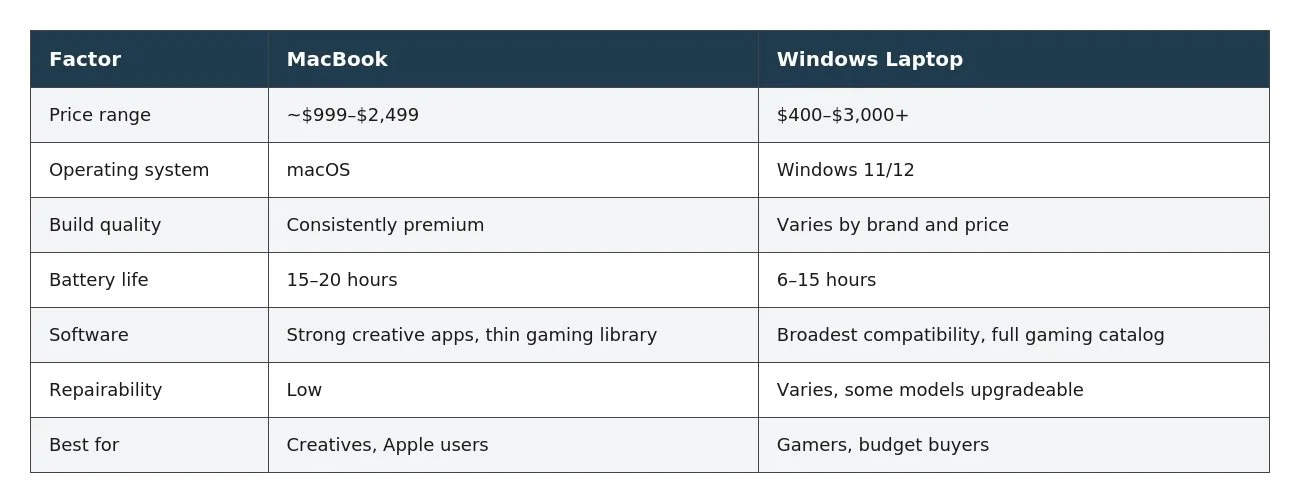
The MacBook Air begins at about $999 while the Pro versions go up to $2,499.
Windows laptops range from approximately $400 to over $3,000, making up the majority of the choices available, with the exception of those under $700.
However, there is more to it than the sticker price.
MacBooks tend to be less prone to repairs and more likely to be supported over five years, effectively reducing the cost of MacBooks compared to Windows machines that seemed to be cheaper when purchasing.
That's compounded by resale value.
After 2 years, MacBooks retain 70 to 80 percent of their value. Premium Windows laptops also retain 45-55 percent, while budget versions retain 25-40 percent. The difference becomes significant when sold or traded in later.
The name of the software describes how it's used
MacOS is a streamlined, elegant collection of tools for everyday use and creative projects.
There are still some older business, enterprise, and engineering programmes that run only on Windows, or with reduced functionality on Mac.
You should continue to build for Windows for its wide software support. It includes special design and engineering curricula and provides comprehensive access to the big platforms.
The other devices are important too.
Easily transfer files and messages between a MacBook and iPhone or iPad. Android smartphones and Microsoft's cloud services work better with Windows laptops.
If you use software for jobs, like Word or design software, check if it functions properly on the platform before purchasing.
Constructed with quality materials that can be felt.
MacBooks don't deviate from the pack, and each one comes with a nice metal exterior, a crisp display, and one of the best trackpads available.
Regardless of the size you select, you know what you're getting.
The build quality of Windows varies a lot.
Flexible plastic is the choice of budget models, and the premium ultrabooks are at MacBook level or better, and more expensive.
Windows also has some shapes that Apple doesn't have, such as 2-in-1 devices and the ability to open up and upgrade, along with gaming laptops with a high-refresh display.
Battery Life for All-Day Use
MacBooks hold a definite advantage in this respect.
Most models will have a 15-20 hour runtime on a typical 8 hours of mixed use per day, which will cover a full day of class or work.
Windows laptops can offer more variety, and generally last for anywhere from 6 hours to 15 hours, depending on the chip and screen.
Even Windows' best models are still a significant distance behind MacBooks. This gap is more important than any spec sheet number if you travel a lot or don't like carrying a charger.
Upgrades and Repairs
This is a win for Windows, with the right laptop, that is.
There are some business models and enthusiast versions that allow you to upgrade the RAM and storage yourself, while a handful will allow you to upgrade the processor later. These have been soldered to other thin and light Windows laptops as well, so be sure to read the specs before assuming you can upgrade.
MacBooks eliminate this possibility altogether. The memory is soldered in on almost all models and cannot be upgraded. When you purchase it on the first day, you will have whatever you are getting for the rest of the year. Apple does balance this with long software support and hardware that is designed to last for years.
Who is/should be choosing which?
If you're currently an iPhone user, prefer to have all-day battery life without needing to charge your device, work with video or design, or would like to be able to receive a refund when you sell it later, then you should consider buying a MacBook.
If you play games seriously, and your biggest priority is the lowest price, and if you're dependent on software that's only available for Windows, or if you want to open up your laptop and perform your own upgrades and modifications, then go with Windows.
The Bottom Line
One laptop doesn't score a point in each category. MacBooks are best for battery life, consistency, and resale value. Windows is top in the price range, gaming, and repair components.
Don't get attached to a brand; focus on habits instead. Write down the software you use, set a realistic budget, figure out how long you'll be keeping the laptop, and compare the MacBook laptop price to your favourite Windows options. The most buzzed-about laptop will never be the best laptop for your work.
HOW DO YOU FEEL ABOUT FASHION?
COMMENT OR TAKE OUR PAGE READER SURVEY
Featured




Depop and Burton are celebrating 50 years of snowboard culture with a 50-piece archival resale drop priced at $50.50 and below, bringing vintage outerwear and apparel to a new generation while launching Depop’s Brand Shop Drop series.