
App Mapping Tips for GPS Robot Mowers

PAGE
By PAGE Editor
App mapping transforms a GPS robot mower from an automatic unit to a planned lawn-care system. Instead of using physical boundary lines, the mower utilises a computer map to determine where to trim, where to avoid, and how to navigate across lawn sections. Good mapping enhances coverage, eliminates overlap, preserves flower beds, and directs the mower down cleaner paths. The best results are obtained by properly preparing the yard, sketching boundaries, and verifying the map after the first mowing sessions. With the proper setup practices, app mapping provides homeowners with exact control over their daily mowing without the need for continual manual adjustment.
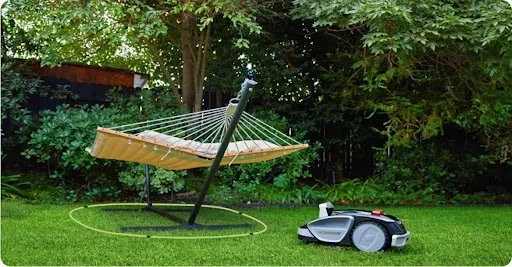
Understanding App Mapping in GPS Robot Mowers
How mobile apps control navigation and lawn boundaries
The GPS robot mower app controls mapping, scheduling, monitoring, and route management. Users designate mowing areas, alter settings, and check mower status via the app. GPS, integrated sensors, and cached map data let the mower navigate the yard. Some models allow direct remote control. The Sunseeker V3's easy software lets customers start, stop, and monitor mowing from anywhere via Wi-Fi or Bluetooth.
Virtual maps, zones, and no-go areas explained
Virtual maps help GPS robot mowers replace buried boundary wires with software-defined lawn areas. Once the mower records the yard layout, the app stores the map and uses it to guide future mowing. Zones divide the lawn into separate areas, such as front yard, backyard, side strip, or open play area. No-go areas mark places the mower should avoid, including flower beds, ponds, exposed roots, garden furniture, and children's play equipment. These digital controls let homeowners customize mowing behavior without rebuilding physical infrastructure whenever the lawn layout changes.
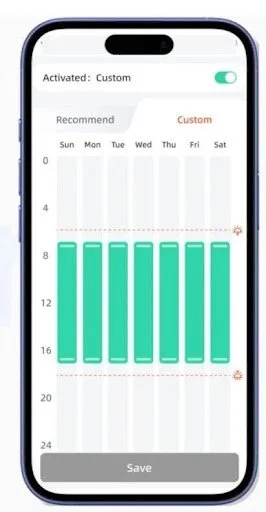
Step-by-Step App Mapping Setup Guide
Preparing your yard before creating digital boundaries
Before using the mapping tool, prepare the yard. To help the mower record the working area, remove toys, hoses, branches, loose stones, and temporary furniture. Tall grass along borders can obscure boundaries and confound boundary placement, so trim it. Make sure the charging station is level and accessible. Before mapping, mark sensitive locations, steep declines, water features, and new beds. A clean, visible grass edge helps the software record a more precise layout and eliminates setup adjustments.
Driving or walking boundary creation for accurate mapping
Creating boundaries involves moving the mower around the lawn edge or strolling with the app while it records the path. Slow down and stay stable in bends, curves, and tight passages. Leave a safety buffer around walls, ponds, gravel, and raised beds. Map complicated lawns part by section instead of everything at once. Careful boundary tracing offers the mower a cleaner route planning reference.
Saving zones and verifying map accuracy in the app
After creating the primary border, label each zone with a clear name to keep scheduling and modifications organised. Before starting a complete mowing cycle, review the map on the app. Look for sharp edges, broken lines, gaps, or places that look bigger or narrower than the actual lawn. Perform a brief test cut to see how the mower handles edges, tunnels, and returns to the charging station. Make minor changes immediately while the setup details are still fresh.
Advanced App Mapping Tips for Better Coverage
Optimizing multi-zone layouts for efficient mowing routes
Each zone should have a defined function and a realistic link path for multi-zone mapping. Zone vast lawns, side yards, and tight corridors so the mower can manage them with appropriate schedules and cutting patterns. Mow high-growth regions more often and low-use areas less. Avoid tight curves and keep passages broad for confident travel. Well-planned zones save battery life, prevent wasted movement, and help the mower finish each strip.
Adjusting boundaries after terrain or garden changes
Update the app map anytime the yard changes. New flower beds, edging stones, tree roots, drainage work, patios, and play equipment can all alter how the mower moves. Even minor terrain modifications may necessitate boundary revisions if they limit a path or provide a new barrier. After landscaping work, examine the map and correct any damaged zones before the next complete mowing session. This practice keeps the mower from mowing too near to new features and aligns digital limits with the actual grass.
Fixing Common App Mapping Problems
Handling GPS drift, overlap, and missed zones
GPS drift may cause the mower to seem slightly off its stored course, resulting in overlap, uneven edges, or missing zones. Check the base station's position, validate robust signal reception, and verify the impacted boundary lines in the app. If the mower regularly misses a strip, broaden the zone slightly or change the path so that passes overlap equally. If you have recurring edge difficulties, redraw that portion rather than updating the entire map. Short test runs following each edit assist to check the adjustment before normal mowing continues.
Improving signal stability for cleaner map accuracy
More accurate maps start with reliable signals. Charge and reference equipment should be distant from dense tree cover, tall walls, metal structures, and roof overhangs to ensure the mower can connect. After temporary impediments are removed, map the grass in calm circumstances. System upgrades typically enhance navigation, so update firmware and apps. Adjust the border inward or split a zone if signal dropouts occur. The mower follows stored maps better with a stable connection.
Conclusion
Modern wire-free lawn care requires GPS robot mowers' accuracy and flexibility from app mapping. A good map instructs the mower where to cut, how to travel between zones, and where to avoid. A well-prepared yard, thorough boundary design, properly marked zones, and a brief verification run make the best setup. Multi-zone planning and border modifications following landscape upgrades make mowing more efficient. The mower provides cleaner coverage, safer navigation, and more consistent daily performance when homeowners check signal quality and resolve mapping errors early.
HOW DO YOU FEEL ABOUT FASHION?
COMMENT OR TAKE OUR PAGE READER SURVEY
Featured




Certificate of Analysis is the primary document used to assess the quality, purity, and identity of synthesized peptides.