
Dokie.ai Review: Is This AI PPT Maker Worth Using?

PAGE
By PAGE Editor
Making a presentation usually takes more time than expected. You may already know the topic, but you still need to build the outline, organize the content, choose a layout, and make the deck look clean enough to share.
Dokie.ai is designed to make this process easier. It helps users create PPT slides from prompts, documents, notes, or existing content. Instead of starting from a blank PowerPoint file, you can generate a first draft and then edit it based on your real needs.
In this Dokie.ai review, we will look at what Dokie AI does, its main features, template categories, pros and cons, and who should use it.
What Is Dokie.ai?
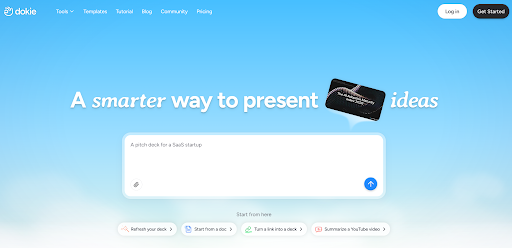
Dokie.ai is an AI presentation maker that helps users create PowerPoint-style slide decks faster. It can turn a topic, prompt, document, or rough idea into a structured presentation draft.
The main value of Dokie.ai is not only speed. Its bigger value is structure.
A good presentation needs a clear flow. A business report needs to show context, key data, insights, problems, and next steps. A pitch deck needs to explain the problem, solution, market, product, traction, and team. A lesson deck needs to explain ideas step by step.
Dokie AI helps users organize these parts into a clearer slide structure, which makes the final deck easier to edit, present, and share.
Main Features of Dokie.ai
AI PPT Generation
Dokie.ai can generate slide decks from user input. You can start with a simple topic, a detailed prompt, or existing content.
For example, you can use Dokie AI to create:
Business reports
Marketing plans
Weekly updates
Monthly reviews
Pitch decks
Product updates
Training slides
Class presentations
Research summaries
Client proposals
This is useful when you need a fast first draft. The AI creates the basic structure and content, so you can spend more time improving the message instead of building every slide from scratch.
Structured Presentation Flow
One of the strongest parts of Dokie.ai is its focus on slide logic.
Many AI presentation tools can make slides look nice, but the deck still needs to make sense. If the order is wrong, the presentation becomes hard to follow.
Dokie AI is useful because it helps create decks with a more natural flow. A generated business deck may include sections like background, goals, analysis, key findings, recommendations, and next steps. A pitch deck may include problem, solution, product, market, business model, traction, and team.
This structure-first approach is especially helpful for work presentations.
PPT Template Library
Dokie.ai also offers many PPT templates, which makes it easier to start from the right visual style and deck type.
The template library includes categories such as All, Business, Education, Marketing, Medical, Technology, Pitch Deck, About Me, and Infographics.
The Business category is useful for reports, strategy decks, project updates, client presentations, and internal meetings.
The Education category works well for lesson slides, student projects, workshops, training materials, and academic presentations.
The Marketing category is suitable for campaign reports, SEO summaries, social media plans, brand strategy decks, product launch plans, and growth presentations.
The Medical category is useful for healthcare education, medical training, patient education materials, and medical research summaries.
The Technology category fits SaaS decks, AI product introductions, product roadmaps, software launch plans, technical reports, and startup presentations.
The Pitch Deck category helps founders and business teams create investor decks, fundraising presentations, startup pitches, and business proposals.
The About Me category is good for personal introductions, portfolio decks, resumes, student profiles, creator media kits, and personal branding decks.
The Infographics category helps users explain data, workflows, processes, timelines, comparisons, and research findings in a more visual way.
These template categories make Dokie.ai useful for different presentation needs, not just one general deck style.
Free PPT Tools
Dokie.ai also provides free PPT tools that help users turn existing files or content into presentations.
These tools include:
PDF to PPT
Word to PPT
Text to PPT
Excel to PPT
JPG to PPT
PNG to PPT
HTML to PPT
DOC to PPT
This is useful because many decks start from existing content. You may already have a PDF report, a Word document, an Excel file, a text outline, images, or a web page. Dokie AI’s free PPT tools help turn those materials into slide format faster.
This makes Dokie.ai more useful for real workflows, where users often need to repurpose content instead of writing everything from zero.
Dokie.ai Use Cases
Business Reports
Dokie.ai is a good fit for weekly reports, monthly reviews, project updates, and company presentations.
Business reports need to be clear and easy to present. Dokie AI can help organize information into sections such as summary, key metrics, progress, challenges, insights, and next steps.
This is useful for managers, marketers, consultants, founders, and operations teams.
Marketing Presentations
Marketing teams can use Dokie.ai to create campaign reports, SEO plans, social media strategies, influencer marketing decks, product launch plans, and growth experiment summaries.
Marketing decks often include many moving parts, such as audience insights, channel strategy, performance data, creative ideas, and action plans. Dokie AI helps turn these ideas into a clearer deck structure.
Pitch Decks
Founders can use Dokie.ai to create startup pitch decks and investor presentations.
A pitch deck needs a strong story. It should explain the problem, solution, product, market size, traction, business model, team, and fundraising ask. Dokie AI’s pitch deck templates can help founders build a first draft faster.
The final deck still needs real data and founder insight, but Dokie AI can reduce the time spent building the basic framework.
Education Slides
Dokie.ai is also useful for teachers, students, and trainers.
It can help create lesson slides, student presentations, workshops, course outlines, and research summaries. Education slides need to be easy to follow, and Dokie AI can help organize content step by step.
Technology Presentations
For SaaS companies, AI startups, product teams, and developers, Dokie.ai can help create product decks, roadmaps, technical reports, software launch plans, and AI product introductions.
Technology topics can be complex, so structure matters. Dokie AI helps explain technical ideas in a clearer presentation format.
Personal Portfolio Decks
The About Me templates are useful for people who need personal introductions, resumes, portfolios, freelancer profiles, student profiles, or creator media kits.
These decks can help users present their background, skills, work experience, projects, and contact information in a more visual way.
Pros of Dokie.ai
Fast First Draft Creation
Dokie.ai helps users create a presentation draft quickly. This is useful when you have a deadline or need to make slides often.
Clear Presentation Structure
The tool is strong at creating organized slide flows. This makes it useful for business decks, reports, pitch decks, and training materials.
Many Template Categories
Dokie AI offers templates for Business, Education, Marketing, Medical, Technology, Pitch Deck, About Me, and Infographics. These categories help users choose a better starting point.
Useful Free PPT Tools
Tools like PDF to PPT, Word to PPT, Text to PPT, Excel to PPT, JPG to PPT, PNG to PPT, HTML to PPT, and DOC to PPT make Dokie.ai helpful for converting existing content into slides.
Good for Office and Business Workflows
Dokie.ai fits practical presentation needs, such as meetings, reports, proposals, project updates, and client decks.
Cons of Dokie.ai
Human Review Is Still Needed
Dokie.ai can create a strong first draft, but users should still check facts, data, wording, and overall logic before using the final presentation.
Important Decks Need More Polish
For investor decks, executive reports, major client proposals, or brand presentations, users may still need to improve the design and storytelling manually.
Output Depends on Input Quality
The clearer your prompt or source content is, the better the result will be. If the input is too vague, the generated deck may also feel general.
Dokie.ai vs. Other AI Presentation Makers
Dokie.ai is different from many AI presentation makers because it focuses more on practical PPT workflows.
Some tools are great for modern web-style presentations. Some are better for visual design. Others are simple prompt-to-slide generators.
Dokie AI is a strong option when you need a traditional presentation that can be used in a meeting, class, report, or pitch. It is especially useful for users who care about structure, editable output, and real business use.
Compared with design-first tools, Dokie AI is more focused on helping users organize content. Compared with simple slide generators, it feels more useful for professional decks. Compared with web-style presentation tools, it is better suited for users who want a more familiar PPT-style workflow.
Who Should Use Dokie.ai?
Dokie.ai is best for people who create presentations often and want to save time.
It is a good fit for office workers who need weekly reports, monthly reviews, and internal updates.
It is useful for marketers who create campaign reports, SEO plans, launch decks, and growth presentations.
It works well for founders who need pitch decks, investor updates, product decks, and business proposals.
It can help teachers and students create lessons, class projects, research presentations, and training slides.
It is also useful for consultants and agencies that need client proposals, audit reports, strategy decks, and business presentations.
Final Verdict
Dokie.ai is worth trying if you want an AI PPT maker that helps you create structured, editable, and practical presentations faster.
Its strongest value is not just generating slides. It helps users move from rough ideas or existing content to a clear presentation draft. The PPT template library and free PPT tools also make it useful for different workflows, from business reports and pitch decks to education slides and marketing presentations.
Dokie.ai is not a replacement for human review. You still need to check the content, add real data, and polish important slides. But it can save a lot of time and make the presentation creation process much easier.
For business users, marketers, founders, students, teachers, consultants, and teams that create presentations often, Dokie.ai is a practical AI presentation maker worth considering.
FAQs
1. What is Dokie.ai?
Dokie.ai is an AI PPT maker that helps users create presentations from prompts, topics, documents, and existing content.
2. Is Dokie.ai good for business presentations?
Yes. Dokie.ai is useful for business reports, strategy decks, project updates, client presentations, and meeting slides.
3. Does Dokie.ai offer PPT templates?
Yes. Dokie.ai offers PPT templates across categories such as Business, Education, Marketing, Medical, Technology, Pitch Deck, About Me, and Infographics.
4. What free PPT tools does Dokie.ai provide?
Dokie.ai provides free PPT tools such as PDF to PPT, Word to PPT, Text to PPT, Excel to PPT, JPG to PPT, PNG to PPT, HTML to PPT, and DOC to PPT.
5. Who should use Dokie.ai?
Dokie.ai is suitable for office workers, marketers, founders, students, teachers, consultants, agencies, and anyone who creates presentations often.
HOW DO YOU FEEL ABOUT FASHION?
COMMENT OR TAKE OUR PAGE READER SURVEY
Featured





Video is no longer optional for marketing teams, e-commerce brands, and solo creators.