How an Online Meeting Notetaker Agent Turns Conversations Into Actionable Insights

PAGE
By PAGE Editor
Meetings help teams exchange ideas and make decisions, but useful information can disappear once conversations end. Employees may forget customer requirements, overlook tasks, or spend time searching recordings. Traditional note-taking also divides attention between listening, contributing, and documenting. An online meeting notetaker agent captures conversations, organizes key details, and turns discussions into useful information.
How AI Improves Meeting Documentation
An online meeting notetaker agent uses artificial intelligence to process virtual meeting conversations. It identifies topics, distinguishes speakers, and prepares summaries that highlight decisions, questions, and next steps.
For example, a prospect might explain a business challenge, mention budget limits, and request a demonstration. A notetaker organizes these details so the sales representative can prepare a relevant follow-up.
1. Captures Important Details Without Interrupting Conversations
Taking notes can make it harder to participate fully. Employees may focus on typing instead of listening or responding to colleagues.
An AI-powered notetaker captures key topics, customer concerns, decisions, and follow-up activities while participants concentrate on the discussion. This helps sales representatives understand expectations and build rapport. They should still review notes for incorrect names, figures, or details.
2. Converts Long Discussions Into Clear Meeting Summaries
Meetings include background information, updates, questions, and decisions. Reading a full transcript to find key points takes time.
An online meeting notetaker agent creates a summary highlighting the purpose, main topics, decisions, unresolved questions, and next steps. For a project meeting covering delivery dates, resources, technical challenges, and client expectations, a structured summary makes outcomes easier to scan and share. It can also help absent employees catch up.
3. Identifies Action Items and Follow-Up Responsibilities
Meetings are more productive when participants know what happens next. Yet teams may discuss tasks without recording owners or deadlines.
A meeting assistant can identify commitments and organize possible action items. A representative may agree to send a proposal, a specialist may answer an implementation question, and a prospect may confirm a budget.
Participants should verify owners and deadlines before treating extracted items as final assignments. This review helps prevent misunderstandings and missed commitments.
4. Extracts Customer Insights From Sales Conversations
Customer meetings reveal operational problems, purchasing requirements, and concerns. When representatives rely on memory, useful details may not reach colleagues. A notetaker can organize customer information into themes, helping teams understand each prospect's priorities.
Useful details may include:
Customer pain points and operational challenges.
Questions about pricing, implementation, or functionality.
Purchase timelines and decision-making requirements.
Objections that need further clarification.
Expectations for the next discussion.
These records help representatives prepare relevant follow-ups. Across conversations, managers may notice recurring concerns and identify gaps in sales resources.
5. Improves Collaboration Across Different Teams
Meetings often bring together sales, marketing, project management, and technical employees. Each group may need different details, but everyone benefits from a reliable record.
If a prospect requests technical information, sales can share the notes with a specialist who can prepare an answer without asking the customer to repeat the issue. Marketing teams can use recurring questions to improve messaging, while project managers can check documented decisions and timelines. Shared records reduce information gaps.
6. Supports Better Follow-Up and Customer Engagement
A structured summary reminds employees what a customer asked, which concerns remain unresolved, and what information they promised to provide. Representatives can use these details to prepare focused responses instead of generic messages.
Combined with sales automation software, meeting insights can support customer communication and follow-up workflows. Employees must still check context, personalize messages, and confirm accuracy. Using AI to automate sales workflows can further help teams connect meeting insights with follow-up activities and CRM updates.
7. Creates a Searchable Record of Business Conversations
As meeting volume grows, finding an earlier decision or customer requirement becomes harder. Organized transcripts and summaries provide a searchable record, allowing employees to locate discussions by topic, customer, or keyword.
This helps new colleagues join projects, supports customers revisiting requirements, and gives managers context for earlier decisions. An archive also preserves organizational knowledge when employees change roles.
Before sharing an archive, teams should also decide who can view particular records. A customer discussion may contain confidential pricing, personal details, or commercial plans. Limiting access and following retention policies helps ensure that easier retrieval does not create unnecessary exposure. These safeguards make meeting documentation more useful and trustworthy.
Online Meeting Notetaker Agent vs. Traditional Note-Taking
Both approaches preserve meeting information, but they differ in how they capture and organize it.
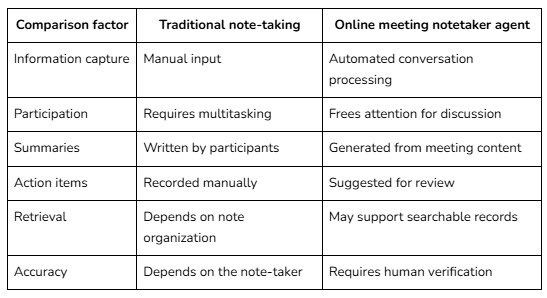
The best approach depends on the meeting's purpose, sensitivity, and documentation needs. Automated tools can reduce effort, but they do not remove the need for human review.
Best Practices for Getting More Value From Meeting Notes
Technology alone does not guarantee better outcomes. Teams need simple habits that turn captured information into reliable work.
Set meeting objectives: Define the purpose so participants can distinguish essential decisions from general discussion.
Review summaries: Check names, figures, decisions, task owners, and deadlines before sharing notes.
Organize records: Use consistent titles and categories so employees can retrieve information later.
Respect privacy: Tell participants when meetings are recorded or transcribed, and follow relevant consent rules and company policies.
Connect notes to workflows: Where appropriate, transfer confirmed tasks into project or customer-management systems.
Guidance on effective meeting follow-ups reinforces the value of documenting next steps and responsibilities. A clear follow-up process helps discussions lead to completed work.
These benefits are not limited to sales or project meetings. Human resources teams can use summaries to track interview discussions, while leadership teams can revisit strategic decisions. Training teams may also use meeting records to identify questions that need clearer explanations. The value depends on choosing which conversations to document and making the resulting information accessible only to appropriate employees. Organizations should consider access controls, retention periods, and the sensitivity of customer or employee information before adopting a tool.
Conclusion
Meetings produce valuable information, but teams need a reliable way to preserve and use it. An online meeting notetaker agent captures conversations, prepares summaries, identifies potential action items, and keeps customer and project details accessible.
These capabilities reduce manual documentation, improve collaboration, and support relevant follow-ups. Results are strongest when organizations combine automated assistance with clear meeting practices and human oversight. By checking generated notes and acting on confirmed decisions, teams can turn conversations into practical insights and measurable progress for teams consistently.
Frequently Asked Questions
1. What is an online meeting notetaker agent?
It is an AI-powered system that processes virtual meeting conversations and creates organized notes. It can summarize topics, highlight decisions, and identify potential action items for participants to review.
2. How does an AI meeting notetaker identify important information?
It uses speech recognition and language-processing technology to interpret conversation content. It then organizes relevant topics, questions, decisions, and commitments. Results depend on audio quality, context, and system capabilities.
3. Can an online meeting notetaker agent help sales teams?
Yes. It can capture customer requirements, objections, questions, and follow-up commitments. Representatives can use these details to prepare relevant responses and maintain continuity between sales conversations.
4. Is an AI meeting notetaker suitable for small businesses?
Yes. Small businesses can use meeting documentation to reduce administrative work and keep decisions accessible. The right option depends on meeting volume, budget, privacy requirements, and existing workflows.
HOW DO YOU FEEL ABOUT FASHION?
COMMENT OR TAKE OUR PAGE READER SURVEY
Featured





Meetings help teams exchange ideas and make decisions, but useful information can disappear once conversations end.