
How to Read Zens Heatmaps On Shop Pages
PAGE
By PAGE Editor
Lookbook weeks fail in a quiet way. A shopper asks about drape from the editorial still, another asks about size from the guide, and a third writes from the bag. If those three notes sit in one time line, the desk answers the last message and treats the first two as the same fault. Zens only helps that week when the confused page is named before anyone writes fabric advice.
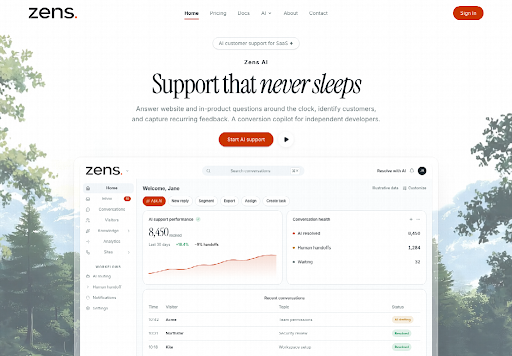
Fashion sites already know the split. The lookbook sells a mood. The size guide sells a measurement. Checkout sells a total. Mixing those rooms in one reply invents a broken cart that never existed. Zens AI publishes heatmaps for pages and product moments that trigger confusion, hesitation, or buying intent. The claim worth checking is narrow: can the desk see which room the question came from, or is it still guessing from the clock?
Shop Questions Split Across Three Pages
A drop week is not a general inbox. The same jacket can be loved on the lookbook, doubted on the size chart, and abandoned beside the bag. Those are three jobs. A single fluent reply that starts with shipping will miss the person who only wanted the hem length in the still.
Old fashion desks sort by arrival time. The newest note wins. The lookbook question waits behind a payment scare that has nothing to do with the cloth. By the time someone opens the first thread, the still has been swapped and the customer is describing a crop that is no longer on the page. The rework starts from an unlabeled page, not from a rude sentence.
The useful reject is local. If the note cannot name the URL or the on-page moment, do not draft a size lecture. Ask which room they are in. A widget that already sits on the site can carry that page with the question. A pasted email usually cannot.
Heatmaps Name The Confused Shop Page
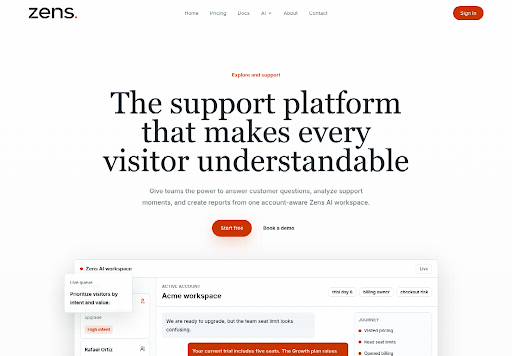
The public product workspace is not only a live queue. It also marks pages and product moments that trigger confusion, hesitation, or buying intent. That is a different object from a transcript. A transcript tells you what was typed. A heatmap tells you where the typing started.
For a fashion desk, “where” is the whole argument. Drape questions that cluster on the lookbook are editorial. Fit questions that cluster on the size guide are merchandising. Money questions that cluster on the bag are operations. If those three clusters are flattened into one “jacket” theme, the next reply will fix the wrong room.
Treat Confusion As A Page Not A Mood
Confusion on a heatmap is a location. Friendlier adjectives will not cool it. If the heat sits on the lookbook crop, the missing fact is usually a hem, a lining, or a still that hides the waist. If the heat sits on the size guide, the missing fact is a number. Writing “it runs true to size” into a lookbook thread does not cool a page that never showed the tape.
Check the page before the cloth. A pass means the reply names the same room the heatmap named. A fail means the draft could be pasted onto any of the three pages and still sound polite. Polite and wrong is how a drop week spends Thursday unsaying Wednesday.
Separate Hesitation From Buying Intent Signals
Hesitation and buying intent can light the same product and still need opposite sentences. Hesitation on a size guide often wants a measurement repeated. Intent on a product moment often wants the still confirmed, not a new lecture about returns. If the desk treats every hot cell as a complaint, it will apologize on a page where the shopper was ready to pay.
The filter is boring on purpose. Open the heatmap. Name the page. Name the moment. Then decide whether the next sentence should measure, confirm, or stop. Do not let a busy queue turn every bright cell into a discount. Zens AI can show the cell. It cannot decide whether the house wants to hold the price.
How Shop Teams Prepare Journey Filters
Heatmaps are easier to misread when every journey stage is piled into one picture. The product page also lets a team pivot conversations by journey stage: activation, pricing, checkout, docs, settings, or renewal. A fashion site will not use those labels as a SaaS textbook. It will use them as rooms. Pricing is the tag page. Checkout is the bag. Docs are the size guide and the care note. Settings are account and returns. Renewal is a second-season buyer.
The install path stays short. Register the shop as a site. Put the snippet on the pages that already take questions. Identify a signed-in buyer after login if the store has accounts. Then stop adding tools until the heatmap and the journey filter agree on the same room.
Filter The Launch Week By Journey Stage
Use four checks, not a new stack.
Keep the widget on the lookbook, the size guide, and the bag. A heatmap cannot name a page the snippet never reached.
Pivot the week to the stage that matches the room. Lookbook chatter is not automatically a checkout stall.
Open only the threads that sit on the hottest cell you intend to answer. Ignore a bright bag if this hour is for hem questions.
Write the reply from that room. If the heatmap and the customer URL disagree, the human owns the bounce. Do not let a draft pick a winner.
That sequence is the tutorial. The public page does not publish a color key or a live paint rate for every still. The published job is simpler: spot the page and the product moment, then keep the answer inside that moment.
Common Heatmap Misreads On Fashion Sites
The first misread is treating a buying-intent cell as a defect. A crop that is hot because people want the jacket is not a broken page. Answering it with a troubleshooting tone trains the next shopper to expect a problem. Confirm the still. Leave the price alone unless the house already decided to move it.
The second misread is averaging three pages into one “product heat.” A jacket can be clear on the lookbook and confused on the size guide. The average looks calm. The size guide is still on fire. If the merchandiser only sees the average, they will reprint the still and leave the tape wrong.
The third misread is answering from memory of last season. A filter that can compare this week with a previous period exists on the same product surface as reports. Use it as a brake, not as a mood board. If last drop heated the lookbook and this drop heats the size guide, the copy change is in the numbers, not in the hero crop. Zens AI will not tell you which measurement to print. It will tell you the room that is asking.
Priority grouping on the same workspace can also sort by checkout risk or repeated help-center visits. That is useful after the page is named. It is harmful before. A “high-value” shopper on the wrong page still gets the wrong sentence. Name the room first. Rank the account second.
Keep The Heatmap On The Launch Week
This reading fits a merchandiser who owns one drop and cannot afford a public apology for a cart that never broke. A traffic desk that only wants a twenty-four-hour widget on every archive page will ignore the room names anyway.
Keep the heatmap on garments that already draw questions from more than one room. A shop with a single FAQ mailbox and no lookbook has nothing for the cells to name. Zens AI can sit on those pages and mark confusion, hesitation, and intent. It cannot sew a hem that the still never showed.
Keep the first week small. One drop. Three pages. One rule: the reply names the same room the heatmap named. A time line that cannot name the room is still just a time line.
HOW DO YOU FEEL ABOUT FASHION?
COMMENT OR TAKE OUR PAGE READER SURVEY
Featured





A comfortable home should offer more than a place to sleep and eat.