
The Lever
PAGE
By PAGE Editor
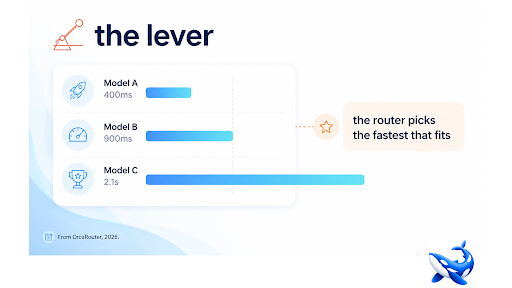
Latency is a per-request choice, and an LLM router is the layer that makes it one. OrcaRouter is one platform built around this pattern; here is why model choice is a performance lever.
The three components of latency
Time to first token — how long before the model starts answering — is driven by prompt processing and provider load. Generation speed is how fast tokens arrive once the model starts, and heavier reasoning models generate slower. End-to-end time includes your app and network. A router can improve the first two by choosing the model with the best current profile, and the third by failing over instead of retrying.
Why the router beats a static choice
Latency is not one number; it is a distribution across models, providers and load. A router that routes against live conditions — avoiding the overloaded provider, preferring the fast healthy model for user-facing work — gets better latency than one that assumes a static winner. The router sees the whole picture and decides per request.
Agents multiply the value
For a single turn, a second is a nicety. For an agent loop of two hundred sequential calls, a second per call is three minutes per run. Latency-aware routing compounds in agentic work, and it is the difference between a loop that feels responsive and one that feels stuck.
The metric to watch
If you track one latency number, track p95 rather than the average. The average hides the experience; the tail is what users feel and what agents compound. A router that keeps p95 low by avoiding the overloaded provider and failing over early is doing more for your users than one with a good median. Instrument p95 per model and per task type, set the routing rules from it, and you will find the tail is where model choice actually matters. The median is a report; the p95 is the product.
A checklist for latency work
Latency is one of those subjects where a checklist beats a strategy document, because the components are known and the failure modes are predictable. The checklist starts with measurement: pull p50 and p95 per model on your own traffic, at your own prompt sizes, at your own peak load. Do not trust a benchmark that says a model is fast; latency under a vendor's test harness has little to do with latency under your production shape. The router records what you need, so the measurement is a report rather than a project.
Second, decide which traffic is user-facing. The rule that matters for latency is simple: user-facing requests should prefer the healthy fast model, and batch requests can optimise cost instead. The router applies that distinction per request, which is something a static model choice cannot do.
Third, instrument the tail. Averages hide the experience, and the p95 is what users feel and what agents compound. When a model's p95 drifts upward, the router's record shows it before the complaints arrive, and the routing rule can shift traffic to the alternative that is currently healthier. Treat the slow tail as a routing problem rather than a mystery, and the fix is a rule change rather than a redeploy.
Fourth, revisit the rules quarterly. Models ship, providers change load patterns, your traffic mix shifts. The latency rules that were right in March are not automatically right in September. The review is what keeps the router's latency behaviour aligned with reality.
Why p95 beats the average
If you track one latency number, track p95 rather than the average. The average hides the experience — a fast median with a bad tail is still a product that feels slow at the wrong moments. The p95 is what users feel and what agents compound: an agent loop of two hundred calls at a degraded p95 is a loop that takes twice as long. A router that keeps p95 low by avoiding the overloaded provider and failing over early is doing more for your users than one with a good median. Instrument p95 per model and per task type, set the routing rules from it, and treat the slow tail as a routing problem rather than a mystery. The median is a report; the p95 is the product.
A note on the slow tail
Latency problems rarely live in the median; they live in the tail. A router helps most where the tail hurts most — the overloaded provider, the model that occasionally takes ten seconds, the retry that turns a bad call into a worse one. Routing against live health catches the tail that a static benchmark cannot: the provider that is fine on paper and slow at 3pm. That is why latency-aware routing matters even when every model in your pool looks fast on its spec sheet. Set the routing rules to prefer the healthy, fast option for user-facing work, measure p95 per model on your own traffic, and treat the slow tail as a routing problem rather than a mystery.
The takeaway
Latency is a per-request choice, and an LLM router makes it: prefer the fastest model that fits the task, avoid the overloaded provider, fail over instead of retrying. For user-facing work and agent loops, that lever compounds. Measure p95 per model on your own traffic, set the rules from the data, and stop treating "which model" as a decision made once.
HOW DO YOU FEEL ABOUT FASHION?
COMMENT OR TAKE OUR PAGE READER SURVEY
Featured





Mounjaro (tirzepatide) is a once-weekly injection used in medical weight management. It acts on two hormone receptors, GIP and GLP-1, which are involved in regulating appetite and blood sugar.