
The Solo Creator's Playbook for Social Media Visuals in 2026
PAGE
By PAGE Editor
Most solo creators don't have a content problem. They have a visual problem. They’ve got a notebook full of post ideas, and they know what to say. But the moment they sit down to actually create the visuals — the Instagram grid post, the Stories graphic, the LinkedIn carousel cover — they hit a wall.
Maybe you can't design, can't afford a designer, or simply don't have hours to turn one idea into multiple visual assets. That's the real bottleneck of being a one-person content team. Not the writing. The visual.
In this guide, we'll turn one idea into a small library of social media visuals using Face AI, with no design background required.
Why Social Media Visuals Are Harder Than They Look
A Good Idea Still Needs a Strong Visual
The algorithm doesn't reward good ideas. It rewards good visuals. A mediocre idea with a sharp photo outperforms a brilliant idea with a blurry one, every time. That's not fair, but it's the platform you sit in. The visual is the hook. Without it, your idea never gets seen.
Creating Every Visual From Scratch Takes Time
Finding the right image, removing unwanted elements, adjusting the layout, and creating different versions all take time. What looks like a simple social post can involve several rounds of design work before it's ready to publish. For solo creators, those small tasks quickly add up, turning visual creation into another full-time job.
One Idea Can Need Several Visual Formats
That single Instagram post also needs a Story version, a Pinterest pin, a LinkedIn header, and maybe a sticker set for replies. One idea, five formats. Multiply by every idea in your content calendar, and the visual workload becomes impossible to sustain.
How AI Can Turn an Idea Into a Visual
Start With a Simple Concept
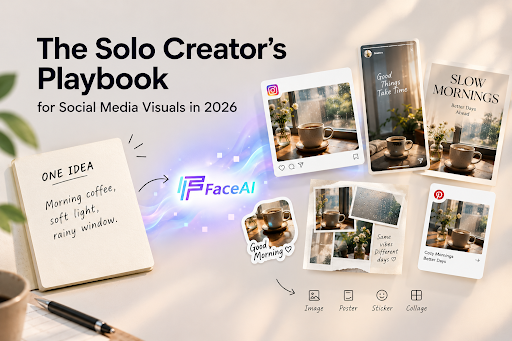
You don't need a design vocabulary. You need a sentence. "Morning coffee, soft light, rainy window." That's a concept. It's not a brief — it's just the moment you want to capture. For this kind of visual, a small and specific prompt is often enough to get started.
This is the biggest shift from traditional design. In Photoshop, you start with a blank canvas and build up. In AI, you start with a sentence and the tool fills in everything else.
Turn the Idea Into an Image
Once you have the concept, run it through an AI image generator. The tool takes your sentence and produces several visual options in seconds. You don't pick the "right" one — you pick the closest one, then regenerate with a refined version of the prompt. Each iteration tightens what you actually want. For many solo creators, that's enough. One image, one post, publish it.
Turn an Existing Image Into Something New
Sometimes you don't start from a sentence. You start from a photo. A product shot with the wrong background. A selfie with bad lighting. A flat-lay that needs more energy. AI can take an existing image and reshape it — swap the background, change the style, extract a subject, adjust the lighting.
This is where AI photo-editing tools earn their keep. You bring the photo; AI brings the rest. Once this loop feels natural—idea in, visual out, refine—you can start creating more than just one post from a single idea.
Four Types of Social Media Visuals You Can Create With Face AI
1. Social Media Images
Create visual content for Instagram, Pinterest, TikTok, and other platforms. Start with the AI Image Generator when you're working from a prompt, or the AI Photo Generator when you want to set a theme and adjust subject, light, style, and color.
To explore different compositions, styles, visual directions and create multiple variations around the same idea — use AI Image to Image. It keeps the concept and changes how it looks.
2. Posters
Turn an idea, announcement, event, or campaign into a more structured visual with the AI Poster Generator. It combines imagery with a clear visual message, so the post reads as designed rather than assembled. Use it when the content needs to communicate more than a single photo can.
3. Stickers
Turn objects, characters, expressions, or ideas into reusable visual elements with the AI Sticker Generator. Useful for personal content, community posts, messaging, and creative social content.
4. Collages
Combine multiple photos or generated visuals into one composition with the AI Photo Collage Maker, or lay them out on a clean grid with the AI Photo Grid Maker. Useful for mood boards, product collections, travel memories, fashion inspiration, and visual storytelling.
From One Idea to Multiple Social Media Assets
The real leverage isn't making one image. It's making many images from one idea, without losing the thread.
Keep the Core Idea Consistent
Every visual should feel like it belongs to the same campaign, product, or theme. That's how a feed reads as a feed, not a random photo dump. AI tools that remember your prompt or brand kit can make this much easier.
Create Different Versions for Different Platforms
That coffee shop photo becomes a square Instagram post, a vertical Story with text overlay, a horizontal LinkedIn banner, and a Pinterest pin. Same idea, four crops, four platforms. AI image tools that regenerate the same idea at different aspect ratios handle this without manual resizing.
Build a Small Visual Library Around One Topic
The most useful thing you can build isn't a single post — it's a small library of branded assets around one topic. Five to ten visuals, all on the same subject, in different formats. Drop them into your content calendar over the next two weeks, and your feed suddenly feels intentional.
What AI Can't Replace
A Visual Still Needs a Clear Idea
If you can't write a clear prompt, you can't get a clear visual. The idea still has to come from you.
Generated Content Still Needs Editing
AI gives you 80% of the way there. The last 20% — tweaking copy, fixing a typo, adjusting a color is still on you. AI doesn't ship; you do.
Not Every Post Needs AI
Some posts are better as raw photos, screenshots, or personal Polaroids. If the authenticity is the point, AI is the wrong tool. Use it where it adds leverage, not where it adds distance.
A Simple AI Workflow for Social Media Visuals
Here's the workflow that actually works for solo creators:
Write the idea in one sentence. "Coffee shop on a rainy morning." That's your prompt seed.
Generate the core visual. Run it through the AI Image Generator. Pick the best of three to four variations.
Make the structured version. Run the same idea through the AI Poster Generator for any post that needs text and layout.
Create platform variations. Use AI Image to Image to create alternate versions of the same idea for Stories, Pinterest, and LinkedIn.
Build small libraries. Use the AI Sticker Generator and AI Photo Collage Maker to extend the idea into DMs, replies, and multi-photo posts.
Edit, then ship. Tweak copy, fix spacing, then post.
That one sentence that single idea, now lives across a week of content. Without a designer.
FAQ
Can AI create social media images from a simple idea?
Yes. The AI Image Generator takes a short text prompt and produces usable visuals in seconds. The clearer the prompt, the better the output.
Can AI create posters for social media?
Yes. The AI Poster Generator handles layout, typography, and spacing automatically — useful for launch announcements, quotes, and any post that needs text and hierarchy.
Can I turn my photos into stickers with AI?
Yes. The AI Sticker Generator pulls a subject out of any photo and turns it into a clean, die-cut sticker file you can drop into DMs, Stories, or replies.
Can AI combine multiple photos into a collage?
Yes. The AI Photo Collage Maker stitches multiple photos into one frame with consistent styling, and the AI Photo Grid Maker does the same in a grid layout. Useful for "day in the life" posts, product bundles, and monthly recaps.
Can AI create different versions of the same social media visual?
Yes. AI Image to Image adjusts the subject composition and creates variations around the same idea, so one visual can be reworked for Instagram, Stories, Pinterest, and LinkedIn.
Do I need design skills to create social media visuals with AI?
No. The whole point of these tools is to remove the design loop. You bring the concept; AI handles the layout, typography, and image manipulation.
Conclusion
If you're running your own social media, you don't need a bigger content calendar. You need a better visual workflow. AI won't replace your ideas, but it'll take the design off your plate — so you can ship a week of posts from a single idea, instead of an afternoon.
Start with one idea. Generate one image with Face AI. See how far it goes.
HOW DO YOU FEEL ABOUT FASHION?
COMMENT OR TAKE OUR PAGE READER SURVEY
Featured



Digital rewards strengthen luxury through practical service, selective access, and thoughtful personalization that keeps each purchase valuable for longer.