
The Technology Behind Live Online Tutoring: Latency, Whiteboards and Why Some Platforms Fail

PAGE
By PAGE Editor
A one to one online lesson lives or dies on delay, and the threshold is lower than most people expect. Once round trip audio delay passes roughly 150 milliseconds, natural conversation starts to break. Past 300 milliseconds, turn takes collapses and speakers begin talking over each other. In a lecture that barely matters, because information flows one way. In a tutorial it matters enormously, because the entire value of the format is a tutor interrupting a student mid error. Platforms that treat tutoring as video conferencing with a whiteboard bolted on usually miss this, and the failure is architectural rather than cosmetic.
Why tutoring is a harder engineering problem than meetings
Video conferencing is optimised for a mostly one way flow. One person presents, several listen, occasional questions. Buffering a second of audio to improve stability is a sensible trade because nobody notices.
A tutorial has a different shape. The tutor watches a student work through a problem and interrupts at the exact moment the error occurs. Wait two seconds and the student has moved on, the teachable instant has passed, and the correction now requires backtracking.
This changes the priority order. A meeting platform optimises for stability and picture quality. A tutoring platform has to optimize for responsiveness first, and accept lower video quality to get it.
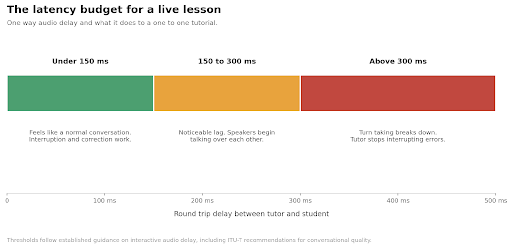
Diagram showing latency bands for live tutoring: under 150 milliseconds feels like normal conversation, 150 to 300 milliseconds produces noticeable lag, above 300 milliseconds turn taking breaks down
The threshold is not arbitrary. It reflects long established findings on interactive audio, including guidance from the International Telecommunication Union on acceptable delay in conversational speech. Human turn taking runs on gaps of around 200 milliseconds. Add network delay on top and you eat the entire budget.
Where the milliseconds go
The end to end path has more stages than people assume.
Most browser based platforms build on WebRTC, so the stages below are broadly common across the market.
Capture and encode. The microphone samples audio, the codec compresses it. Frame size drives delay here. A 20 millisecond frame is standard; larger frames compress better but cost responsiveness.
Network transit. Physical distance sets a floor. Light in fibre covers roughly 200 kilometres per millisecond, and real routes are never direct. Dubai to London is about 30 to 40 milliseconds one way at best. Route it through a server in Virginia and you can double that for no reason other than architecture.
Server processing. If the platform routes media through a selective forwarding unit, that adds a hop. Peer to peer connections avoid it but scale badly and struggle behind restrictive firewalls.
Jitter buffer. This is the big one. Packets arrive unevenly, so the receiver holds a small buffer to smooth playback. Larger buffer, fewer glitches, more delay. Adaptive buffers that shrink on stable connections are the difference between a platform that feels live and one that does not.
Decode and playback. Small, but it counts.
Add these up on a well engineered path between two nearby regions and you land around 80 to 120 milliseconds. Add a distant relay and a conservative fixed buffer and you are at 400.
The whiteboard problem
Shared whiteboards look simple and are not. Two people drawing on one surface is a distributed systems problem: concurrent edits, unreliable ordering, and no acceptable answer that involves losing a stroke.
Screen sharing a drawing app is the naive approach and it fails badly. You are encoding a mostly static image as video, which wastes bandwidth on unchanged pixels while making thin lines and small text blurry precisely when clarity matters most. Anyone who has tried to read a shared equation over compressed video knows the result.
The better approach sends the strokes themselves. A pen stroke is a short list of coordinates with pressure and timing, a few hundred bytes rather than a video frame. Each client renders locally at native resolution, so text stays sharp regardless of connection quality, and total bandwidth drops by an order of magnitude.
That introduces the ordering problem. If two people draw simultaneously, both clients must converge on the same final state. Most implementations use conflict free replicated data types or operational transformation, the same family of techniques behind collaborative document editors. For a two person whiteboard the constraints are mercifully looser than for a shared text document, since strokes rarely conflict semantically.
For maths and science tutoring there is an additional requirement that general purpose tools handle poorly: equations. Writing a fraction or an integral with a mouse is miserable. Platforms serving these subjects generally need either proper stylus support or an equation editor, and providers such as tuitionaledu.com that focus on maths and physics tend to build around this rather than treat it as an add on.
Recording, and why it is harder than it looks
Session recording is a near universal feature request from parents. The obvious implementation, capturing the composited video stream, produces large files that are painful to review.
The better model records the underlying events: audio, plus the whiteboard stroke stream with timestamps. That produces something much smaller and, more usefully, something searchable. Reconstruct the board at any moment, jump to the point where a specific topic appeared, skip the silence.
It also raises obligations. Recordings of lessons involving minors are sensitive data. Encryption at rest, clear retention limits, defined access rules and compliance with the relevant data protection regime are not optional extras. Any platform that cannot answer where recordings are stored and who can reach them should be treated with suspicion.
Engineering for bad connections
Much of the market for online tutoring sits in regions where connectivity is variable. A platform tested only on European fibre will disappoint.
The techniques that matter:
Prioritise audio absolutely. When bandwidth drops, degrade video first and keep audio intact. A lesson survives frozen video. It does not survive broken audio.
Adapt bitrate quickly. Detect congestion and step down before packets start dropping.
Handle network changes gracefully. Students switch from wifi to mobile data mid lesson. The session should survive it.
Choose servers by geography. A relay on the wrong continent adds delay that no amount of client side optimisation recovers.
Degrade to audio and whiteboard. On a genuinely poor connection, dropping video entirely and keeping voice plus board preserves most of the pedagogical value at a fraction of the bandwidth.
The honest summary
The technical requirements for effective online tutoring are well understood, and mostly involve accepting constraints rather than adding features.
Keep round trip delay under 150 milliseconds. Send strokes rather than pixels. Record events rather than frames. Protect audio above everything else. Put servers near the users.
None of that is exotic. What makes it uncommon is that it requires building for a specific use case instead of adapting a general one. Plenty of platforms are a video conferencing SDK with a canvas attached, and they work acceptably until the moment a tutor needs to interrupt a student mid sentence, which is the moment the whole format exists for.
The gap between a good tutoring platform and a mediocre one is roughly 200 milliseconds. It does not sound like much. In a conversation, it is the difference between talking with someone and taking turns broadcasting at them.
Marco Bellini writes about real time systems and communications infrastructure.
HOW DO YOU FEEL ABOUT FASHION?
COMMENT OR TAKE OUR PAGE READER SURVEY
Featured



Mounjaro (tirzepatide) is a once-weekly injection used in medical weight management. It acts on two hormone receptors, GIP and GLP-1, which are involved in regulating appetite and blood sugar.