
What Healthcare Providers Should Know About Digital Records

PAGE
By PAGE Editor
Paper charts have had a good run, but let’s be honest: they eat up space, slow down teams, and make simple questions harder than they need to be. For a busy practice, moving to digital records can mean less time digging through files and more time focused on patients. In the 2024 NEHRS, 95.0% of U.S. office‑based physicians had adopted electronic health record (EHR) systems, with 83.6% using a certified EHR system. Still, choosing a system is not something to rush. You need to understand the tools, the rules, and the daily workflow changes before you sign a contract or migrate years of patient files.
The Digital Shift From Paper to Connected Care
Healthcare records have moved far beyond clipboards, file rooms, and color-coded tabs. Today’s systems can carry important patient information across visits, departments, and care teams. That matters because better information usually leads to quicker decisions and fewer missed details.
From Paper Charts to Digital Systems
For many practices, digital health records have changed the rhythm of the workday. Instead of waiting for someone to pull a chart, clinicians can review allergies, medications, lab results, prior notes, and care plans in just a few clicks.
The rise of digital records in healthcare also makes handoffs cleaner. Primary care teams, specialists, labs, and billing staff can work from more consistent information. Is every implementation smooth? Not always. But paper is no longer the practical default.
Why EHR and EMR Differences Matter
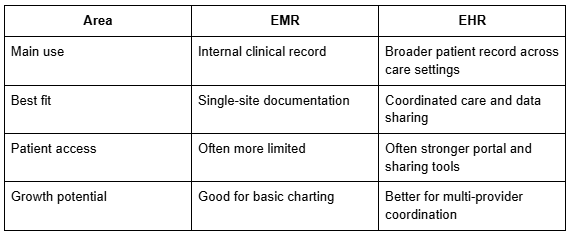
Many providers compare EHR vs. EMR before choosing software, and that comparison can shape future growth. EMRs are usually built for use inside one practice. EHRs are designed to share patient information more broadly across providers, organizations, and care settings.
Compliance Is Part of the Decision
HIPAA, state privacy laws, the ONC Cures Act, and sometimes GDPR all affect how patient data is stored, accessed, shared, and protected. You do not need to become a legal scholar. Thankfully. But you do need a vendor that treats security as a core feature, not a checkbox.
Once the foundation is clear, the bigger question becomes simple: what do these systems actually improve?
Core Advantages for Providers and Patients
When records become digital, the benefits show up in exam rooms, billing workflows, care coordination, and patient communication. The real value is not just storing data. It is using that data without slowing everyone down.
Better Access Supports Patient-Centered Care
When electronic medical records are accurate and easy to search, clinicians spend less time asking patients to repeat the same story. That may sound small, but patients notice. A visit feels more organized when the provider already has the basics in front of them.
Shared records also help care teams stay aligned. A therapist, primary care provider, and specialist can work from the same facts rather than separate notes that may or may not match.
Workflow Improvements Reduce Friction
Strong healthcare data management can reduce duplicate typing, missing paperwork, delayed orders, and billing confusion. Prescription renewals, lab requests, referral notes, and coding details can move through the system with fewer manual steps.
That does not replace professional judgment. It simply removes some of the clutter that keeps clinicians stuck at their desks long after the last appointment.
Quick Comparison: EHR vs. EMR in Practice
When considering EHR vs. EMR, it helps to compare how each system tends to function in day-to-day care:
For the first time since 2021, data gathering was the most commonly reported benefit of EHR usage, with 87 percent of facilities that use an EHR listing data gathering as a benefit.
Those improvements naturally connect to the broader practice goals: better outcomes, stronger operations, and healthier finances.
EHR Benefits for Providers and Practice Performance
Digital systems are not just clinical tools. When they are configured well, they can support revenue, reporting, staffing, patient communication, and long-term care relationships.
Financial Impact and Return on Investment
One of the clearest EHR benefits for providers is more accurate billing. Cleaner documentation can reduce claim errors, support appropriate coding, and make follow-up on unpaid balances less painful.
Practices may also spend less on storage, printing, transcription, and administrative time. The savings may not appear in the first week, of course. But they often grow as staff becomes more comfortable with the system.
Real-Time Decisions at the Point of Care
Modern EHRs can flag drug interactions, missed screenings, care gaps, and abnormal results. Those reminders can be genuinely useful, especially when clinicians are moving through a full schedule.
Analytics can also reveal patterns across patient groups. For instance, a practice may notice rising blood pressure risk across a panel before those patients need urgent care.
Population Health and Reporting
Value-based care programs often rely on accurate reporting. Without structured data, it is hard to prove quality, track outcomes, or prepare for payer reviews.
Still, even a powerful system can create problems if implementation is rushed or poorly planned.
Common Challenges in Implementation
Software cannot fix every workflow issue by itself. Providers need to think carefully about privacy, training, staff buy-in, and how the system fits real clinical work.
Security and Privacy Safeguards
Access controls, encryption, audit logs, and strong password policies are basic requirements. The human side matters just as much. One shared login or one successful phishing email can undo a lot of technical protection.
Patients want convenience, but they also want trust. Clear portal policies, consent workflows, and staff education help protect both.
Integration With Existing Workflows
A system may look beautiful in a demo and still feel awkward during a packed clinic day. Before committing, test scheduling, documentation, billing, lab orders, messaging, and reporting.
Bring in the people who will actually use it: front-desk staff, billers, nurses, clinicians, and administrators. They will spot practical issues that leadership may not see right away.
Burnout and Change Management
New systems can frustrate clinicians when templates are bloated or clicks multiply. Training works best in stages, not as one overwhelming launch-week marathon.
When digital health records reflect how care teams truly work, adoption feels less forced. That creates a stronger foundation for newer tools that depend on clean, reliable data.
Trends Shaping Digital Records
The next generation of record systems is less about storing notes and more about helping teams act sooner. Still, every feature should earn its place. More technology is not always better technology.
AI and Machine Learning
Artificial intelligence can help identify risk patterns, suggest documentation language, and sort through large volumes of data. It should not replace clinical judgment. Think of it more like an extra set of eyes.
Natural language tools may also reduce after-hours charting. For tired providers, that is no small thing.
Telehealth and Patient Engagement
Telehealth works best when video visits, notes, prescriptions, results, and follow-up messages live in the same system. Patients should not have to repeat everything simply because the appointment moved online.
Portals, reminders, and secure messages also help patients stay connected between visits. Sometimes the simplest tools make the biggest difference.
Blockchain and Advanced Security
Some organizations are exploring blockchain for clearer audit trails and data history. It will not be necessary for every practice, but the focus on trust is worth watching.
As remote care expands, healthcare data management must keep up with stronger identity checks and cleaner ways to share information.
Choosing and Improving the Right System
Selecting software is not just an IT decision. It affects how your team documents care, communicates with patients, gets paid, and meets privacy requirements.
Vendor Evaluation Criteria
Look for HIPAA-ready tools, responsive support, billing features, patient portals, reporting, and third-party integrations. Ask how updates are handled and whether the vendor understands your specialty.
Do not skip references. A short conversation with a similar practice can tell you more than a glossy sales deck.
Customization and Scalability
Specialty workflows matter. Behavioral health, primary care, pediatrics, and physical therapy do not document care the same way.
A good system should grow with you without forcing a complete rebuild. Cloud access, modular features, and flexible templates can help, as long as they do not become overly complicated.
Ongoing Training and Support
Training is not a one-and-done event. New hires, software updates, and changing payer rules all call for refreshers.
Peer learning helps too. Staff often discover the best shortcuts from colleagues, not manuals.
Once you choose a system, success depends on a practical rollout plan with clear checkpoints.
A Practical Roadmap for Rollout
Implementation works best when it is treated like a practice-wide project, not just a software switch. Start small, measure what matters, and adjust before bad habits settle in.
Step-by-Step Rollout
Begin by mapping current workflows. Then clean patient data, assign internal champions, test templates, train staff, and pilot the system with a limited schedule.
After launch, keep extra support available. The first few weeks are when small problems either get fixed or become permanent headaches.
KPIs That Actually Help
Track appointment wait times, claim denial rates, chart completion time, portal use, and patient message response time. These measures show whether the system is helping or simply adding clicks.
Keep reviews short and regular. A monthly check-in can prevent a lot of grumbling later.
Final Thoughts on Digital Records That Work
A strong digital records strategy helps providers save time, protect patient information, coordinate care, and make better decisions. The best results come from matching tools to real workflows, training staff well, and reviewing progress often. Digital records in healthcare are not just a technology upgrade. They are part of how modern care stays organized, safe, and responsive. Plan carefully now, and your practice will be better prepared for what patients expect next.
Common Questions About Digital Records
Providers often ask the same practical questions before making a change. Here are straight answers without the tech fog.
What are the top 3 EHR systems in healthcare?
Commonly recognized large EHR systems include Epic, Oracle Health, and MEDITECH. The “best” choice depends on practice size, specialty, budget, integrations, and support needs, so smaller practices may prefer lighter tools built for simpler workflows.
What are the six basic components of an electronic medical record?
The basic components usually include patient demographics, medical history, medication lists, allergies, lab and imaging results, and clinical notes. Many systems also include scheduling, billing, e-prescribing, referrals, and patient portal tools.
Can electronic medical records improve telemedicine outcomes?
Yes, they can. When video visits connect with notes, prescriptions, test results, and follow-up reminders, providers can act faster, and patients get clearer instructions. The key is using one connected workflow, not scattered apps.
HOW DO YOU FEEL ABOUT FASHION?
COMMENT OR TAKE OUR PAGE READER SURVEY
Featured





Black Friday is such a popular time to pick and purchase shapewear, and lots of shoppers hope to stock up during the big sale.