
Why Better AI Images Often Come From Editing, Not Starting Over

PAGE
By PAGE Editor
There is a lot of advice online about finding the “perfect” AI image prompt. That can help, but it does not reflect how most visual work gets done. You rarely type one sentence, get exactly what you wanted, and stop there.
Usually, you already have something to work with: a product photo, a portrait, an illustration, or an earlier AI-generated image. The real task is improving it without losing the parts that already work.
Start with the image, not a blank canvas
Text-to-image generation is useful when you need a completely new concept. But many everyday creative jobs begin with an existing visual.
A shop owner may have a solid product photo with a messy background. A creator might like a portrait but want softer lighting. A designer may need to give an illustration more space so it fits a banner or social post.
In those situations, rebuilding the whole scene is often unnecessary. It is usually faster to upload the image, describe the change, and keep the original composition as the reference.
Pixlio approaches this through its AI image editor. You can start from an existing image, describe what you want changed, and continue refining the result. If you need a fresh source image instead, text-to-image is available in the same workspace.
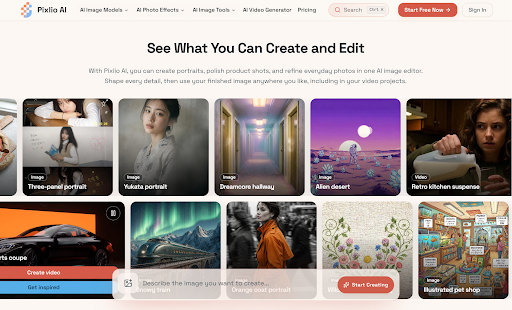
Make one meaningful change at a time
Prompts tend to work better when they give the model a clear job.
Instead of asking for something broad like “make this look like a luxury skincare ad,” it is often more reliable to spell out the changes that matter: “replace the background with pale stone, keep the bottle shape and label unchanged, and add soft window light from the left.”
Then look at the result before changing anything else.
Maybe the lighting is right but the background feels too busy. Maybe the product needs more space around it. Make that the next edit. Keeping each revision focused makes it easier to see what worked and what did not.
This also helps when details need to stay consistent. With portraits, you may want the face and pose preserved while changing clothing or surroundings. With products, packaging, logos, or proportions may matter more than the overall style.
Keep working from the strongest result
One of the more frustrating parts of using several AI tools is the constant file shuffling. You finish an edit, download it, open another tool, upload it again, and repeat.
A smoother setup treats the current result as a working asset rather than a finished file.
In Pixlio, an edited result can be used again for another edit, sent to an upscaler, passed to a background remover, or extended beyond its original frame. The same selected image can also move into the video workflow.
That continuity makes experimentation easier. You can try a variation, keep the better version, and move it into the next task without rebuilding your workflow around each tool.
Use motion when the image has more work to do
Not every image needs to become a video. A clean product shot, thumbnail, or illustration may already be doing exactly what it should.
But sometimes the same asset needs to work in a Reel, short ad, presentation, or social teaser. That is where image-to-video becomes useful.
You can create video from images and use the finished still as the visual starting point. The prompt can focus on movement instead of rebuilding the scene: how the camera should move, what the subject should do, or how the lighting should change over time.
For a product shot, that might mean a slow camera push with reflections moving across the surface. For an illustration, it could be drifting fog, subtle character movement, or a gentle shift from daylight to evening.
Pixlio's video workspace supports image-led generation with controls that vary by model, such as duration, aspect ratio, resolution, audio, and reference inputs. The image establishes the look; the video step adds motion.
Write prompts like instructions, not descriptions
Long prompts are not automatically better prompts. For editing, concrete instructions usually matter more than decorative language.
Say what should stay the same. Say what should change. Add details about lighting, framing, texture, color, or mood only when they are relevant.
If you are editing a person, specify whether the face, pose, hairstyle, or clothing should remain unchanged. If you are working with a product, mention packaging details that need to stay accurate. If you are extending an image, describe what should logically continue beyond the current frame.
The goal is not to impress the model with wording. It is to remove ambiguity.
Think in revisions, not one-click results
The most reliable way to use AI for visual work is to treat each output as another version, not as the final answer.
Start with a strong image. Change what needs changing. Keep the parts that already work. Move the best result into the next tool only when there is a reason to do so.
That is much closer to a normal creative process than chasing a perfect prompt. The value comes from being able to revise, reuse, and adapt the same visual until it fits the job.
HOW DO YOU FEEL ABOUT FASHION?
COMMENT OR TAKE OUR PAGE READER SURVEY
Featured

A cozy ginger tea ritual for late or irregular periods: how to brew it, when to drink it, who should skip it, and when it's time to see a doctor.