
How to Download a TikTok Profile Photo From a Profile URL
PAGE
By PAGE Editor
Every TikTok profile URL sits at tiktok.com/@username. That handle after the @ symbol is the key to the profile picture too. Get it right and the download takes ten seconds. Get it wrong and you end up with a blurry thumbnail, a screenshot of somebody else’s profile or nothing at all.
Here is how the process actually works, why the in-app version looks worse than the browser version and what to do when the URL you have is not the one you need.
Quick Answer
Copy the profile URL from a TikTok profile page. The format is tiktok.com/@username. Paste it into a browser-based profile picture downloader, which reads TikTok’s public image endpoint directly and returns the full-resolution file. Save it as JPG or PNG. The whole thing takes under a minute and requires no TikTok login on your side.
Why the URL Matters
The profile URL contains the piece of information every tool needs.
The username sits between the @ symbol and any further path segments.
That username is what a downloader uses to fetch the image.
Both plain usernames and full URLs work with most tools.
A short vm.tiktok.com link redirects to the full URL when opened, so click through first to get the actual handle.
The important thing is that TikTok stores every public profile picture at full resolution on its content delivery network, but the app only displays a small circular version. That gap is why downloader tools exist in the first place.
Four Ways People Try This, Side by Side
Not every method returns the same result. This table shows why.
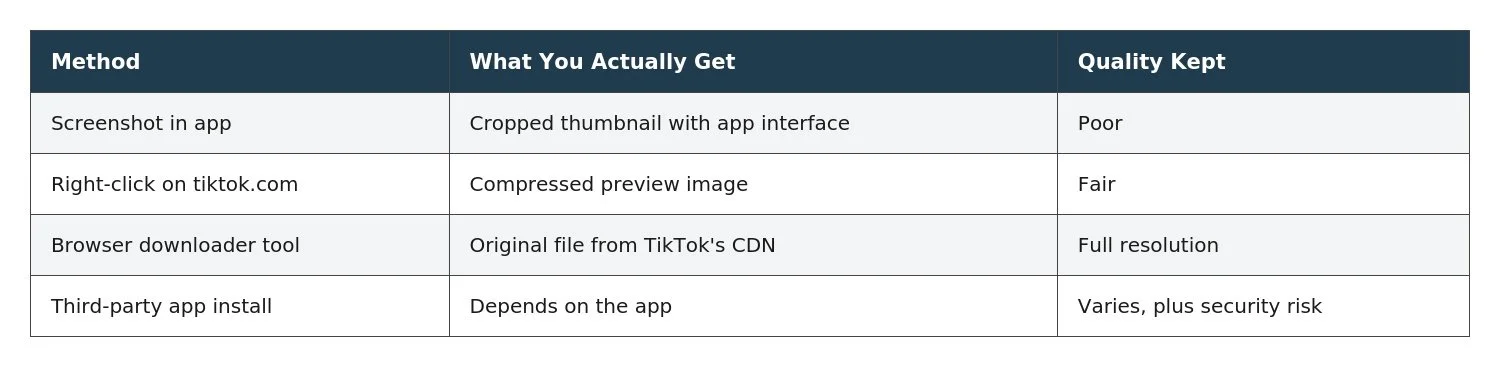
The third row is the only one that gets you the original file. Everything else is a compressed or altered version.
The Step-by-Step Process
Assuming you have a profile URL, this is the fastest route.
Open the TikTok profile in any browser. The URL will look like tiktok.com/@example.
Copy the entire URL from the address bar. Alternatively, just grab the username after the @ symbol.
Open a browser-based profile picture downloader that accepts either format.
Paste what you copied into the input field.
Hit Submit or Fetch and the profile picture loads at full size.
Right-click the image and choose Save Image As. Alternatively, use the download button if the tool provides one.
The file lands in your Downloads folder as a JPG or PNG. Sizes typically run 720x720 or 1080x1080 pixels depending on what the creator uploaded.
When the URL Is Not Quite Right
Three common cases where the URL alone will not work directly.
Video URL instead of profile URL. A link like tiktok.com/@user/video/12345 points to a specific post rather than the profile. The username is still visible, so trim everything after the handle to get the profile URL.
Short link (vm.tiktok.com). These redirect on click. Open the link once, wait for the address bar to update to the full tiktok.com/@username version and copy that instead.
Display name instead of username. Display names appear at the top of a profile. Usernames appear underneath preceded by an @ symbol. Downloaders need the second one.
Old URL after a username change. Creators can change their handle. Old links stop working immediately. The correct profile now lives at a different URL.
Why Screenshots Miss the Point
Screenshots feel like the obvious shortcut, but the results usually disappoint.
TikTok updates profile pictures as circular avatars inside the app, cropped and displayed at whatever pixel dimensions the device screen renders. A screenshot captures that displayed version rather than the source file, which lives at full resolution on TikTok’s servers.
Screenshots inherit the round mask, so you get a square image with a black or white corner.
Interface elements sometimes overlap the picture depending on device.
Resolution is limited by your screen rather than the source.
Sharing a screenshot exposes the app UI along with the image.
None of that happens when a tool pulls the file directly. The image arrives clean, uncropped and at whatever resolution the creator originally uploaded.
The Public vs Private Distinction
Not every account is reachable.
TikTok’s private account documentation explains that private accounts restrict content to approved followers. That includes the profile picture in most cases. Non-followers see a placeholder rather than the actual avatar. No external tool can bypass that.
Public accounts return their profile picture to any downloader.
Private accounts return either nothing or a placeholder image.
Suspended or deleted accounts return nothing at all.
Regional restrictions may block certain accounts in specific countries.
What File Format You Actually Get
TikTok stores profile pictures as either JPG or PNG depending on how the creator uploaded them.
JPG. The more common format. Smaller file size, slightly compressed, works everywhere.
PNG. Used when the creator uploaded a PNG. Preserves transparency if present, larger file size.
WebP. Occasionally served by TikTok’s CDN for delivery efficiency. Most modern browsers and image viewers open these natively.
Nothing gets converted along the way, so what you download is what TikTok is currently serving. If the source is a JPG, that is what lands on your device.
Getting the Cleanest Download Every Time
A short checklist for people doing this regularly.
Always use a profile URL rather than a video URL when possible.
Verify the account is public before pasting.
Choose a tool that accepts either usernames or full URLs, since flexibility saves time.
Skip anything that asks you to sign in with TikTok. Legitimate tools never need credentials.
Save the file with a meaningful name so you can find it later, since default filenames are usually just numbers.
A dedicated tool like a TikTok Profile Picture Downloader accepts a plain username, an @username or a full profile URL and returns the original image without asking for any login.
One Note on Fair Use
Downloading is quiet, but that does not change who owns the image.
TikTok’s Community Guidelines cover content ownership. Creators retain rights to their profile pictures regardless of who saves them. Personal reference, offline viewing and confirming somebody’s identity before adding them are ordinary uses. Republishing a downloaded profile picture as your own, using it commercially or building a fake account with somebody else’s image is not.
Personal reference is fine.
Verifying an account before adding it is fine.
Commercial use requires the creator’s permission.
Impersonation is a Community Guidelines violation and against most jurisdictions’ laws.
Profile Photo Download FAQs
Do I need a TikTok account to download a profile picture?
No. Browser-based tools read public data directly, without any login on your side.
Will the account holder know I downloaded their profile picture?
No. TikTok sends no notification for profile picture views or downloads.
Can I download my own profile picture back in full size?
Yes. Same process, same result. Paste your own profile URL and download the original file, which is often useful when you no longer have the source image on your device.
Why does the downloaded image look different from what I see in the app?
The app displays a circular crop of the source image. The download gives you the full square version, which is why it may look slightly different around the edges.
One URL, One Image, One Click Away
The whole process comes down to one insight. A TikTok profile URL contains the username, the username is the key to the full-resolution image and a browser tool bridges the gap between what TikTok displays and what TikTok actually stores. Nothing needs to be installed, no account has to be created and no watermark ends up on the file.
The next time you need a profile picture at proper resolution, skip the screenshot and paste the URL. Ten seconds of work saves the frustration of a blurry, cropped image that never really looks right.
HOW DO YOU FEEL ABOUT FASHION?
COMMENT OR TAKE OUR PAGE READER SURVEY
Featured





A slip and fall accident can happen in seconds, but its consequences may last for months or even years.