
Top 10 AI Image Generator Platforms Ranked for 2026
PAGE
By PAGE Editor
Picking the right AI Image Generator in 2026 is harder than it was two years ago. The market has split into model-first workspaces, multi-model aggregators, and specialized creative suites. Each type solves a different problem.
This guide breaks down 10 platforms we've actually tested. You'll get real feature notes, current pricing, and honest use-case matches. No hype, no filler.
Some tools shine at character consistency. Others focus on cinematic control or budget access. By the end, you'll know which one fits your workflow.
How We Compare These AI Image Generator Tools
Every platform below was scored on the same six criteria:
Output quality and access to leading models
Pricing transparency and value per credit
Editing precision, including inpainting and character consistency
Commercial rights on paid plans
Workflow speed and interface design
Best-fit user — solo creator, team, or enterprise
Rankings are use-case driven. A tool that ranks high for filmmakers may not suit a student. Read each entry with your workflow in mind.
TL;DR: Quick Comparison of the Top 10 AI Image Generator Platforms
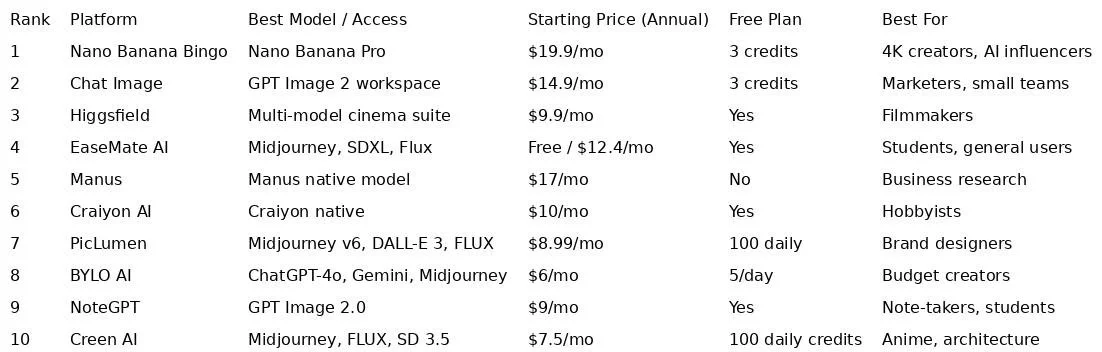
Bottom line: model-first platforms lead on quality, while aggregators win on flexibility.
The 10 Best AI Image Generator Platforms in 2026 — Reviewed
1. Nano Banana Bingo
What Is Nano Banana Bingo
Nano Banana Bingo is a high-performance AI workspace built around the Nano Banana model family. It combines advanced generation with professional editing and 4K output. Users can pick between three models: Nano Banana 2 for balanced quality, Nano Banana 2 Lite for quick drafts, and Nano Banana Pro for high-fidelity final work.
The platform runs entirely in the browser. No GPU or plugin setup is needed.
Features
Tiered specialized models — Nano Banana 2, Nano Banana 2 Lite, and Nano Banana Pro
Character consistency from a single selfie across dozens of scenes
Scene preservation — edit only what you ask, leave the rest untouched
Multi-image fusion up to 14 references and 5 consistent people (Pro)
Native 4K output with landscape or portrait framing
Clean text rendering in multiple languages for posters and mockups
Style reference control separate from subject reference
Pricing
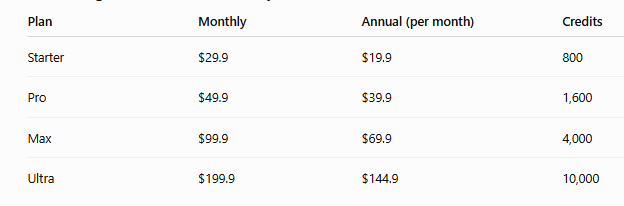
New accounts get 3 free credits with no card. One-time credit packs range from $39.90 to $4,999.90.
Pros and Cons
Pros: 4K native output, strong character consistency, accurate text rendering, fast browser workflow.
Cons: Interface is web-only, so there's no offline mode; power users may want to explore all three model tiers before settling on a favorite.
Best For
Serious creators building AI influencers, storyboards, or brand campaigns that need consistent characters and print-ready resolution.
2. Chat Image
What Is Chat Image
Chat Image is an advanced AI workspace that turns complex prompts into production-ready visuals. It focuses on precision and high-fidelity output through a unified dashboard. The platform is built for creators who want more control than a legacy chatbot generator offers.
Chat Image handles aspect ratio, lighting, color, and composition in one place.
Features
Specialized AI Image Tools: AI Face Swap, AI Background Changer, AI Outfit Generator, AI Skin Smoother, AI Outpainting
Utility toolkits: Clear Watermark, Clean Text, Remove Object
Precise prompt understanding with high-fidelity output
Production-grade styles: photorealistic portraits, cinematic landscapes, 3D characters, product photography
Visual consistency across characters and styles
3-step logic: reason intent, refine prompt, finalize at high resolution
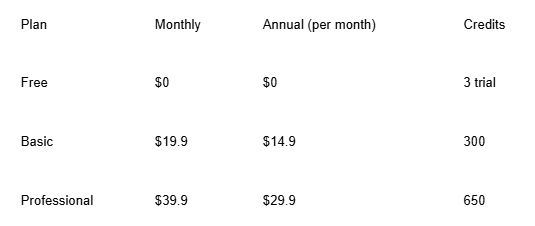
Annual billing saves around 25% on both paid tiers.
Pros and Cons
Pros: Deep toolkit of specialized editors, strong prompt accuracy, commercial-ready downloads on paid plans.
Cons: New users may need a short ramp-up to explore every specialized tool.
Best For
Solo marketers, designers, and small creative teams building social media assets, posters, and ads at scale.
3. Higgsfield
What Is Higgsfield
Higgsfield is built for filmmakers and pro creators. It positions itself as an AI-powered camera control system that runs from script to screen. The tool combines image generation with cinematic video.
Features
Precision camera control — angles, lighting, composition
Non-destructive editing — no full regeneration needed
Cinema Studio integration for video pre-production
Photorealistic output as the default target
All-in-one model access in a single workspace
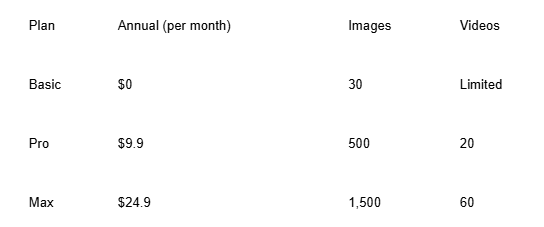
Pricing
Pros and Cons
Pros: Best-in-class camera control, strong for hybrid image-video workflows.
Cons: Overkill for static-only creators; learning curve on camera settings.
Best For
Filmmakers, cinematic ad producers, and video-first social creators.
4. EaseMate AI
What Is EaseMate AI
EaseMate AI is an all-in-one AI assistant that mixes productivity and creativity. Beyond image generation, it handles document summarization, translation, and homework help. The image tools sit alongside other work utilities.
Features
Image-to-Image transfer for style changes
Prompt + image blending for hybrid outputs
Model access: Midjourney, SDXL, DALL-E 3, Flux, Kling
Editing utilities: background removal, watermark removal, face swap
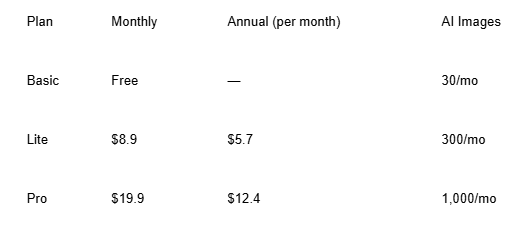
Pricing
Pros and Cons
Pros: Cheap entry, wide model access, good for mixed study-work use.
Cons: Image quality lags dedicated image platforms; credit limits fill quickly.
Best For
Students and multitaskers who want one subscription for writing and visuals.
5. Manus
What Is Manus
Manus is a professional AI platform now part of Meta. It focuses on research, website creation, and slide generation, with image tools built in. The design philosophy: "less structure, more intelligence."
Features
Text-to-image in seconds with photorealistic output
Diverse artistic styles, from illustration to realism
Seamless workflow into reports, sites, and slides
Commercial safety included on paid plans
3-step generation: prompt, style, download
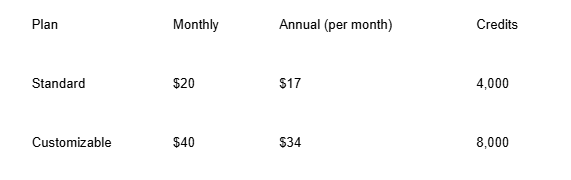
Pricing
Pros and Cons
Pros: Strong productivity integration, decent credit ceilings, photorealistic defaults.
Cons: Not a pure creative tool; image features feel secondary.
Best For
Individual researchers and knowledge workers who need visuals inside a broader productivity stack.
6. Craiyon AI
What Is Craiyon AI
Craiyon, formerly DALL·E Mini, is one of the most accessible name-brand generators. It offers a simple web interface for turning text into art. It targets both hobby and light commercial use.
Features
Prompt + style buttons: Art, Drawing, Photo
Negative prompts for finer control
Post-generation tools: Upscale, Animate, Vectorize
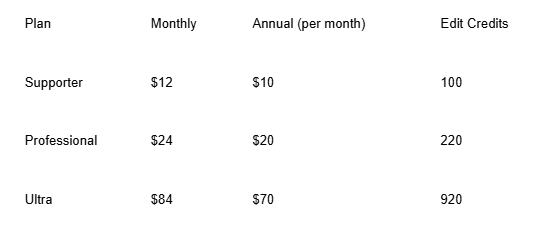
Unlimited generation on all paid tiers
Private images on Professional and Ultra plans
Pricing
Pros and Cons
Pros: Unlimited generations on paid plans, novel Animate and Vectorize tools.
Cons: Base image quality trails premium models; free tier requires attribution.
Best For
Hobbyists and casual creators who want unlimited output without heavy pricing.
7. PicLumen
What Is PicLumen
PicLumen is a web-based platform aimed at design, branding, and gaming work. It packages top-tier models into one interface. The Lumens credit system covers all generation and editing.
Features
Model roster: Midjourney v6, DALL-E 3, FLUX.1, SDXL, SD 1.5
Text-to-image and image-to-image
Smart editors: Background Remover, Watermark Remover, Super Resolution
Business focus on brand identity and product design
3-step workflow: prompt, model, generate
Pricing
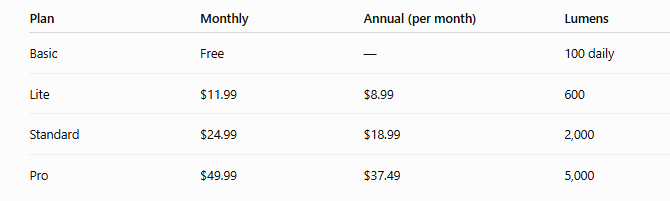
Pro includes unlimited Relax Mode generations.
Pros and Cons
Pros: Wide premium model access, unlimited Relax Mode on Pro, credit top-ups available.
Cons: Free plan is basic-model only; higher tiers add up fast.
Best For
Brand designers, indie game creators, and commercial illustrators who want variety in one dashboard.
8. BYLO AI
What Is BYLO AI
BYLO AI is an all-in-one image generator and photo editor. It pulls together ChatGPT-4o, Gemini, and Midjourney under one roof. The tool leans hard into creative styles and portrait editing.
Features
Style variety: Pixar, Ghibli, Chibi, Minecraft, PS2 filter, 3D figures
ChatGPT-4o tools for comics, emojis, coloring pages, action figures
Character consistency settings for series work
Precision editing: add/remove objects, merge images
Portrait suite: Clothes Changer, Headshot Generator, Hairstyle Changer, Face Swap
Pricing
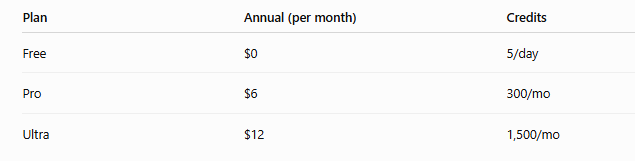
Annual billing offers 40% off.
Pros and Cons
Pros: Very cheap paid tiers, huge style library, deep portrait toolkit.
Cons: Free tier includes watermarks; credit generations are modest.
Best For
Budget creators, meme makers, and casual portrait editors.
9. NoteGPT
What Is NoteGPT
NoteGPT is a study and productivity platform with an image tool built in. It handles transcription, summaries, mind maps, and video processing. The image feature runs on GPT Image 2.0.
Features
No sign-up required for quick generation
Simple 3-step workflow — prompt, generate, download
High-quality visuals for social and marketing
Diverse output range from illustrations to functional designs
Commercial rights on paid tiers
Pricing
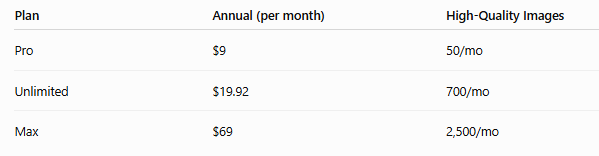
The Unlimited plan is the most popular — around 80% of buyers pick it.
Pros and Cons
Pros: Very low entry price, no-signup access, integrates with note-taking workflow.
Cons: Image output is not the platform's main focus; limits on Pro tier are tight.
Best For
Students, note-takers, and content summarizers who need occasional visuals alongside study tools.
10. Creen AI
What Is Creen AI
Creen AI is a Hong Kong–based visual creation platform developed by CODESAIL Limited. It integrates leading models into a single interface. The platform targets creators, designers, and marketers.
Features
Model access: Midjourney v6.1, DALL-E 3, FLUX.1 Pro/Dev/Schnell, SD 3.5
Specialized models for anime (Pony Diffusion, Animagine), realism, and architecture
Text-to-image and image-to-image
Editors: Background Remover, Watermark Remover, Upscaling
Commercial safety across all plans
Pricing
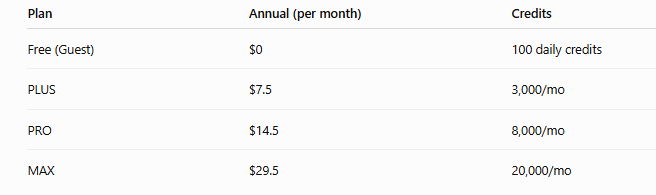
Free users get 100 daily credits that refresh roughly every hour. Annual billing offers 50% off monthly rates on paid plans.
Pros and Cons
Pros: Generous 100 daily free credits, aggressive annual discount, strong anime and architecture models.
Cons: Free credits don't stack across days; paid plan credits don't roll over month to month.
Best For
Anime creators, interior designers, and architects who need specialized model support without upfront commitment.
How to Choose the Right AI Image Generator for You
Different workflows demand different tools. Here's a quick decision map:
Need character consistency and 4K output? → Go with a model-first platform like Nano Banana Bingo.
Need controlled editing plus specialized toolkits? → Pick a workspace platform like Chat Image.
Need multi-model access on a budget? → Aggregators like PicLumen, BYLO AI, or Creen AI.
Need cinematic control? → Higgsfield stands alone here.
Need visuals inside a broader productivity suite? → Manus, EaseMate AI, or NoteGPT.
Match the tool to the job you do most often. Don't pay for features you'll never open.
Always run a free trial or lowest-tier month before committing to annual billing. Credit systems vary widely, and what looks cheap can burn out fast.
Final Thoughts on the 2026 AI Image Generator Landscape
The AI image space has matured. Quality is no longer the main differentiator — workflow fit is. Pick based on how you actually create, not on which name shows up in headlines.
Test two or three tools from this list before locking in. Your best AI Image Generator is the one you'll open every day.
HOW DO YOU FEEL ABOUT FASHION?
COMMENT OR TAKE OUR PAGE READER SURVEY
Featured



Online research supply markets have expanded, giving laboratories and independent researchers more ways to explore specialized materials.