Top 10 AI Video Generators That Turn Simple Scripts Into Finished Videos

PAGE
By PAGE Editor
Introduction
Writing a script is the easy part. Turning that script into a watchable video—with visuals, voiceover, pacing, captions, and background music—used to require a storyboard artist, a video editor, and a sound designer. That bottleneck is exactly what a new generation of script-to-video platforms is designed to eliminate.
Today's best AI video generator tools can ingest a plain-text script, a URL, or even a PDF, and output a fully assembled video in minutes. They handle scene breakdowns, generate matching visuals, synthesize narration, align lip movements, and layer in audio—all without a timeline editor in sight. But not every platform executes this pipeline equally well. Some excel at talking-head formats, others at cinematic storytelling, and a few at marketing-style explainers.
This article compares ten platforms that genuinely transform scripts into finished videos, with an emphasis on how much manual work remains between "paste your script" and "export the final file."
How We Test
We evaluated each platform through the lens of script-to-video automation, focusing on five criteria:
Script Input Methods — Does the tool accept raw scripts, URLs, PDFs, or prompts? How flexible is the ingestion?
Scene Decomposition — Does the AI automatically break the script into shots or scenes with matching visuals?
Voice & Lip Sync Quality — How natural is the narration, and how well is it synchronized?
End-to-End Finishing — Captions, music, transitions, and export without manual editing.
Output Flexibility — Resolution, length limits, aspect ratios, and commercial licensing.
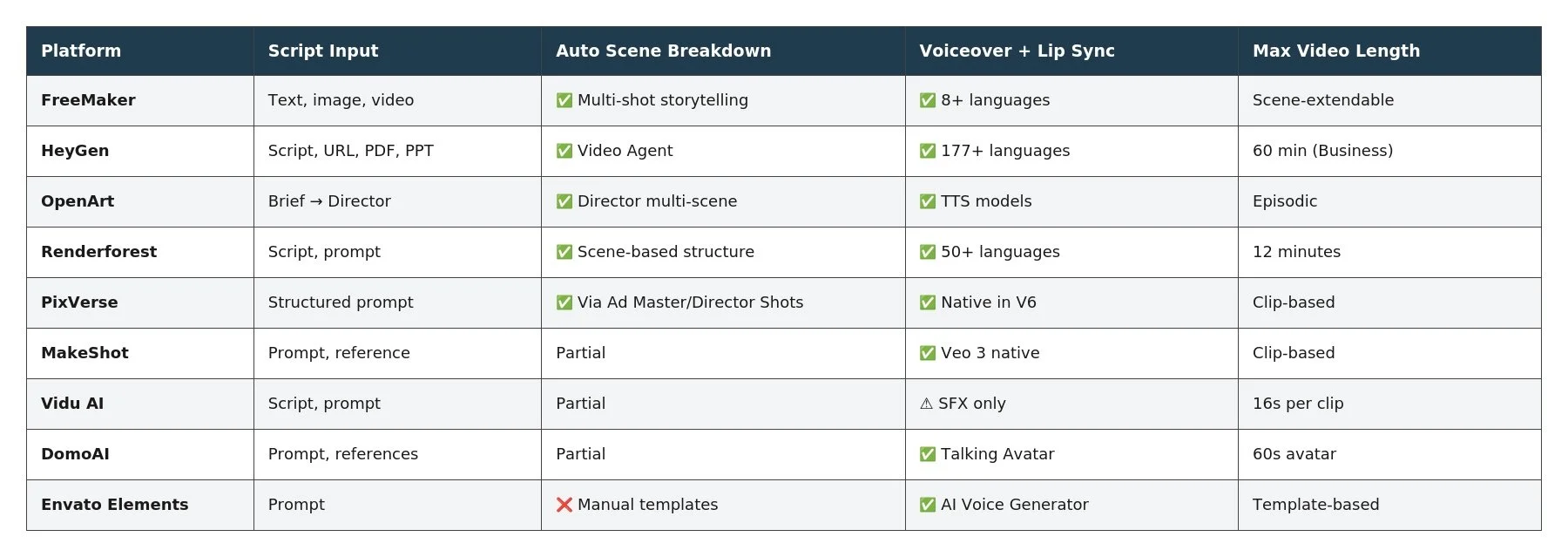
TL;DR Comparison Table
Website List
FreeMaker
What is it?
FreeMaker is a browser-based AI video generator that pairs a multi-model video engine with native audio synthesis, so a written script can be transformed into a scored, narrated, finished video without leaving the workspace.
Features
Text-to-video with multi-shot storytelling that maintains consistent characters, settings, and tone across shots
Smart Scene Extension to lengthen clips while preserving physical momentum and lighting
Native audio-visual co-generation: voiceover with 8+ language lip-sync, Foley SFX, ambient audio, and background music
First & final frame control for precise scene transitions
Integrated models: Google Veo 3.1, ByteDance Seedance 2.0, Kling, Hailuo, Wan, Nano Banana
AI Music Generator producing royalty-free tracks up to 8 minutes
Dedicated tools like the AI image combiner, AI Video Ads generator, Unblur Video, and AI Avatar Maker
Output up to 4K with multiple aspect ratios (16:9, 9:16, 1:1, 4:3, 21:9)
Pricing
Lite: $14.9/month (300 credits, 720p)
Pro: $29.9/month (600 credits, 1080p)
Premium: $149.9/month (3,200 credits, 1080p, priority support)
Pros & Cons
✅ Script → visual → audio pipeline in a single workflow
✅ Multi-shot storytelling keeps characters consistent across cuts
✅ Native music generation eliminates sourcing royalty-free tracks
❌ No PDF or URL ingestion (text and image prompts only)
❌ Lite credit pool fills quickly for long scripts
Best for
Creators, marketers, and solo YouTubers who want to go from written script to narrated, scored video without touching a separate editor.
HeyGen
What is it?
HeyGen is an AI video generator built specifically for script-driven, avatar-led video production. Its Video Agent is arguably the most mature script-to-video pipeline available.
Features
Video Agent accepts text scripts, URLs, PDFs, and PPT decks and outputs fully rendered video
Automatic script formatting, scene selection, presenter avatars, AI B-roll, voiceovers, and captions
Personal Avatars from 15-second webcam video
Avatar V model with phoneme-level lip sync in 177+ languages
Embedded models: Seedance 2.0, Veo 3.1, Nano Banana, Seedream, Kling, Runway, Hailuo
Text-based video editor — change the script, and the video re-renders automatically
One-click video translation into 175+ languages with lip alignment
Voice Director, Voice Mirroring, Gesture Control, Brand Kits
Pricing
Free: 3 videos/month, up to 1080p
Creator: 29/mo(24/mo annual) — 600 credits
Pro: 49/mo(39/mo annual) — 1,000 credits, 4K
Business: $149/mo — 1,500 credits, 60-min videos
Enterprise: Custom
Pros & Cons
✅ Industry-leading script-to-video automation
✅ Accepts the widest range of input formats (script, URL, PDF, PPT)
✅ Text-based editing avoids full re-renders
❌ Avatar-centric — less suited for cinematic or b-roll-heavy content
❌ Credits deplete faster with premium AI models
Best for
Corporate trainers, course creators, and marketers producing script-driven talking-head videos at scale.
Renderforest
What is it?
Renderforest is a template-rich AI video generator that converts scripts into structured scene-based videos with built-in narration, templates, and finishing tools.
Features
Text-to-video converts scripts into scene-based videos with visuals, narration, and music
Hybrid model stack: Veo 3.1, Kling 3.0 Omni, Seedance 2.5, MiniMax H3, Pixverse V6
Multilingual voiceovers in 50+ languages with tone and emotion control
1,200+ pre-designed studio-quality templates
Smart Edit for scene-level revisions without full re-renders
Up to 12-minute long-form video support
Unified editing timeline for trimming, captions, aspect ratios, and branding
Includes logo maker, mockup maker, and website builder
Pricing
Free: $0 (watermarked)
Lite: $8/mo annual
Pro: $19/mo annual
Business: $39/mo annual (4K exports)
Pay-per-export: $24 per HD1080 video
Pros & Cons
✅ Supports long-form scripts up to 12 minutes
✅ Template library handles finishing automatically
✅ Pay-per-export option avoids subscriptions for one-off videos
❌ Template-first design can feel rigid for purely prompt-based creators
❌ Credit math varies significantly across models
Best for
Small businesses, educators, and marketers producing long-form explainers, product videos, or branded content from written scripts.
OpenArt
What is it?
OpenArt is an AI video generator with a dedicated Director feature that reads a creative brief or script and orchestrates a multi-scene story automatically.
Features
OpenArt Director transforms a single brief into episodic short films, ad creatives, music videos, explainers, or micro dramas
Video models: Seedance 2.5, Kling 3.0, Sora 2, WAN 2.7, LTX-2.3, Pixverse
Image models: GPT Image 2.0, Grok Imagine, Nano Banana 2, Seedream 5.0 Pro
Audio models for TTS, SFX, and voice generation
Character Builder for consistent faces across scenes
Motion Sync & Lip Sync to animate talking characters
Conversational editing — swap characters, backgrounds, or extend clips via chat
Pricing
Starter: 14/mo(13/mo annual) — 4,000 credits
Plus: 34/mo(27/mo annual) — 12,000 credits
Pro: 56/mo(44/mo annual) — 24,000 credits
Wonder: 240/mo(175/mo annual) — 106,000 credits
Pros & Cons
✅ Director feature structures scripts into cohesive multi-scene stories
✅ Character consistency across episodes is strong
✅ Conversational editing minimizes manual rework
❌ Learning curve to use Director effectively
❌ Credits can deplete fast with premium video models
Best for
Narrative creators producing short films, micro dramas, and episodic content from longer scripts or outlines.
PixVerse
What is it?
PixVerse is an AI video generator with a structured prompt system and dedicated mini-apps that handle script-driven ad and marketing production.
Features
Structured prompt formula: subject + setting + action + camera + light + sound + format
Native audio in PixVerse V6 at 1080p
Multi-model access: Sora 2, Kling O3, Seedance 2.5, MiniMax H3, Wan 3.0
Mini-apps: Ad Master, Director Shots, Promo Mix, Sound Effect Generator, Fashion Beat, Vibe MV
Image-to-video preserves subject identity, lighting, and composition
ISO/IEC 27001 certified; Web, Mobile, API, CLI
Up to 4K resolution on higher tiers
Pricing
Basic: Free (60 initial + 30 daily credits)
Standard: $8/mo annual
Pro: $24/mo annual
Premium: $48/mo annual
Ultra: $149/mo annual
Pros & Cons
✅ Ad Master and Director Shots are purpose-built for script-driven marketing
✅ Native V6 audio reduces post-production
✅ Enterprise-grade security certification
❌ Scene decomposition requires more manual direction than HeyGen
❌ Audio depth varies by model
Best for
E-commerce brands, performance marketers, and agencies producing script-based ads and promotional videos.
MakeShot
What is it?
MakeShot is a multi-model AI video generator that lets creators test the same script across 10+ engines and pick the output that best matches their vision.
Features
Unified access to Veo 3/3.1, Sora 2, Kling, Wan 2.5/2.7/3.0, Grok, Runway Gen 4, Seedance, Flux
Text-to-video, image-to-video, text-to-image, image-to-image
Native synchronized dialogue, SFX, and ambient audio via Veo 3
First and last frame control for scene continuity
Multi-reference image uploads for brand and character consistency
Resolutions up to 4K via premium models
Full commercial rights, no watermarks
Pricing
Starter: 8.3/moannual(29.99 monthly)
Pro: 25/moannual(89.99 monthly)
Unlimited: 75/moannual(149.99 monthly)
Pros & Cons
✅ A/B testing the same script across engines is powerful
✅ Unlimited plan removes credit anxiety for basic models
✅ Full 4K + commercial license on all plans
❌ No formal script parser — relies on structured prompts
❌ No long-form timeline editor
Best for
Agencies and power users who want to optimize short script-driven clips by comparing outputs across the best available models.
DomoAI
What is it?
DomoAI is a multi-model AI video generator that pairs its Talking Avatar workflow with Omni Reference blending for script-driven character content.
Features
Talking Avatar generates lifelike speaking characters that recite scripts
Omni Reference blends up to 50 image, video, and audio references
AI Music Video Generator from portrait + audio
Character to Video, Frames to Video, Text/Image/Video to Video
Integrated models: Seedance 2.5, MiniMax H3 (synced dialogue/SFX), Nano Banana Pro & 2
Fast Mode (credit-based) and Relax Mode (unlimited queue)
Video upscaling to 4K, images up to 6K
Pricing
Basic: 9/moannual(13 monthly) — 600 credits
Standard: 29/moannual(42 monthly) — 2,200 credits
Pro: 99/moannual(142 monthly) — 8,000 credits
Team: $99/seat annual
Pros & Cons
✅ Talking Avatar workflow is strong for monologue-style scripts
✅ MiniMax H3 outputs synced dialogue and ambient audio
✅ Relax Mode allows unlimited generation on supported models
❌ No full script-to-multi-scene decomposition like HeyGen or OpenArt
❌ Talking Avatar capped at 60s on Pro
Best for
Creators making monologue, voiceover, or avatar-driven narration pieces from short scripts.
Vidu AI
What is it?
Vidu AI is an AI video generator powered by the Vidu model, best suited for turning short script segments into character-consistent, cinematic clips.
Features
Text-to-video up to 1080p from prompts or script paragraphs
Reference to Video for multi-subject consistency across clips
Realistic and animated 2D aesthetic options
Camera motion controls with adjustable amplitude
Companion AI Sound Effect Generator
Built-in templates for popular effects
Extended video length (3–16s) on paid plans
Up to 4K upscaling on higher tiers
Pricing
Free: 40 credits/month
Standard: 8/moannual(10 monthly)
Premium: 28/moannual(35 monthly)
Ultimate: 79/moannual(99 monthly)
Pros & Cons
✅ Strong character consistency across multiple generations
✅ SFX generator complements script scenes
✅ Affordable entry pricing
❌ No voice-over or narration generation
❌ Short per-clip duration limits long scripts
Best for
Creators who treat scripts as a series of short cinematic clips rather than one continuous video, with a focus on visual consistency.
Envato Elements
What is it?
Envato Elements combines a massive stock library with AI tools, letting creators pair a scripted voiceover with stock footage and AI-generated clips in one subscription.
Features
AI Video Generator, AI Image Generator & Editor, AI Music Generator, AI Voice Generator, AI Sound Generator
Powered by GPT Image 2, Gemini Omni, Flux 3, Nano Banana 2, Seedance 2.0, Minimax H3, ElevenLabs
29M+ stock assets: video, photos, music, SFX, templates, graphics
Premium video templates for broadcast packages, logo stings, product promos
Lifetime commercial license on all AI outputs and stock downloads
AI Graphics and Mockup generators
Pricing
Core: $16.50/mo annual (20 AI credits)
Plus: $39/mo annual (200 credits, 3 parallel generations)
Ultimate: $168/mo annual (500/1,000/2,000 credits, 10 parallel)
Enterprise: Custom
Pros & Cons
✅ AI Voice Generator + stock footage covers script-driven workflows manually
✅ Lifetime commercial license is a major advantage
✅ Massive supplementary asset library
❌ No automated script → scene decomposition
❌ AI credits are modest compared to specialized video platforms
Best for
Video editors and marketers who want AI voiceover plus stock-backed footage to assemble script-based content manually with professional polish.
Key Takeaways
For true end-to-end script-to-video automation, HeyGen and OpenArt are the most mature, with HeyGen leading for avatar/talking-head formats and OpenArt leading for cinematic narratives.
For creators who want script + music + voiceover generated together, FreeMaker and Renderforest offer the most unified pipelines.
For long-form scripts (10+ minutes), Renderforest's 12-minute support and HeyGen's 60-minute Business plan are the top choices.
For short-form, clip-driven scripts, PixVerse, Vidu AI, and MakeShot excel at generating individual high-quality shots.
For multilingual scripts, HeyGen (175+ languages) and Renderforest (50+ languages) are the strongest.
For hybrid stock + AI workflows, Envato Elements remains unmatched for asset variety.
Conclusion
Script-to-video automation is no longer about replacing writers or editors—it's about compressing the production timeline from weeks to minutes. The ten platforms covered here each solve a different piece of that equation. Some ingest full documents and output finished videos. Others focus on scene-level quality where creators still assemble the final cut. A few blend automation with manual control to balance speed and craft.
If your workflow is script-heavy and talking-head-driven, HeyGen will almost certainly be the fastest path from idea to export. If your scripts lean cinematic, OpenArt's Director or FreeMaker's multi-shot storytelling will serve you better. For long-form explainers, Renderforest's 12-minute support and template library are hard to beat. Whichever direction you choose, the central promise holds: writing is becoming the only step that still requires a human from start to finish.
HOW DO YOU FEEL ABOUT FASHION?
COMMENT OR TAKE OUR PAGE READER SURVEY
Featured





Learn how to add product schema markup to show prices, ratings and stock status in Google results. Boost click-through rates and stand out from competitors.