
Product Schema and Rich Results: Getting Price and Stars on Google
PAGE
By PAGE Editor
Picture two listings for the same electric kettle on Google. One shows only a title and a short description. The other shows RM189, “In stock” and 4.6 stars. Most shoppers will click the second one without thinking about it.
The difference usually isn’t better SEO or a bigger budget. It’s often product schema: a small block of structured data that tells Google exactly what a page sells, what it costs and how customers rate it. This guide covers how it works, how to set it up, and what stops it from showing.
What Is Product Schema?
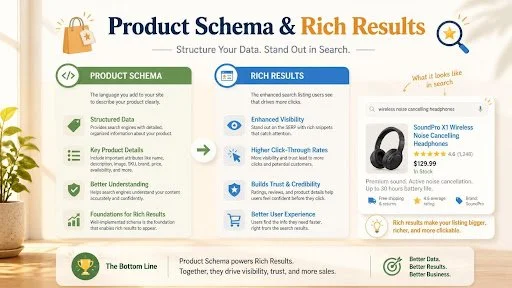
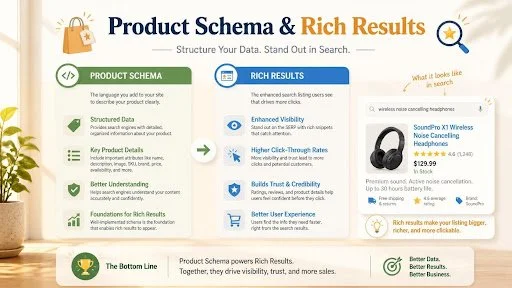
Product schema is structured data, added to a product page’s code, that labels details like name, image, price, currency, availability and ratings in a format search engines read reliably. It follows the schema.org vocabulary and is usually written in JSON-LD. It helps Google understand the page and, in some cases, show richer results.
Google can read your page text and guess the price. Guessing goes wrong when a page shows a crossed-out price, a delivery fee, a bundle price and a variant price all at once. Schema removes the guesswork by stating the facts in plain, labelled fields.
One caveat before we go further. Schema makes a page eligible for rich results. It doesn’t guarantee them. Google decides what to display based on quality, relevance and whether your markup matches what’s visible on the page.
Which Rich Results Can Product Schema Trigger?
Google describes two broad types of product markup. Product snippets suit pages where the product can’t be bought directly, such as editorial reviews. Merchant listings suit pages where shoppers can buy from you, and they support richer detail like shipping and returns. If your page meets the merchant listing requirements, it can generally qualify for product snippets too.
For an online store, that means building to the merchant listing standard. Here’s what each piece of markup can contribute:
Price: The product offer should include the price and currency. Malaysian stores should use MYR for ringgit.
Stock status: Product availability information should accurately reflect whether the item is in stock or sold out.
Star rating: Aggregate ratings or review information can support stars when genuine reviews are visible on the product page.
Product image: A clear product image is required for merchant listings.
Shipping and returns: Shipping and return policy information can provide additional details to shoppers. These properties are optional but useful.
Your product page content, internal links and technical health still matter. Schema supports those foundations. It doesn’t replace them.
How Do You Add Product Schema to a Product Page?
Write structured product information that describes one product, place it in the page’s HTML through your website platform, and make sure every value matches what customers see. At minimum, include the product name, an image, and an offer with price, currency and availability. Then test the page before publishing sitewide.
Step 1: Gather Accurate Product Data
Start with what’s already on the page: name, main image, SKU, brand, price and stock status. Don’t add anything to the markup that a visitor can’t see on the page.
Step 2: Prepare the Product Information
Here’s a simplified example for a fictional kettle.
The product is called Stainless Steel Electric Kettle 1.8L. Its main image shows the kettle, and its description explains that it has a 1.8-litre capacity, a stainless steel body and an automatic shut-off feature.
Its product identifier is KT-1800, and its brand is ExampleBrand. The listed price is RM189.00, the currency is Malaysian Ringgit (MYR), and the availability status is In Stock.
The product information also includes its relevant product page URL.
Together, these details explain the product's identity, features, pricing and availability in a consistent format that search engines can understand. The same information should be accurate and visible on the actual product page.
Step 3: Place It Where Your Platform Allows
On Shopify, WooCommerce and Magento, themes or plugins often output some schema automatically. Check what’s already there before adding more (see the mistakes section below).
Step 4: Test, Then Roll Out
Run a handful of pages through Google’s Rich Results Test, fix errors, and then apply the template across the catalogue.
How Do You Get Star Ratings to Show on Google?
To be eligible for stars, a product page needs review or aggregate rating information based on genuine customer reviews that visitors can actually see on that page. Ratings you invent, copy from another site or hide from users can cause Google to ignore the markup or take manual action.
Stars are the most requested rich result, and also the most misused. A few practical rules:
Use reviews collected from real buyers of that specific product.
Show the same rating and review count on the page itself.
Keep the numbers current. If your page says 58 reviews and the markup says 580, you have a mismatch.
Don’t paste one store-wide rating onto every product.
Even with perfect markup, stars won’t appear for every query or every page. Treat them as a bonus, not a promise.
Common Product Schema Mistakes
After reviewing a lot of product pages, the same problems keep coming up:
Duplicate markup: The theme outputs Product schema and a plugin adds another. Google may see two conflicting versions of the same product.
Price mismatch: The markup says RM189 while a promotion on the page says RM159. Update both together.
Wrong availability: Items marked as in stock in the markup while the page says sold out.
Variants ignored: A shirt with five sizes and three colours shows one price in the markup, even though prices differ by variant.
Schema on category pages: Product markup belongs on single-product pages, not on listing pages that show dozens of items.
Currency left out: A price without its currency information is incomplete.
None of these are exotic. Most are fixed in an afternoon once you know where to look.
How to Test and Monitor Your Markup
Testing happens in three places, and it’s worth using all of them:
Rich Results Test: Enter a URL or product information to see which features the page is eligible for and what errors exist.
URL Inspection in Search Console: Confirms Google can actually fetch and read the live page. It also catches pages blocked by robots.txt or noindex tags.
Search Console reports: Google provides a Merchant listings report for pages that sell products and a Product snippets report for review-style pages. Check them regularly, especially after a theme update or site migration.
A Merchant Center account isn’t required for merchant listing eligibility anymore. Google does note that providing both page markup and a Merchant Center feed maximizes eligibility and helps it verify your data, so it’s worth considering if you plan to appear in Shopping surfaces too.
A change in click-through rate is worth reporting, but the cause needs its own evidence.
Rankpage Case Study: How Rankpage Combined Retail Page Content with Technical Review
For a specialist retailer, Rankpage mapped keywords to categories, product pages and guides, developed their content and metadata, and linked guides to relevant shopping pages. The team also reviewed page speed, indexing and appropriate structured data.
This treats structured data as part of a wider page-quality effort. The page still needs useful information, a clear role and a workable mobile journey; Rankpage’s scope brought those elements together.
GSC recorded CTR increasing from 1.3% to 1.7% and clicks from approximately 5,250 to 7,390 across 18 April–17 July and 18 July–17 October 2026. These are whole-site results, not proof that a particular schema change or rich result caused the increase.
Product Schema for Malaysian Online Stores
A few local points are worth keeping in mind.
Always use MYR as the currency code and keep the decimal format consistent. If your store serves Singapore or other markets with separate pages, each page should carry the price and currency for that market.
You’re also competing against large marketplaces, which dominate many product searches. A clear price, stock status and rating on your own store’s listing helps shoppers recognise it as a real, active option rather than another thin page.
If your catalogue has hundreds of SKUs, or you’d rather not touch theme code yourself, it can make sense to get help with e-commerce SEO with product schema as part of a wider clean-up of product pages, categories and technical issues. Schema works best when titles, descriptions, site structure and speed are already in decent shape.
FAQ
Does product schema improve rankings directly?
Google has said structured data isn’t a direct ranking factor. It helps Google understand a page and can make listings eligible for rich results, which may improve click-through rates. Think of it as a visibility and clarity tool rather than a ranking switch.
How long does it take for price and stars to appear?
There’s no fixed timeline. After Google recrawls and processes a page, eligible rich results may appear, but timing varies by site and page. Use the URL Inspection tool to request indexing for key pages, then monitor Search Console.
Why aren’t my stars showing even though my schema is valid?
Valid markup only means it’s readable. Google may withhold stars if reviews aren’t visible on the page, if ratings look unreliable, or if it simply chooses not to display them for that query. Check content quality and guideline compliance first.
Do I need a Google Merchant Center account for price to show?
No. Merchants can become eligible for merchant listing experiences using structured data on their pages alone. A Merchant Center feed can still help, since Google can combine both sources to verify and complete your data.
Should I use JSON-LD, Microdata or RDFa?
Google supports all three, and JSON-LD is generally the easiest to maintain because it sits separately from your visible HTML. Choose one format per page and avoid mixing them for the same product.
Can I add product schema to category pages?
Not for the whole listing. Product markup is meant for pages about a single product. Category pages are better served by clear titles, content and internal links to the product pages.
Final Thoughts
Product schema is one of the more practical fixes in e-commerce SEO. It’s not flashy, but it gives Google clean facts and gives shoppers a reason to click. Get the basics right: accurate price, correct currency, honest reviews, no duplicate markup. Then test and monitor.
If you’d like a second opinion on how your product pages are marked up, Rankpage offers SEO audits for Malaysian businesses, and a quick review of your schema setup is a sensible place to begin.
HOW DO YOU FEEL ABOUT FASHION?
COMMENT OR TAKE OUR PAGE READER SURVEY
Featured




Reju Inc. is expanding its digital wellness platform with a Learning Management System and integrated Wellness Journal, bringing education, mental health resources, and personal development together in a more comprehensive technology ecosystem.