
AI Clothes Swap vs Virtual Try-On
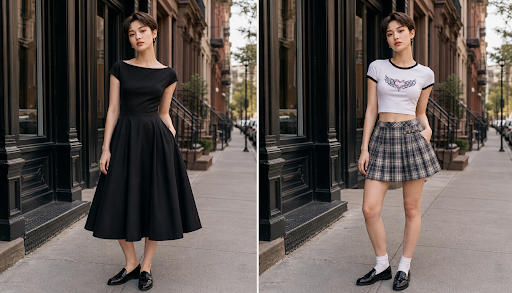
PAGE
By PAGE Editor
Choosing between AI clothes swap and virtual try-on comes down to one question: are you trying to create a better outfit image, or are you trying to predict how a garment may fit and look before buying it? The two sound similar, but they solve different problems. I’ve used both for outfit planning, product mockups, social content, and quick client previews, and the best choice depends on how accurate the final image needs to be.
AI clothes swap is stronger when you want fast visual changes on an existing photo. Virtual try-on is stronger when the goal is shopping confidence, size judgment, or product display. Both can save time, but both can also mislead you if you expect them to replace a real fitting room.
The short version
If you want to change the clothing in a photo for styling, content, or creative testing, an AI clothes swap tool is usually the easier choice. I’ve used EasyFaceSwap for quick face and image edits, and the same kind of simple upload-and-generate flow is what makes clothes swapping useful for non-designers. You start with a person photo, choose or upload a garment image, and let the tool blend the new outfit into the original scene.
If you’re comparing outfits for photos, profile pictures, or campaign concepts, ai clothes swap is more about believable visualization than exact garment science. It can help you see if a red blazer works better than a black hoodie, or if a dress style suits a pose. But if you need true size guidance, fabric stretch, or detailed product fit, virtual try-on is usually the safer route.
Virtual try-on is often built for retail. It may use body measurements, product images, 3D garment data, or a brand’s sizing model. That makes it more useful for shoppers deciding what to buy, but it also means setup can be heavier and results depend on the quality of the product data.
AI Clothes Swap: overview, features, pros and cons
AI clothes swap takes a photo of a person and replaces the outfit with another style. In practice, it feels closer to image editing than shopping tech. You upload a portrait or full-body image, pick a new clothing style, and the model rebuilds the outfit area while trying to keep the face, pose, lighting, and background intact.
The biggest feature is speed. In my own workflow, I’ve used clothes swapping when a client wanted to compare outfit moods before a shoot. Instead of booking another session or asking the model to bring five looks, we tested casual, formal, and seasonal options from one clean base image. It wasn’t perfect every time, especially around hands and loose sleeves, but it was fast enough to guide the creative direction.
Good clothes swap tools handle color, texture, neckline, sleeve length, and overall silhouette. They’re especially useful for social media creators, stylists, photographers, marketers, and small shops that need quick visual ideas. The best results usually come from simple poses, clear lighting, and clothing that doesn’t hide too much of the body shape.
The main advantage is creative freedom. You can test looks that you don’t own, create outfit concepts for mood boards, or refresh older photos with a new style. It’s also helpful when you need content variety but don’t have the budget for a full shoot.
The trade-off is accuracy. AI clothes swap can make an outfit look convincing, but it doesn’t know the real garment’s cut unless you give it a strong reference. It may invent seams, alter fabric behavior, or smooth over details. If the original photo has crossed arms, busy patterns, or hair covering the shoulders, you may see odd edges or warped areas.
AI clothes swap is best for people who care about visual impact more than exact fit. It’s great for testing an outfit idea, creating fashion content, building ads, planning a photoshoot, or seeing how a style might look on a person. I wouldn’t use it as the only basis for buying a tailored suit or judging whether jeans will fit at the waist.
Virtual Try-On: overview, features, pros and cons
Virtual try-on is designed to show how a specific garment may look on a person or body model. It’s common in fashion retail, eyewear, shoes, cosmetics, and accessories. In clothing, the system may ask for a customer photo, height, weight, measurements, or body shape. Some versions use flat product photos, while more advanced ones use 3D garment files.
The key feature is product context. A retailer can connect the try-on result to a real SKU, size chart, and available colors. This matters because shoppers don’t just want a pretty image. They want to know if the dress is likely to fall above the knee, if the jacket looks boxy, or if the shirt might pull at the chest.
When I’ve tested virtual try-on on retail sites, the best ones helped with proportion and styling confidence. They showed if a cut felt too long on a shorter frame or if a color washed out the model. The weaker ones looked like a flat sticker placed on top of a body, which can be worse than no preview at all because it gives false confidence.
Virtual try-on works well when the brand has clean product images, consistent sizing data, and clear body inputs. It can reduce some doubt before checkout, especially for shoppers between sizes. It can also help stores lower return rates, though no system removes returns completely. Fabric weight, stretch, posture, and personal comfort are still hard to predict.
The downside is setup and limits. A brand may need product feeds, measurement logic, 3D assets, or technical support. For a casual creator, that’s often too much. For a shopper, the result is only as good as the data behind it. A virtual try-on can show appearance, but it can’t tell you how a waistband feels after sitting for two hours.
Virtual try-on is best for online stores, marketplaces, fashion brands, and shoppers who want help choosing a size or style before buying. It’s less ideal for quick creative edits or changing an outfit in an existing lifestyle photo. If the goal is to make a polished image for a campaign concept, AI clothes swap usually feels faster and more flexible.
Side-by-side summary
The easiest way to compare the two is to separate creative visualization from purchase guidance. AI clothes swap helps you imagine a new outfit in a photo. Virtual try-on helps you judge a real product on a body or model before buying.
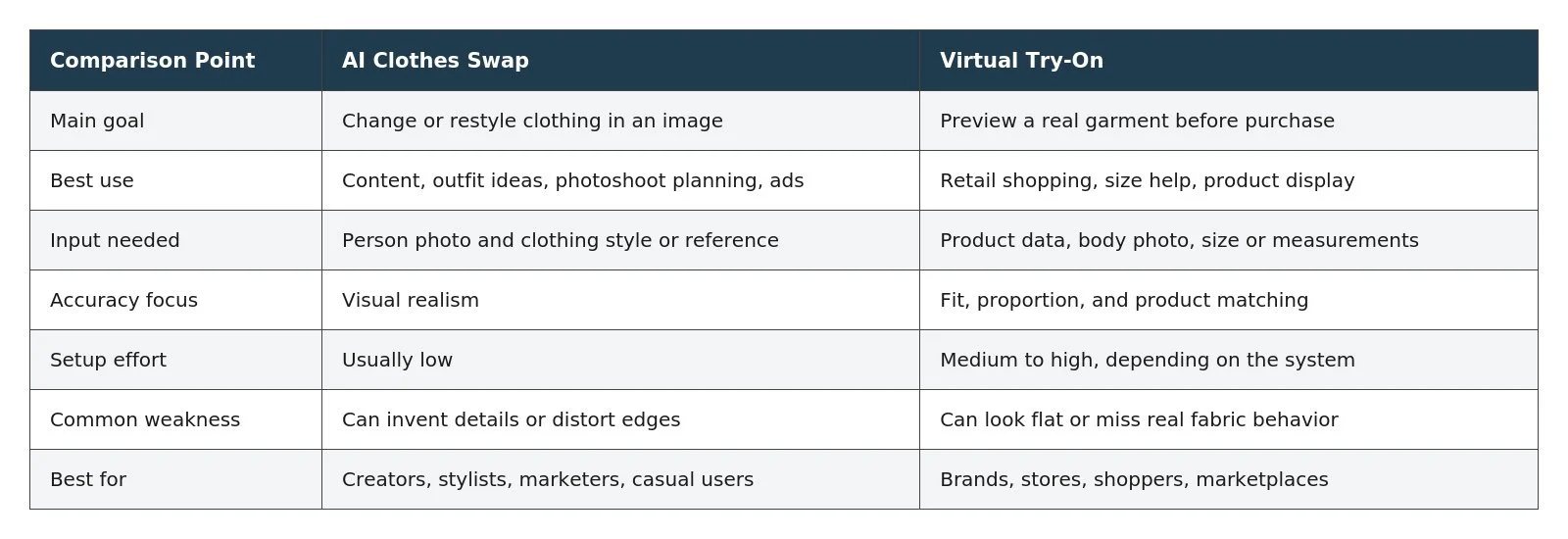
AI clothes swap wins when speed and creative range matter most. If I’m planning a themed shoot and want to compare streetwear, formalwear, and vacation looks, I don’t need perfect garment physics. I need enough realism to decide what mood works. That’s where clothes swap tools feel practical.
Virtual try-on wins when the garment is the product. If a shopper is deciding between two dress sizes, a creative clothes swap image won’t be enough. The shopper needs product-linked information, not just a nice visual. In that case, virtual try-on offers more useful context, even if the image is less dramatic.
There’s also a privacy angle to consider. Both methods may involve uploading body or face images. I always check what the tool says about storage, rights, and deletion before using client photos. For brand work, I prefer test images or approved model assets until the usage terms are clear.
Cost can also differ. Many clothes swap tools are built for fast, individual edits, so they’re easier to try without a large setup. Virtual try-on for a store can require platform integration and product preparation. That cost may be worth it for a retailer with high return rates, but it’s overkill for someone who just wants to test outfits for a dating profile or Instagram post.
Final recommendation
Choose AI clothes swap if you want quick outfit visualization, creative edits, or fresh content from an existing image. It’s the better option for creators, stylists, photographers, small teams, and anyone who wants to compare looks without handling real garments. The results can be impressive, but treat them as visual concepts, not proof of fit.
Choose virtual try-on if your main goal is to support a buying decision. It’s better for online fashion stores, shoppers, and brands that need to connect a preview to real products and sizes. It takes more data to work well, but it gives more useful answers when the question is, “Should I buy this?”
For most casual outfit planning, I’d start with AI clothes swap because it’s faster and easier. For retail, I’d use virtual try-on when the product catalog and sizing data are strong enough to support it. The best choice isn’t about which technology sounds newer. It’s about what kind of confidence you need from the image.
HOW DO YOU FEEL ABOUT FASHION?
COMMENT OR TAKE OUR PAGE READER SURVEY
Featured




A comfortable home should offer more than a place to sleep and eat.