
How Shopify Merchants Selling Educational Products Can Standardize Curriculum Infographics with Nano Banana 2.1

PAGE
By PAGE Editor
When parents evaluate physical learning kits or STEM toys on an ecommerce storefront, they make purchase decisions under acute time pressure and cognitive overload. The primary friction point on an educational products storefront is rarely price; it is the steep verification cost of figuring out whether a learning kit matches a child's developmental stage. When Shopify merchants fail to present lesson progressions and component hierarchies clearly, shoppers abandon the cart out of sheer uncertainty. Modern store owners cannot afford multi-week design bottlenecks for every curriculum refresh or supplemental module, which is why adopting nano banana 2.1 within an asset creation pipeline represents a pivotal operational shift. By examining the anatomy of high-performing lesson explainers, merchants can systematically standardize graphic output without sacrificing pedagogical rigor.
Educational ecommerce requires precise instructional diagrams rather than generic lifestyle imagery. To maintain commercial authority, merchants turning to Pikvee creative workflows must ensure that each curriculum asset communicates concrete milestones while preserving clean digital typography. Deploying nano banana 2.1 enables teams to systematically construct detailed visual teardowns, transforming complex product contents into scannable storefront collateral.
Anatomy of an Educational Product Detail Page Infographic
An educational product detail page infographic must accomplish three immediate objectives: demonstrate tactile contents, establish age-appropriate scaffolding, and prove developmental value within five seconds of mobile viewport scanning. For an advanced robotics and coding starter pack, this asset takes the form of a structured 4:5 vertical gallery card that combines physical component callouts with an illustrated lesson timeline. In traditional workflows, graphic designers spend hours manipulating layered vector software to align micro-labels, sensor diagrams, and curriculum milestones, creating severe production bottlenecks during seasonal catalog updates.
The core challenge in producing this specific educational asset lies in balancing structural clarity against visual fatigue. If an infographic crowds too many text descriptions onto micro-components, mobile readability collapses. Conversely, if the diagram glosses over assembly complexity to maintain a minimalist look, parents assume the kit is too advanced or poorly documented. Introducing nano banana 2.1 into this drafting process gives visual production teams the ability to set disciplined structural boundaries, ensuring each physical block, microcontroller board, and wire terminal aligns cleanly with corresponding pedagogical milestones.
Merchants using Pikvee tools to automate catalog assets often struggle to maintain consistency across entire product collections. An educational catalog cannot tolerate erratic visual styles where one kit features photorealistic renders while another uses flat pastel sketches. Leveraging nano banana 2.1 allows creative teams to establish uniform lighting, exact schematic depths, and predictable graphic callouts across dozens of product variations. When educational products demand rigorous factual layouts, utilizing a dedicated generation run powered by nano banana 2.1 ensures the initial draft respects structural margins and functional proportions.
Deconstructing Key Layout Layers Generated with Nano Banana 2.1
Dissecting an optimal curriculum breakdown card reveals distinct operational layers that must harmonize to maintain shopper attention:
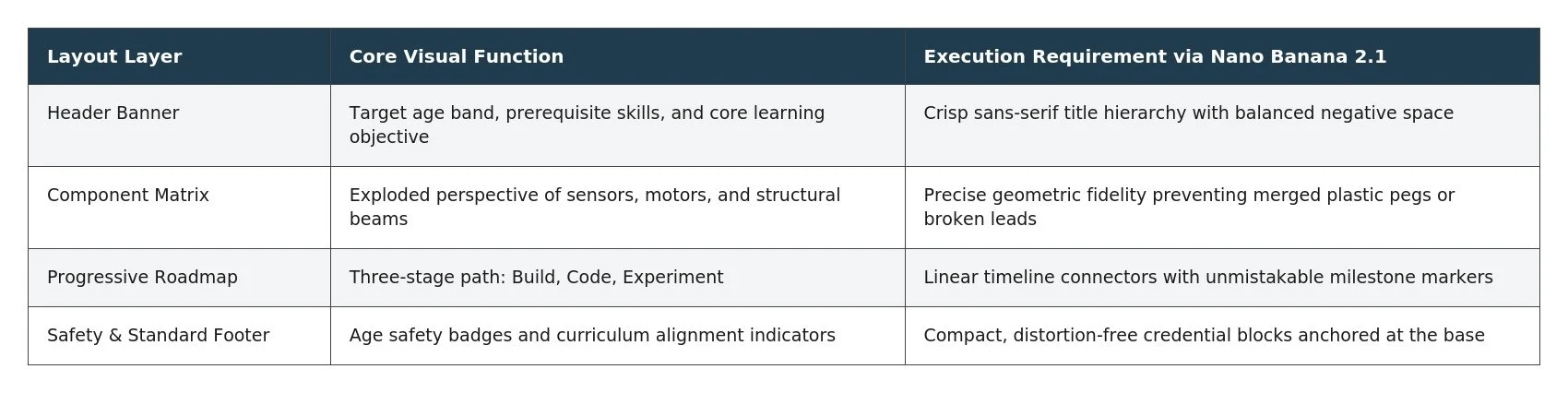
The primary header anchors customer expectations by isolating grade tiers and required reading levels. By utilizing nano banana 2.1, teams can render sharp primary typography alongside contextual icons without introducing visual blurring. This eliminates the muddy lettering that historically plagued automated visual models, ensuring parents instantly recognize whether a workbook kit fits kindergarten prep or middle school enrichment.
Below the header, the component schematic displays tactile hardware elements in clear perspective. Generating this middle tier requires meticulous physical fidelity; a motor housing must show distinct mounting holes rather than blurred plastic edges. Running prompts through nano banana 2.1 preserves clean mechanical lines while maintaining a consistent isometric perspective. The step-by-step curriculum milestones trace a logical arc from basic tactile assembly to guided problem-solving, making the progressive value proposition tangible. With nano banana 2.1 handling layout balancing, each milestone icon aligns along a vertical axis that guides mobile scrolling naturally toward the add-to-cart module.
How Visual Precision Directly Shapes Parent Trust and Shopify Conversion
In educational ecommerce, graphic precision correlates directly with buyer confidence. When a parent examines a detailed hands-on science kit, visual ambiguity triggers immediate fears of poor build quality, incomplete instructions, or frustrating weekend assembly sessions. A blurry diagram suggests careless manufacturing, driving up checkout hesitation and driving potential customers back to generic marketplace listings. By implementing nano banana 2.1 across their digital asset pipelines, Shopify brands reinforce their credibility through disciplined typographic sharpness and meticulous diagrammatic proportions.
This visual clarity generates compounding operational benefits across the customer journey:
Compressed Time-to-Comprehension: Shoppers decode curriculum scope in under ten seconds, accelerating mobile purchasing velocity.
Reduced Return Inquiries: Accurate visual breakdowns eliminate customer mismatch regarding part counts and prerequisite software skills.
Elevated Perceived Pedagogical Value: Clean schematic styling justifies premium price positioning over low-cost plastic toy alternatives.
Unified Multi-SKU Presentation: Consistent asset layouts across related subject bundles encourage larger order sizes and higher lifetime customer value.
When creative teams connect their asset workflows to Pikvee infrastructure, production velocity increases without eroding asset quality. Testing modular variants of educational graphics using nano banana 2.1 reveals that concise, legible component cards decrease pre-purchase inquiries regarding kit contents by eliminating guesswork. Incorporating nano banana 2.1 into automated image staging ensures that product launch deadlines are met while maintaining consistent compositional standards across high-volume collections.
Comparing Production Flaws in Legacy Visuals Against Nano Banana 2.1 Outputs
Auditing legacy storefront assets reveals chronic compositional errors that undermine consumer trust. Prior generation models frequently produced illegible lettering, warped geometric shapes, and nonsensical schematics where wires led to nowhere. In educational products, such errors are fatal to conversion; a distorted science apparatus makes the brand look unprofessional and careless.
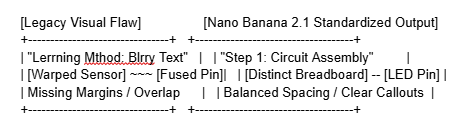
A recurring failure mode in legacy assets involves background clutter that bleeds into the instructional diagram. Earlier systems often placed detailed diagrams against busy, high-contrast living room backdrops, obscuring subtle label lines and small assembly hardware. Implementing nano banana 2.1 allows creative operators to isolate subjects on clean, neutral staging planes, ensuring essential structural details pop against crisp white or soft slate backdrops.
Furthermore, multi-part consistency previously required extensive manual post-processing. Designers had to airbrush out phantom components or re-type corrupted callout boxes individually. With nano banana 2.1, layout generation respects strict spatial instructions, keeping instructional numbers separate from component boundaries. The resulting visual reliability makes nano banana 2.1 an indispensable tool for growing brands seeking marketplace differentiation without the overhead of enterprise design teams.
A Reusable Inspection Checklist for Educational Storefront Graphics
To prevent unvetted graphic drafts from reaching a live Shopify catalog, merchant operations should establish an explicit pre-publish gating procedure. A disciplined quality control framework prevents visual drift across growing inventories.
Text Legibility Verification: Examine primary milestone titles and sub-bullet labels at a simulated 375px mobile screen width to ensure text remains readable.
Component Accuracy Audit: Confirm every illustrated gear, sensor, or puzzle piece features intact borders and realistic mechanical proportions.
Linear Hierarchy Review: Ensure the visual flow moves predictably from broad curriculum overviews to granular component details.
Canvas Dimension Alignment: Confirm the asset renders in the target 4:5 or 1:1 aspect ratio without tiling artifacts or stretched border margins.
Brand Style Coherence: Verify secondary color palettes match storefront button styles and core identity guidelines.
Embedding this systematic evaluation into weekly catalog routines allows teams to harness nano banana 2.1 with absolute consistency. Rather than treating visual generation as an unpredictable trial-and-error experiment, store operators can establish a repeatable pipeline where nano banana 2.1 provides structurally sound diagram bases that need minimal final touch-ups.
Ultimately, winning the trust of educators and parents requires total transparent clarity on the product page. When merchants replace ambiguous promotional images with structured, highly legible curriculum blueprints powered by nano banana 2.1, they elevate their digital storefronts above competitors. Combining rigorous pedagogical information with the disciplined rendering power of nano banana 2.1 transforms standard product pages into persuasive instructional blueprints that drive lasting educational brand equity.
HOW DO YOU FEEL ABOUT FASHION?
COMMENT OR TAKE OUR PAGE READER SURVEY
Featured





Yes. A yellow light dispute can affect your car accident claim because it helps determine who was responsible for the collision.