
Best Desk for a Treadmill: Height, Size, and Fit Guide
PAGE
By PAGE Editor
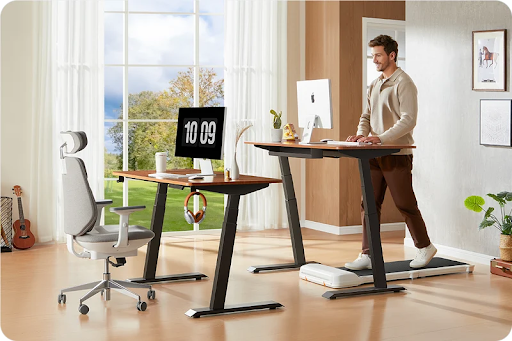
The best desk for a treadmill is a stable height-adjustable desk that reaches your elbow height while you stand on the walking belt. It also needs enough clear space between its legs for the full treadmill body, not just the belt. Desktop depth, monitor placement, cable routing, and a safe entry path complete the setup.
What Type of Desk Works Best With a Treadmill?
For most home offices, an electric or pneumatic standing desk with an open frame is the best choice. Height adjustment matters because a walking pad raises your body several inches above the floor. A normal fixed desk that feels correct while you stand on the floor will usually be too low once you step onto the belt.
Start with the height and floor-clearance specifications rather than the color or number of drawers. WalkingPad's adjustable standing desk collection shows the useful range of full-size, mobile, electric, and pneumatic formats.
Avoid a center pedestal, low crossbar, drawer unit, or control box where the treadmill needs to sit. A wide desktop can still have little usable room underneath. Two-leg and four-leg frames can both work when the opening is clear and stable.
How High Should a Treadmill Desk Be?
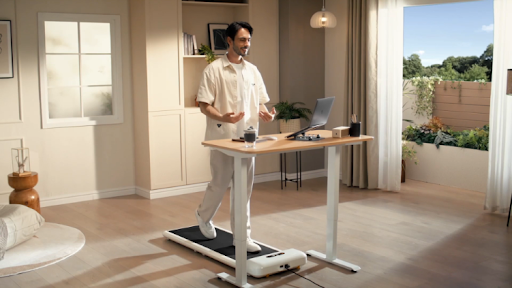
Do not choose the desk height from a generic chart alone. Put the treadmill in its operating position, wear the shoes you normally use, step onto the stationary belt, and relax your shoulders. Bend your elbows to about 90 degrees. The keyboard surface should sit near elbow height so your wrists can stay straight and your upper arms can remain close to your body.
Calculate the Required Maximum Height
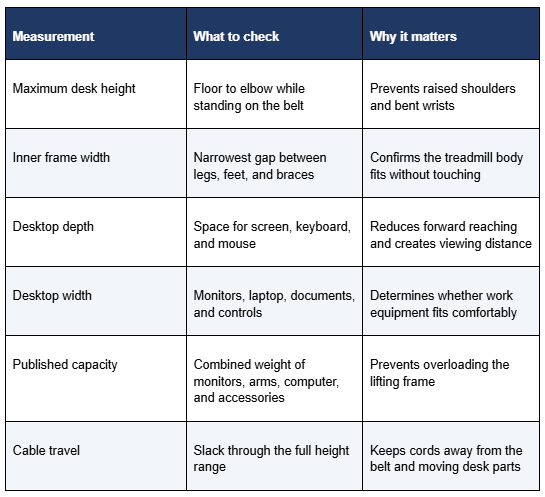
Measure from the floor to your elbow while standing on the treadmill. That finished floor-to-desktop measurement is the minimum height the desk must reach for your setup. Another way to estimate it is to add the treadmill's standing-surface height to your comfortable standing desk height on the floor. Then verify the result by measuring your actual posture.
Leave adjustment headroom rather than choosing a desk whose published maximum exactly matches your number. Desktop thickness, footwear, and posture can shift the final position, while some frames become less stable near maximum height.
Separate Keyboard Height From Monitor Height
Raising the whole desk to fix a low monitor can make the keyboard too high. Set the desk for relaxed shoulders and neutral wrists first, then use a monitor arm or riser. OSHA recommends placing the monitor directly in front of the user, with the top of the screen at or slightly below eye level and enough viewing distance to avoid leaning forward.
What Desk Measurements Matter Most?
Measure the desk and treadmill as a pair before ordering either one. Use the treadmill's widest exterior point and the desk's narrowest usable opening. Include feet, side covers, wheels, a front motor housing, cable trays, drawers, braces, and anything else that reduces the space shown in a simple desktop-width listing.
Allow Clearance Around the Treadmill
The treadmill should not rub against a desk leg. Contact can transfer vibration into the desktop and may obstruct movement or controls. Leave practical side clearance and follow the treadmill manufacturer's placement instructions. Check front clearance for the motor housing and rear space for stepping off safely.
Choose Enough Desktop Depth
If the desk lacks sufficient depth, you may be forced to position the monitor too close to yourself or push the keyboard toward the edge of the desk. The desk surface should accommodate the monitor, keyboard, and pointing device, and the monitor should generally be placed at least 20 inches (approximately 50 cm) away from your eyes. While using a monitor stand can save space, it cannot compensate for a desk that is too small.
Which Desk Style Should You Choose?
Electric Standing Desk
An electric desk is convenient for alternating among sitting, standing, and walking, especially with memory presets. Compare maximum height, full-extension stability, lift capacity, adjustment noise, and anti-collision features. A wider top helps with two monitors but must still fit the room.
Pneumatic Standing Desk
A pneumatic desk adjusts without a power cord and can suit a flexible or compact workspace. It may also be useful where desk power and treadmill power would compete for outlets. Confirm that the surface remains easy to raise with your equipment loaded and that the maximum height still reaches your measured requirement.
Fixed Standing Desk or Desktop Converter
A fixed standing desk works only when its finished height matches you on the treadmill. A desktop converter can raise a seated desk but reduces usable surface and may move while typing. Both require careful measurement and offer less flexibility than a full adjustable frame.
How Does the WalkingPad Pro Standing Desk Fit This Use?
WalkingPad focuses on compact home-fitness equipment and workday walking, so its desk is designed around the same space and setup problems as an under-desk treadmill. The Pro One-piece Tabletop Standing Desk offers a 28.3-46.5" height range, 176 lb capacity, four memory presets, anti-collision sensing, and 40", 48", or 55" desktop widths. Each top is 23.62" deep.
Those specifications make the WalkingPad Pro Standing Desk a practical match for a home walking workstation when 46.5" is high enough and the frame opening clears the selected treadmill. The 48" or 55" version gives monitors and input devices more room than the 40" top. However, a tall user or someone using a thick treadmill deck may need a desk with a higher maximum.
Should You Buy the Desk and Treadmill Together?
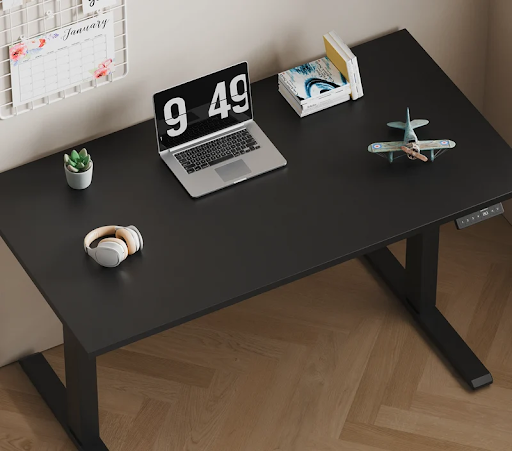
Buying a matched package can reduce guesswork, especially when you are building the whole workstation at once. It does not remove the need to check personal height, room dimensions, user capacity, power placement, and the tasks you plan to do while walking.
If you already own one compatible component, measure it and buy only the missing piece. The treadmill's overall width, standing-surface height, and operating footprint should control the desk search.
How Should You Set Up the Desk for Walking?
Place the Keyboard and Mouse First
Keep the keyboard directly in front of you and the mouse close beside it. Your elbows should stay near your body, your shoulders should remain relaxed, and your wrists should stay in line with your forearms. If you lean onto the desk or reach forward while walking, lower the speed and move the input devices closer before changing multiple settings.
Use the Monitor to Support a Neutral Head Position
Position the main monitor directly ahead rather than off to one side. Adjust screen height with an arm or stand instead of compromising keyboard height. A laptop-only setup ties the keyboard and screen together, so an external keyboard and mouse usually make longer walking sessions easier to arrange.
Secure Cables and Start Slowly
Route desk and computer cables with enough slack for the full lifting range, then secure them away from the walking belt, transport wheels, and entry path. Start the treadmill at its lowest speed and test simple tasks such as reading or calls before typing for longer periods.
Detailed design work, precise mouse control, handwriting, or intense concentration may be easier while standing still or sitting. A good treadmill desk supports changing positions rather than walking all day.
What Treadmill Desk Mistakes Should You Avoid?
Do not shop by desktop width alone, ignore the treadmill's deck height, or place the walking pad against the desk frame. Avoid setting the desk so high that your shoulders lift, and do not raise the keyboard simply to bring the monitor up. Keep drawers, cable trays, loose cords, and storage boxes out of the treadmill's operating and exit areas.
Do not treat load capacity as a stability rating. A desk may hold heavy equipment yet wobble at full height. Level the feet, tighten fasteners as directed, and test the workstation at a slow walking speed.
Frequently Asked Questions
Can You Use a Regular Desk With a Treadmill?
Usually not. A seated desk is generally too low once you stand on the treadmill. It can work only if a properly sized converter or other manufacturer-approved setup places the keyboard near elbow height without reducing stability or clearance.
How Wide Should a Desk Be for a Walking Pad?
Desk width depends on your equipment, while treadmill fit depends on the clear opening between the desk supports. A compact laptop setup may fit a 40-inch top; two monitors often need more surface. Measure both dimensions separately.
How Deep Should a Treadmill Desk Be?
Choose enough depth to keep the monitor at a comfortable viewing distance while the keyboard and mouse remain close. Around 24 inches may suit a compact flat-screen setup, while larger monitors or stands may require a deeper surface.
Is a Two-Leg or Four-Leg Desk Better for a Treadmill?
Either can work. Four-leg frames may offer more resistance to movement, while a well-built two-leg frame can provide more open floor space. Compare actual stability, inner clearance, maximum height, and crossbar placement rather than choosing by leg count alone.
Can You Walk at a Treadmill Desk All Day?
It is better to alternate walking, standing, and sitting. Begin with short sessions at a slow pace and increase gradually. Stop if walking changes your balance, posture, or ability to complete the task safely.
Conclusion
The best treadmill desk is not simply the widest or most expensive model. It must reach elbow height while you stand on the belt, clear the treadmill body and cables, remain stable at that height, and hold your work equipment. Measure the complete setup first, then choose an adjustable desk that supports comfortable keyboard, mouse, and monitor placement.
HOW DO YOU FEEL ABOUT FASHION?
COMMENT OR TAKE OUR PAGE READER SURVEY
Featured





Wellness has increasingly become part of how we think about everyday life. It influences the way we design our homes, choose personal care products, and create moments of quiet in otherwise busy schedules.