
From Audio to Actionable Intelligence: Rethinking What a Transcription Tool Can Do

PAGE
By PAGE Editor
The modern workplace generates an astonishing volume of spoken content. Meetings are recorded, interviews are captured, presentations are archived, and podcast episodes accumulate like digital sediment. The assumption has always been that this audio represents value—that somewhere in those recordings are insights, decisions, and ideas worth preserving. But the gap between recording and action has traditionally been vast. Transcription was the bridge, but it was a slow, expensive, and often unreliable one.
The emergence of high-accuracy speech recognition changed the technical landscape, but it didn't automatically solve the workflow problem. Having a transcript is useful. Having a transcript that's searchable, editable, shareable, and actionable is something else entirely. Whisper AI operates in that second space, treating transcription not as an end in itself but as the foundation for a broader set of capabilities.
The Architecture of a Modern Transcription Platform
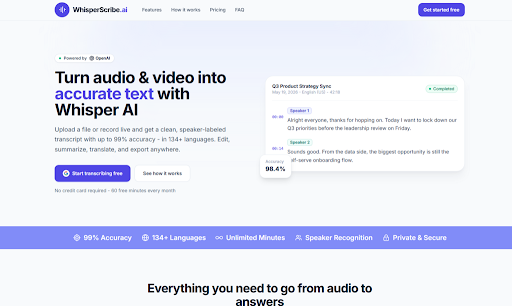
Understanding what the platform does requires looking beyond the surface-level features. The underlying model is OpenAI's Whisper, which provides the core speech recognition capability. But the platform adds several layers on top of that foundation—layers that transform raw text into something more useful.
The Intelligence Layer: Beyond Simple Transcription
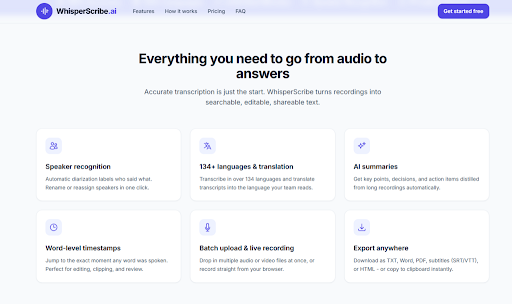
The platform doesn't just convert speech to text. It structures the output, separates speakers, adds timestamps, and provides tools for summarization and translation. This isn't a passive transcription service; it's an active processing engine that prepares the content for whatever comes next.
The automatic language detection is particularly noteworthy. There's no need to specify the source language—the system figures it out. This matters for international teams, for researchers working with multilingual sources, or for anyone who receives recordings from colleagues in different regions. The platform supports over 134 languages, which covers the vast majority of professional use cases.
The Editing Layer: Where Precision Happens
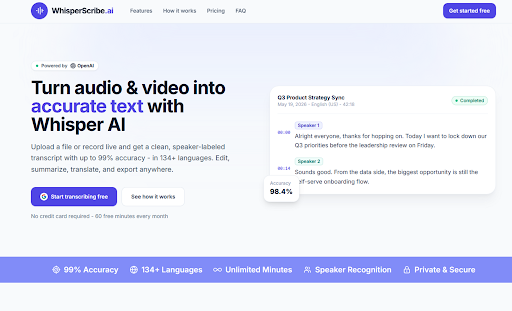
The built-in editor is where the platform's design philosophy becomes apparent. The transcript appears with speakers clearly labeled, timestamps visible, and text that's fully editable. You can fix names, merge or split speaker lines, and adjust timestamps. The editor auto-saves changes, so there's no risk of losing corrections.
This matters because no automated system is perfect. The platform's accuracy on clear audio reaches up to 99%, but challenging audio—background noise, heavy accents, overlapping speech—produces lower accuracy. The editor makes cleanup straightforward rather than painful, which is the difference between a useful tool and a frustrating one.
The Workflow: How the Platform Actually Operates
The platform's workflow is designed for efficiency. Everything happens in the browser, with no software to install and no configuration to manage.
Step 1: Getting Content Into the System
Flexible Input Options
The platform accepts any common audio or video format, with a per-file limit of 2 GB. You can upload files by dragging them into the browser window or by clicking to browse your file system. Batch upload support allows you to queue multiple files at once, which is essential for processing multiple recordings in a single session.
The live recording option adds another dimension. Click the microphone icon, grant browser permissions, and the platform captures audio directly from your system input. This is useful for quick dictation, for capturing meetings that happen in real time, or for situations where you want a transcript of something you're about to say rather than something you've already said.
Step 2: The Transcription Process
Automatic Processing and Speaker Separation
Once the file is uploaded, the platform's transcription engine takes over. The system automatically detects the language, separates speakers, and returns the transcript in seconds. The speed varies depending on the length of the recording and the complexity of the audio, but in testing, a forty-minute meeting transcript was available within a few minutes.
The speaker separation, or diarization, labels each speaker automatically. In multi-participant recordings, this creates a structured transcript where each speaker's contributions are clearly delineated. The system doesn't always get the labels right—similar voices or overlapping speech can confuse the algorithm—but the one-click reassignment feature makes corrections simple.
Step 3: Refining and Exporting
Editing, Summarizing, and Translating
The transcript appears in the editor, where you can make corrections, adjust speaker labels, and refine the text. The AI summary feature generates a condensed version of the recording, highlighting key points, decisions, and action items. This is particularly useful for long recordings where the full transcript is more than you need to review.
The translation feature allows you to translate the transcript into another language. This is useful for international teams, for content that needs to be shared across language barriers, or for researchers working with multilingual sources.
Export Options
The platform offers a range of export formats: TXT, Word (.docx), PDF, subtitles (SRT and VTT), and HTML. You can also copy the transcript directly to the clipboard. The Free plan restricts exports to TXT, which is sufficient for basic use but may be limiting for users who need richer formats.
Privacy and Security Considerations
The platform takes privacy seriously. Files and transcripts are encrypted at rest with AES-256 and stored on enterprise-grade infrastructure. Every upload and request runs over TLS/HTTPS, protecting data from the browser to the servers. Users can delete any recording or transcript at any time, and the platform does not sell user data.
The web-based nature of the service means files are processed on remote servers. For users who require absolute data locality—for example, handling sensitive legal or medical recordings—this may still be a consideration.
Pricing Structure
The pricing model is straightforward:
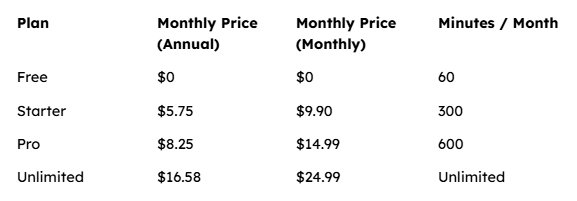
The Free plan provides 60 minutes of transcription per month with no credit card required. Annual billing saves up to 45%, which makes the paid plans more attractive for regular users.
Strengths and Limitations
What Works Well
The platform excels at processing clear, well-recorded audio. In those conditions, the accuracy is impressive, the speaker labeling is reliable, and the summary feature produces genuinely useful output. The batch upload capability is a significant time-saver for anyone dealing with multiple recordings. The editor is intuitive and responsive, and the export options cover the formats most users actually need.
The combination of features—speaker labeling, word-level timestamps, summaries, translation, and flexible export—makes this a genuinely useful tool for a wide range of professional users.
Where It Falls Short
The platform's accuracy is heavily dependent on audio quality. Noisy environments, heavy accents, or overlapping speech produce lower accuracy—sometimes significantly so. The speaker recognition system, while impressive, isn't infallible. In recordings with more than three speakers, occasional mislabeling occurred.
The web-based nature of the service means you need an internet connection to transcribe. For users who frequently work offline or in areas with poor connectivity, this is a genuine constraint.
The AI summary and translation features are useful but not perfect. Summaries occasionally miss nuance, and translations read as competent but not literary. For most business and content workflows, this is entirely sufficient. For academic or legal work requiring absolute precision, manual review remains essential.
Who Should Use This Tool
The platform is best suited for professionals who regularly deal with audio or video content and need accurate, editable transcripts without spending hours on manual transcription. Journalists, researchers, video editors, podcasters, and business professionals will all find the feature set directly useful.
The Free tier makes it easy to test whether the tool fits your workflow. For users who transcribe less than an hour per month, the Free plan may be all that's needed. For those with heavier workloads, the Pro and Unlimited plans offer good value.
A Practical Assessment
Whisper AI represents a thoughtful approach to the transcription problem. It doesn't just convert speech to text; it prepares that text for whatever comes next—whether that's editing, summarizing, translating, or exporting to another format. The three-step workflow is efficient, the editor is intuitive, and the export options cover the formats most users actually need.
The platform has limitations, and they're worth acknowledging. Accuracy varies with audio quality. Speaker labeling isn't perfect. The web-based nature of the service requires an internet connection. But within its intended use cases—clear recordings, professional workflows, reasonable expectations—the platform delivers genuine value.
For anyone who has ever spent hours transcribing a recording, the value proposition is clear. The platform doesn't claim to eliminate all human effort. It claims to reduce it substantially, and on that front, it delivers. The question isn't whether the platform is perfect. The question is whether it makes transcription work easier, faster, and more productive than the alternatives. Based on a week of testing across a variety of real-world scenarios, the answer is yes.
HOW DO YOU FEEL ABOUT FASHION?
COMMENT OR TAKE OUR PAGE READER SURVEY
Featured




Deep clean, seal, and protect your tile & grout in Oceanside, CA. Bring the original shine back to your floors. Request a quote today!