
How AI Assistants Can Now Make Video Ads for You
PAGE
By PAGE Editor
AI assistants such as ChatGPT and Claude can now create finished video ads through a connection standard called the Model Context Protocol, or MCP. Instead of switching between apps, a user describes the ad in a normal chat, and the assistant passes the request to a specialized ad-making service that handles scripts, visuals and editing. Videos typically take several minutes to generate, and the assistant delivers them when they’re ready. For freelancers, side-hustlers and small business owners, this turns ad creation into something as simple as sending a message, though every result still needs a careful human review before it goes live.
The chat window is becoming a creative studio.
What MCP Actually Is
Most people use AI assistants to answer questions, write emails or brainstorm ideas. Until recently, these assistants worked mostly on their own, without direct access to other software.
The Model Context Protocol changes that. It’s an open standard that lets AI assistants connect to outside tools and services in a consistent way. Think of it as a universal adapter: once a service supports MCP, any compatible assistant can use it, without each company building a custom connection for every app.
That opens the door for assistants to do real work in specialized software, including design, data analysis and video production.
From Chat Message to Finished Ad
Video advertising is a good example of how this works in practice. Creatify, an AI ad platform, released an AI creative agent in May 2026 that researches brands, writes scripts and produces ads through conversation, as described in its launch announcement. The company has since made those abilities available inside popular assistants.
With Creatify’s MCP integration, users connect their account to ChatGPT or Claude, then ask for an ad in plain language. A request might be as simple as describing a product, a mood and a call to action. The company says its MCP server also works with any MCP-compatible client, not just those two assistants.
Behind the scenes, the request goes to Creatify’s tools, which handle production. Chat responses come back in seconds, while video generation usually takes 5 to 15 minutes. Because the process runs in the background, the assistant checks on progress and delivers the finished files when they’re done, rather than freezing the conversation.
What You Can Ask For
The appeal is that people can describe ads the way they’d describe them to a friend. Creatify lists a range of ready-made starting points, including:
Turning a product page into short video ads sized for social media
Creating several opening hooks for the same ad to see which grabs attention
Resizing one video into vertical, square and widescreen formats
Translating a successful ad for new markets
Rewriting real customer reviews into scripts for AI presenters
Refreshing an ad that’s lost momentum without changing its core idea
This means a small business owner can go from “I need an ad for our new candle scent” to several finished options without learning editing software.
It Remembers Your Brand
One of the frustrations with AI tools is repeating the same details every time. Creatify says its MCP setup saves brand preferences so they carry into later chats. It can also pull product information from a web page, including colors and logo options, to keep ads consistent with the brand.
For someone running an online shop or a side business, that consistency matters. Customers should recognize your brand whether they see an ad today or next month.
How It Compares to Traditional Ad Creation
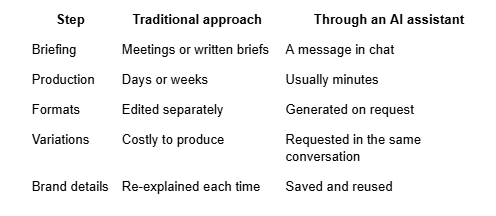
This doesn’t make professional creatives obsolete, but it does give smaller businesses and individual creators a practical way to start.
Choosing How Much Control You Want
Creatify offers several generation modes through its MCP connection. A default mode includes a full creative review of each scene, a faster mode skips reviews for quick drafts and other options give users more direct control. Generations draw on the same credits as the main Creatify platform, and each request reports the credits it used, which helps users keep track of spending.
The company’s newer models, such as the advertising-focused Boreal-H3 released in October 2026, show how quickly the technology behind these tools is improving.
Tips for Getting Better Results
A few habits make AI-generated ads more effective:
Be specific. Describe your audience, tone, colors and call to action.
Ask for variations. Compare different hooks or openings before choosing one.
Use accurate product details. Double-check prices, features and claims.
Review on a phone. Most viewers will watch on small screens.
Test before spending big. Run small campaigns to see what works.
Keep it honest. Avoid implying that AI presenters are real customers.
Things to Keep in Mind
Convenience doesn’t remove responsibility. AI can still make mistakes, misread instructions or produce visuals that don’t feel right. Always watch the final video, check every word on screen and make sure the ad reflects your business accurately.
It’s also worth reviewing what account access you grant when connecting any service to an AI assistant, and disconnecting tools you no longer use.
Creativity, One Message at a Time
Connecting AI assistants to specialized tools is changing how everyday people create content. For video ads, that means fewer apps, faster drafts and more room to experiment.
The ideas still come from you. Now the assistant can help bring them to life.
HOW DO YOU FEEL ABOUT FASHION?
COMMENT OR TAKE OUR PAGE READER SURVEY
Featured

AI assistants such as ChatGPT and Claude can now create finished video ads through a connection standard called the Model Context Protocol, or MCP.