
The Physics of Presentation Washout
PAGE
By Finixio Digital
You spend months planning a high-stakes corporate summit. The catering is perfect, the seating is flawless, and the keynote speaker finally steps onto the stage. They click to their first slide, and the room deflates. The text is a faded, muddy gray, completely unreadable against a washed-out background.
This nightmare scenario happens constantly at live events. Planners often treat audiovisual equipment as a universal tool, but physics tells a different story. The core problem is simple: ambient light can overpower the light from a projector, causing the picture to look washed out. Bright sunlit windows and harsh overhead venue lighting easily swallow the output of a standard office projector.
To avoid this disaster, you must match your projection power and lens types to a venue's specific lighting conditions and physical dimensions. Event planners need to understand the relationship between ambient light, screen size, and projector specifications. Choosing the right hardware prevents faded visuals and guarantees your audience actually sees the presentation you worked so hard to build.
Figuring out the exact specifications for a specific room can feel overwhelming. If you are unsure how to match equipment to your space, you can learn more about venue-specific AV matching and high-lumen rental options. Getting the math right before load-in day saves time, money, and your reputation as an event professional.
Key Takeaways
ANSI lumens serve as the only reliable, standardized metric for measuring projector brightness at professional events.
Calculating the throw distance formula dictates whether your venue requires a standard, short-throw, or ultra-short-throw lens.
High ambient light spaces and outdoor venues demand specialized, high-lumen equipment to guarantee visual clarity.
Demystifying Projector Brightness: Marketing Lumens vs. ANSI Lumens
Event planners often ask what ANSI lumens are and why they matter so much when sourcing AV equipment. The answer comes down to industry testing standards. ANSI stands for the American National Standards Institute. When a projector has an ANSI lumen rating, it means the manufacturer tested the equipment's brightness across multiple points on a screen under strict, standardized conditions.
Consumer projectors often advertise incredibly high numbers on the box. These are known as "marketing lumens" or peak lumens. Manufacturers generate these numbers by measuring the single brightest spot on the projector's lamp, completely ignoring how that light distributes across a screen. This leads to wildly inflated numbers that do not reflect real-world performance.
Renting equipment based on standard marketing numbers creates a massive risk for your event. You might rent a consumer projector claiming 9,000 lumens, only to find it performs like a 2,000-lumen model in a bright conference room. Professional AV gear relies entirely on the ANSI or ISO standard to communicate actual, usable brightness.
Professionals in the audiovisual industry constantly warn against trusting unverified specifications. Always verify the ANSI rating before signing a rental agreement.
How to Calculate Lumens for Your Specific Event Space
Figuring out exactly how many lumens you need requires looking at your specific room layout. Planners often wonder how the requirements change between a moderately bright boardroom and an outdoor daytime event. The answer lies in the relationship between your room size, your screen dimensions, and the presence of ambient light.
A larger screen spreads the projector's light over a wider surface area. This means a 180-inch screen requires significantly more lumens to look vibrant than a smaller 120-inch screen. When you add ambient light from large windows or outdoor sun, you need even more power to punch through that light pollution.
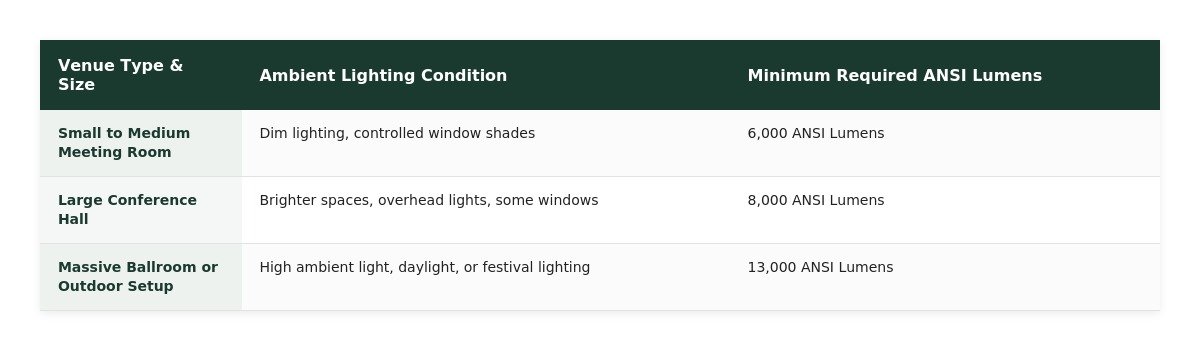
Outdoor setups carry their own specific baseline requirements because you compete directly with the sun or local streetlights. However, professional corporate setups often need much higher outputs to guarantee perfect visibility.
To simplify the planning process, use the baseline data below to match your venue type with the minimum required ANSI lumens.
The Math Behind Throw Distance and Venue Depth
Throw distance is the physical space required between the projector lens and the projection screen to create an image of a specific size. Event planners must calculate this distance perfectly before load-in day. If you skip this math, you risk renting a projector that physically does not fit inside your venue's layout.
Calculating this requirement relies on a simple mathematical formula: Throw Distance = Throw Ratio × Screen Width. Every projector lens has a specific throw ratio, usually listed as a number like 1.5:1. This means for every foot of image width you want, the projector must sit 1.5 feet away from the screen.
Your chosen resolution also interacts directly with this formula. Professional corporate events typically use WUXGA (1920×1200) resolution. WUXGA provides a 16:10 aspect ratio, which dictates the exact width of your screen compared to its height. You must use the precise width of that 16:10 screen in your throw distance equation to get an accurate measurement.
Miscalculating this formula easily causes last-minute setup disasters. Imagine renting a 180-inch wide screen and a projector with a 2.0 throw ratio. The math says the projector needs to sit 30 feet back from the screen. If your rented breakout room is only 25 feet deep, the projector hits the back wall before the image fits the screen. You are left scrambling for a replacement lens hours before the event starts.
Overcoming Physical Venue Constraints
Utilizing Short-Throw and Ultra-Short-Throw Lenses
Many modern venues look beautiful but offer terrible dimensions for audiovisual setups. Planners frequently struggle with projecting large images in shallow rooms with limited floor space. When your venue depth is restricted, you must swap your standard equipment for short-throw or ultra-short-throw lenses.
A standard lens requires significant distance to create a large picture. This setup often forces you to place the projector directly in the middle of the audience seating area. By swapping to a short-throw lens, you can move the projector much closer to the screen. This simple change frees up valuable floor space and stops attendees from accidentally walking through the light beam and casting shadows on the presentation.
Tight stages benefit even more from specific lens choices. Using an ultra-short-throw lens allows for rear projection setups. You can place the projector just a few feet behind the screen, completely hiding the equipment from the audience. This keeps the stage looking clean and prevents the presenter from being blinded by a front-facing projector lamp.
Adapting to Non-Standard and Outdoor Venues
Physical venue constraints go beyond just room depth. Historic buildings, museums, and unconventional event spaces often feature structural limitations that impact your equipment layout. For example, historic ceilings frequently have strict rules prohibiting any rigging or mounting of AV gear.
When you cannot mount a projector to the ceiling, you need alternative hardware solutions. Truss-mounted projector systems offer a safe, stable workaround for non-standard rooms. AV teams can build freestanding aluminum truss towers at the back of the room. This elevates the projector over the audience's heads without drilling into protected venue architecture.
Outdoor environments introduce weather and extreme elements into the planning equation. Outdoor festivals, evening weddings, and community movie nights cannot rely on indoor office equipment. These events require IP65-rated weatherproof projector enclosures. These specialized cases protect high-lumen projectors from rain, dust, and humidity, keeping your event running smoothly regardless of the forecast.
Conclusion
Treating audiovisual projectors as a one-size-fits-all solution is a direct path to presentation washout and physical setup failures. Every room has a unique combination of ambient light, ceiling height, and floor depth. Standard office equipment simply cannot adapt to the harsh lighting of a corporate ballroom or the depth restrictions of a historic venue.
To protect your event, always follow the core technical steps of AV planning. Verify the true ANSI lumen count to combat ambient light effectively. Calculate the throw distance mathematically using your specific screen width and aspect ratio. Finally, account for your venue's physical depth by selecting the appropriate standard, short-throw, or ultra-short-throw lens.
Live events contain hundreds of moving parts and are incredibly complex to manage. However, matching the correct technical specifications to your venue makes the execution simple. When you respect the physics of light and space, you deliver a flawless visual experience for every single attendee in the room.
HOW DO YOU FEEL ABOUT FASHION?
COMMENT OR TAKE OUR PAGE READER SURVEY
Featured





Yes. A yellow light dispute can affect your car accident claim because it helps determine who was responsible for the collision.