
Image to Image as a Practical Creative Workflow

PAGE
By PAGE Editor
When people first try Image to Image, they often expect a novelty feature that simply restyles a photo. In my testing, the more interesting part is not the effect itself but the shift in workflow. Instead of starting from a blank canvas, you begin with visual structure that already exists and then guide it toward a new use. That matters because many creators are not short on ideas. They are short on time, iteration speed, and reliable ways to transform one visual into many useful versions.
That is also why this kind of tool feels more relevant now than it did a year ago. Modern content work is no longer only about making one good image. It is about adapting assets across formats, audiences, moods, and campaigns without rebuilding everything from zero. A strong source photo can become a product concept, a branded scene, a stylized portrait, or even the starting frame for motion. The platform’s value becomes easier to understand when viewed through that lens.
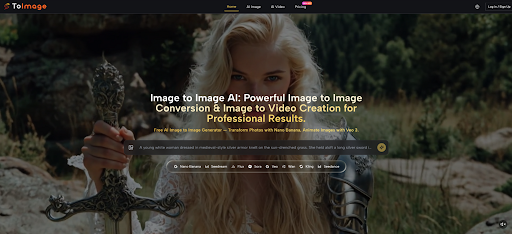
Why Source-Guided Creation Feels More Practical
A prompt-only workflow can be exciting, but it is often unstable when the user already has a clear visual target. Starting from an existing picture changes that. The source image gives composition, subject placement, lighting direction, and visual constraints. The model then interprets what should change instead of guessing everything from scratch.
That sounds like a small distinction, but it produces a very different creative experience. In personal testing, source-guided transformation tends to reduce the gap between intention and output, especially when the job is not pure imagination but controlled revision. For ecommerce, social media, branding, and editorial work, that difference is often more important than raw spectacle.
How The Platform Structures Creative Control
The platform is built less like a single-purpose editor and more like a model hub for visual transformation. Rather than pushing one engine for every task, it gives access to several models with different strengths. That design makes sense because not every creative problem needs the same kind of intelligence.
One Workspace Connects Several Model Personalities
From the official flow, the system revolves around a simple sequence: upload a source image, describe the transformation, and select a model. The practical advantage is that model choice is not an afterthought. It is part of the editing logic.
Some models are positioned for realism and reference control. Others favor fast output, broader experimentation, or more precise context-aware edits. There are also video-oriented options on the same platform, which means a still visual can later become motion content without switching to a completely different ecosystem.
The Real Difference Comes From Task Matching
In my observation, platforms like this work best when users stop asking which model is “best” in general and start asking which model fits the job. A realistic fashion variation, a brand-consistent product mockup, and a surgical text edit inside an image are not the same task. Treating them as the same usually leads to disappointment.
That is why the platform’s multi-model structure matters more than a single headline claim. It encourages a more practical habit: define the result first, then choose the engine.
What The Official Workflow Actually Looks Like
The official process is straightforward, and that simplicity is part of the appeal. It does not ask users to learn a complicated node system or build a technical pipeline before they can get value.
Upload A Source Visual With Intent
The first step is to upload the image you want to transform. This source file is not just an attachment. It is the visual foundation the system reads for subject identity, composition, color relationships, and scene structure.
For many users, this is where the workflow becomes less abstract. Instead of describing everything from nothing, they begin with something concrete that already carries useful information.
Describe The Change In Plain Language
The next step is to describe what should change. Based on the platform’s own examples and FAQ-style guidance, this can include style conversion, detail enhancement, background changes, or a more complete reimagining of the scene.
The strongest results usually come from clear intent rather than longer prompts for their own sake. In my testing across similar systems, users tend to get better outputs when they specify what must stay stable and what is allowed to change. That keeps the request directional rather than chaotic.
Select A Model That Fits The Job
The third step is model selection. This is where the platform becomes more than a simple filter tool. Nano Banana is presented as the realism-focused option with support for up to four reference images. Nano Banana 2 adds higher-resolution output and batch generation. Seedream is framed around speed and rapid iteration. Flux is described as more context-aware for targeted edits, including text and object-level changes.
That means the platform is quietly teaching an important lesson: creative control is often a routing problem, not just a prompting problem.
Nano Banana Favors Controlled Visual Reinvention
For users who care about realism, material texture, or reference-based continuity, this appears to be the most obvious starting point. The support for multiple reference images is especially relevant for recurring characters, product lines, and brand systems.
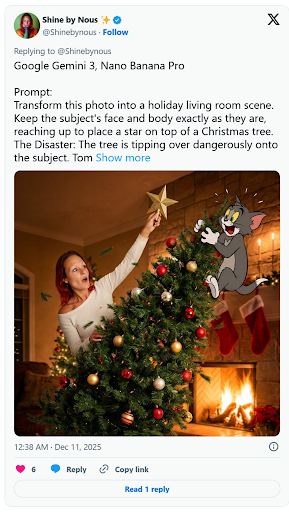
Nano Banana Two Expands Resolution And Volume
When a workflow needs several candidates at once or larger output sizes, the second version looks better suited. The ability to generate multiple options in 1K, 2K, or 4K makes it more useful for comparison and production refinement.
Seedream Rewards Fast Directional Exploration
Not every task requires maximum realism. Sometimes the job is simply to test many visual directions quickly. Seedream seems designed for that stage, where speed matters because the user is still deciding what the image should become.
Flux Helps When Precision Matters More
Flux stands out when the edit needs to feel selective rather than global. If the goal is to preserve most of the picture while changing a local object, modifying embedded text, or making a controlled visual correction, that more surgical behavior is valuable.
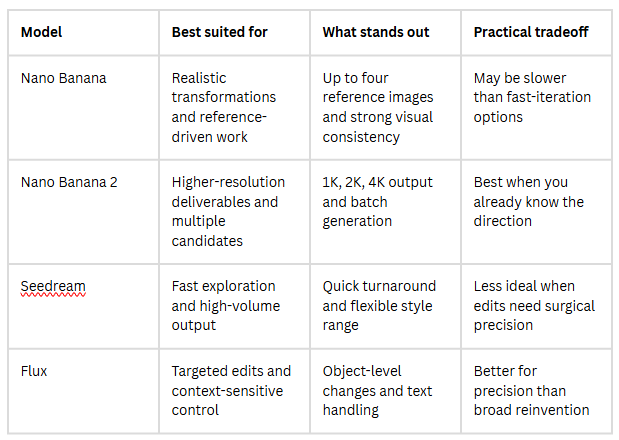
How The Models Differ In Daily Use
A comparison is useful here because the platform’s strengths are easier to understand when the models are viewed side by side.
Where This Workflow Becomes Genuinely Useful
The most persuasive use case is not “art for art’s sake,” though it can do that too. It is the ability to turn one visual asset into multiple forms of working content.
Brand Assets Can Stretch Further
A single product shot can become several campaign directions without requiring a reshoot. A portrait can be adapted into multiple moods for different channels. In practice, this means creative teams can keep visual identity stable while still producing variation.
Social Publishing Gets Faster Without Feeling Empty
There is a real difference between making more content and making adaptable content. When one source image can generate several stylistic directions, the user gains output volume without always sacrificing coherence. That makes the workflow useful for creators who need consistency across regular posting.
Still Images Can Become Motion Later
One of the platform’s broader advantages is that it also connects image-based creation with video generation tools. Even if the first goal is a static visual, the same asset can later move into motion-oriented workflows. That continuity is easy to underestimate until you need it.
What Users Should Keep In Mind
A balanced view matters here. Tools like this can feel surprisingly capable, but they are not magic.
Prompt Quality Still Shapes The Ceiling
Even with a strong source image, vague instructions usually create vague outcomes. Better inputs tend to come from clear decisions about subject, atmosphere, detail level, and what should remain unchanged.
One Attempt Is Rarely The Final Attempt
The platform is clearly designed for iteration, and that is a clue in itself. Comparing outputs across models and trying several generations is part of the workflow, not a sign of failure. In my view, users get more from this kind of system when they treat generation as guided refinement rather than one-click perfection.
Why This Feels Bigger Than A Simple Filter
What makes the platform interesting is not that it can stylize a picture. Many tools can do that. What stands out is the way it organizes visual transformation into a more usable process: start from a source asset, decide what kind of change you want, choose the right model, and compare outcomes with a clearer purpose.
That is a more mature way to think about AI-assisted creation. It moves attention away from novelty and toward workflow design. For creators, marketers, and small teams, that shift may be the real reason this category keeps growing. The output matters, of course, but the deeper value is that one image no longer has to remain only one image.
HOW DO YOU FEEL ABOUT FASHION?
COMMENT OR TAKE OUR PAGE READER SURVEY
Featured





A comfortable home should offer more than a place to sleep and eat.