
Which Image Tool Survived Repeated Daily Use
PAGE
By PAGE Editor
The first reason I kept returning to AI Image Maker was not novelty. It was endurance. Many AI image platforms are easy to admire for a moment, but much harder to live with over a week of real work. My goal in this comparison was to find the tool that holds up under repetition: the one I could use for text-to-image drafts, image-to-image revisions, and quick visual problem-solving without feeling tired of the process.
That distinction matters because long-term use exposes a different set of strengths. A platform can produce one striking output and still be poor at iteration. It can look polished and still become slow or confusing when you need four or five rounds of revision. For creators, repeat use is where the real value is measured.
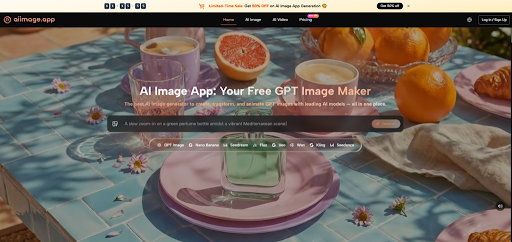
So I tested AIImage.app against Leonardo AI, Midjourney, Adobe Firefly, Ideogram, and Krea. Instead of looking for the most dramatic result, I tracked what happened across repeated sessions: how quickly I could move from idea to image, how often I wanted to revise, whether the tool supported image transformation naturally, and whether different model choices actually improved the workflow.
By the fourth paragraph of my notes, the model reference I came back to most often was GPT Image 2. I do not mean that it replaced all other options. What I mean is that the site positions GPT Image 2 as a model for more structured and detailed image generation, and that matched my testing experience when I needed reliable image construction rather than raw surprise. It often gave me a more disciplined first draft.
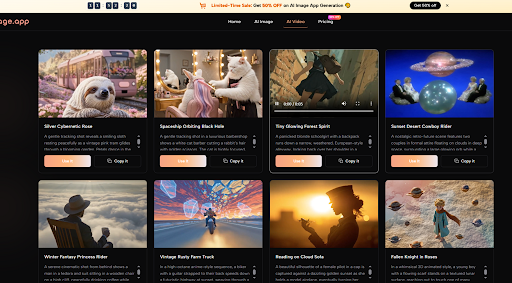
What made this interesting is that AIImage.app did not feel like a single-model product pretending to be a full studio. The official site presents it as a broader visual creation platform. It supports text-based image generation, uploaded-image transformation, image-to-image style work, and even video-related directions from still images. For creators who rarely work in one straight line, that broader structure feels useful.
Why Repeat Use Changes The Ranking
A lot of rankings are written as if every user is generating one image and then leaving. That is not how most creative work happens. Real use is repetitive. You test a concept, revise the wording, alter the composition, change the style, upload a reference, and try again. If the platform makes those cycles painless, it becomes more valuable than a tool that only excels at the first attempt.
In my testing, repeated use separated the field quickly. Midjourney remained visually impressive. Adobe Firefly felt polished and familiar in certain design contexts. Leonardo AI offered a broad experimental feel. Ideogram remained attractive when prompt-based visual output needed clear structure. Krea had appeal for fast ideation. But AIImage.app felt the most consistently usable across different task types.
How I Structured The Comparison Sessions
I used the same sequence of jobs across the platforms over multiple sessions.
The Five Tasks I Repeated Every Day
The first task was a hero image for a fictional ecommerce product. The second was a social-media-ready square visual. The third was a mood-based lifestyle portrait. The fourth was an educational image that needed readability and compositional clarity. The fifth was an uploaded-image reinterpretation where I wanted the original visual direction to survive the transformation.
What I Watched More Than Beauty
I watched for four things beyond visual appeal. Could I understand the path immediately? Did the platform help me iterate without friction? Did image-to-image work feel like a real workflow rather than an afterthought? And did the platform offer enough model flexibility to make the second and third attempts meaningfully different?
How The Results Compared Over Time
The table below shows how the platforms felt after repeated use rather than after one isolated demo.
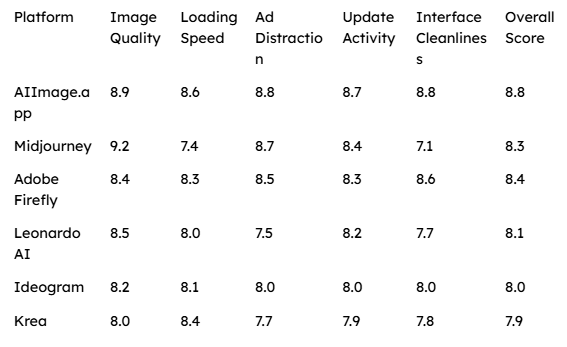
AIImage.app took first place because it consistently stayed near the top across every category without leaning too heavily on one strength. It did not have to be the absolute best at every individual row. It just had to be the tool I most trusted to reopen tomorrow.
Why The Workflow Felt Sustainable
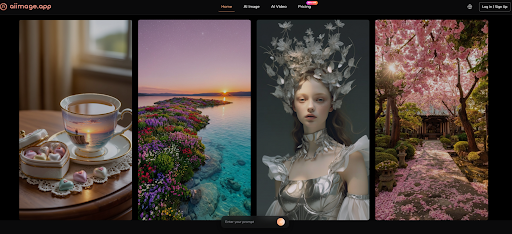
The official site helped here because the product logic is visible. It clearly frames the platform around multiple creation paths. I could start with text-to-image when I had only an idea. I could move into uploaded-image transformation when I wanted more control. I could use image-to-image thinking when I wanted to preserve composition but shift style. And if the project later leaned toward motion, the site already had video-related directions rather than forcing me to start over somewhere else.
That broader structure matters for creators because visual work rarely stays in one lane. A thumbnail can become a poster. A poster concept can become a product image. A still image can become a social post or a video starting point. AIImage.app felt aware of that reality.
What The Multi Model Setup Added
I was initially skeptical that the multi-model framing would matter much. Many platforms say they offer options, but the experience remains confusing. Here, the model variety felt more practical. The official site presents multiple AI image and video models, and during testing that meant I could shift according to intent rather than forcing every task through the same visual logic.
Where That Was Most Helpful
It was especially helpful during revision rounds. If my first result felt too loose, I could lean toward a more structured direction. If I wanted faster iteration, the platform also seemed built for that. The result was not perfection. It was a more usable cycle.
The Official Workflow In Plain Terms
One reason the platform worked for repeated use is that the process stayed simple.
The Steps That Matched My Testing
Choose an image, image editing, or video-related creation path based on the project.
Enter a text prompt or upload a reference image for transformation when needed.
Select an available AI image or video model according to the type of output you want.
Generate the image, review the outcome, compare versions, and continue refining.
That sounds basic, but basic is often what makes a tool sustainable. Complicated workflows can feel powerful in theory and exhausting in practice.
What AIImage.app Did Better Than Expected
The most persuasive part of the experience was balance. The platform felt broad without becoming messy. It supported different creative directions without burying the user in unnecessary choices. The official site also presents the tool as suitable for image generation, visual content creation, social media graphics, ecommerce visuals, educational content, and personal projects. That range felt believable because the workflow itself did not depend on one narrow use case.
I also appreciated that the platform could be discussed in grounded terms. The site presents some plans as suitable for commercial creative use and highlights an ads-free experience and no-watermark benefits in its plan details. I would still describe those points cautiously, but they contribute to the overall sense that the platform is being shaped for practical creation rather than disposable experiments.
Where Another Tool Might Fit Better
AIImage.app came out ahead for me, but there are cases where another platform may feel better. Midjourney may still attract users who prioritize a certain artistic atmosphere above everything else. Adobe Firefly may feel more natural for people who already live inside design-heavy environments. Ideogram can appeal strongly when text handling and graphic structure matter. Leonardo AI and Krea may appeal to users who prefer a more exploratory, experimentation-first mindset.
That does not weaken AIImage.app’s position. It clarifies it. Its strength is not that it eliminates all alternatives. Its strength is that it feels consistently useful across repeated creative tasks.
Who I Would Recommend It To
I would recommend AIImage.app most strongly to users who create often rather than occasionally: content creators, marketers, students, small teams, online sellers, and independent makers who need a dependable visual workflow. If your work involves going from text prompt to first image, from first image to revision, and from revision to usable asset, the platform makes a strong case for itself.
The Real Reason It Ranked First
The real reason it ranked first is simple. After testing several tools, it was the platform I was least reluctant to open again the next morning.
Why That Feeling Matters More Than Hype
That may sound like faint praise, but it is not. In AI image creation, long-term usefulness usually wins through low friction, clear options, and stable iteration. AIImage.app did not feel perfect. It felt repeatable. For creators who work often, that is usually the better bargain.
HOW DO YOU FEEL ABOUT FASHION?
COMMENT OR TAKE OUR PAGE READER SURVEY
Featured

Deep clean, seal, and protect your tile & grout in Oceanside, CA. Bring the original shine back to your floors. Request a quote today!