
Convert PDF to PPT Online Free–No Email Required
PAGE
By PAGE Editor
Last quarter, a colleague spent three hours manually recreating a 28-slide PDF proposal in PowerPoint — reformatting every heading, re-inserting every chart, fixing every broken text block. The original PDF was clean. The final deck looked nearly identical. Three hours, gone.
That is the kind of pain a good PDF to PPT converter eliminates in under 60 seconds.
This is not a roundup of ten tools you will never use. It is a practical walkthrough of how the conversion actually works, what breaks during the process, and how to get a clean, editable .pptx file from a PDF without handing over your email address or sitting through a paywall.
The Real Problem With PDFs in a Presentation Workflow
PDFs are brilliant for distribution. They render identically on every device, they are compact, and nobody can accidentally move a text box. That consistency is also exactly what makes them useless in a live editing environment.
Try dropping a PDF into a PowerPoint deck mid-project. You get a flat image — not a slide. You cannot edit the title. You cannot swap the font to match your master slides. You cannot rearrange bullet points for a different audience. The content is locked inside a container that was never designed to be touched.
Sound familiar?
The scenario repeats constantly: a vendor sends a PDF proposal, a researcher shares a PDF report, a colleague emails a PDF one-pager — and somewhere downstream, someone needs to turn that document into a living, editable presentation. Without a proper converter, that means rebuilding from zero.
What Actually Happens During PDF to PPT Conversion
Most people assume conversion is just "extracting" content. It is more complicated than that, and understanding it helps you predict where output quality will vary.
A PDF stores content as a series of positioned objects — text blocks, image layers, vector shapes — mapped to coordinates on a page. There is no concept of "this is a slide title" or "this is a bullet list." A converter has to interpret that positional data and reconstruct it as PowerPoint XML, which does have those structural concepts.
When the source PDF was originally exported from PowerPoint or a design tool like InDesign, the text layer is clean and parseable. A 30-page document converts in roughly 45 to 60 seconds, and the text blocks land in editable text boxes with formatting largely intact.
When the source PDF is a scanned document — a photographed whiteboard, a faxed contract, a physical brochure that was photographed — there is no text layer. The converter sees pixels, not characters. Output quality drops sharply unless the tool includes optical character recognition.
Knowing which type of PDF you are working with before you upload saves frustration.
How to Convert PDF to PPT Free Using AIPPT — Step by Step
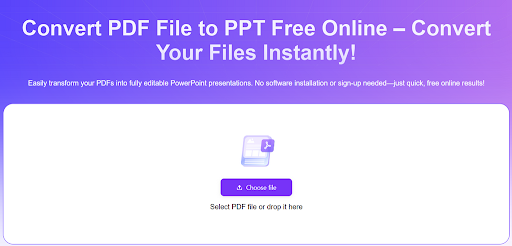
AiPPT runs a browser-based pdf to ppt converter that requires no account, no email verification, and no installed software. Here is the actual process from upload to editable deck.
Open the tool directly. Go to www.aippt.com and navigate to the PDF to PPT converter. The interface loads immediately — no forced landing page, no cookie consent wall blocking the upload button.
Upload the PDF. Click to browse or drag the file straight into the window. The tool accepts standard PDFs up to the specified size limit. A 20-slide PDF with embedded images uploads in a few seconds on a normal connection.
Run the conversion. Hit the convert button. For a clean, text-based PDF of 15 to 30 pages, the process typically completes in under 60 seconds. Larger files with heavy image content take longer — expect one to three minutes for anything above 50 pages.
Download the .pptx file. Once conversion finishes, the download link appears immediately. No confirmation email. No "check your inbox" delay. The file lands on your device ready to open.
Open and review in PowerPoint. This step matters. Even on a clean conversion, spend five minutes checking that text boxes are positioned correctly, that fonts rendered properly, and that any charts or tables came through as editable objects rather than flattened images. Fix anything that shifted during the process before you share the deck.
Total time for a standard 20-slide PDF: under three minutes from upload to an editable deck you can work with.
The Editing Phase Is Where the Real Value Shows Up
Conversion gets you in the door. Editing is where the efficiency compounds.
Once the PDF content exists as a proper PowerPoint file, you can apply a master slide template in seconds — your company colors, logo placement, font scheme — across the entire deck at once. That single action would have taken 30 minutes of manual reformatting per slide with a manually rebuilt deck.
You can also pull individual slides into other decks. A client case study that lived as a PDF can become a modular slide block you insert into any pitch. A competitor analysis PDF can be split into individual slides and reorganized by theme. A training document can have new slides inserted between existing ones.
None of that is possible when content is locked in a PDF.
Why No-Email Access Matters More Than It Sounds
This is worth addressing directly because a lot of "free" tools are not actually free — they are lead generation tools wearing a free converter costume.
The exchange typically works like this: you upload a sensitive document (a business proposal, a financial report, a product roadmap), you get your converted file, and the service gets your email address, your company name, and metadata about the type of documents your business handles. That data feeds a sales sequence.
If you are uploading internal documents, proposals, or anything with confidential data, that trade-off carries real risk. A converter that operates without registration removes that data exposure entirely.
AIPPT's pdf to powerpoint tool does not require account creation for basic conversions. Upload, convert, download. The interaction ends there.
When Conversion Results Are Imperfect — And How to Fix Them
No converter produces a perfect result 100% of the time. Here are the specific failure modes you will actually encounter and how to handle each one.
Text renders as an image. This happens with scanned PDFs. The slide looks right visually but the text is not selectable or editable. Fix: use an OCR tool on the source PDF first to add a text layer before running the conversion again.
Columns collapse into a single block. Multi-column layouts — common in annual reports and academic papers — sometimes merge into a single left-aligned text box. Fix: manually split the text box into two and reposition. Takes two minutes per affected slide.
Fonts substitute incorrectly. If the source PDF used a proprietary or uncommon font, the converter substitutes the closest system font available. Fix: open the slide master, apply your preferred font globally, and the substitution becomes irrelevant because your brand font takes over.
Images lose resolution. Compressed PDFs sometimes contain low-resolution embedded images that look fine at PDF zoom levels but appear blurry in a full-screen slide presentation. Fix: source the original high-resolution image file and re-insert manually.
Tables flatten into images. Complex tables frequently convert as image objects rather than editable PowerPoint tables. Fix: use PowerPoint's built-in table tool to recreate the table, or use a dedicated table extraction tool on the PDF before conversion.
Most conversions require minor touch-up on one or two slides. Full rebuilds are rarely necessary with a quality tool and a clean source PDF.
Specific Scenarios Where This Workflow Saves Significant Time
Quarterly business reviews. Finance teams regularly receive PDF reports from external analysts. Converting a 40-page PDF analyst report into editable slides allows the key metrics to be extracted, reformatted with company branding, and presented in under 30 minutes rather than rebuilding charts from scratch.
Proposal repurposing. A sales team receives a competitor's public-facing PDF proposal or case study. Converting it to PowerPoint allows direct annotation, comparison slides, and integration into a competitive battle card deck.
Training content updates. Compliance and HR teams often hold years of training materials in PDF format. Converting these to editable PowerPoint files lets trainers update regulatory references, add new scenarios, and insert current employee data without rebuilding the structural framework of each module.
Academic presentations. Research papers, conference proceedings, and literature reviews published as PDFs become the source material for conference talks. A 25-page paper can become a structured 12-slide presentation deck in minutes once the PDF is converted, rather than hours of manual slide composition.
A Note on File Security
Before uploading any document to an online converter, check whether the service publishes a clear data retention policy. Responsible services process the file, perform the conversion, and delete the uploaded document from their servers within a defined window — typically within 24 hours or immediately after download.
If you are working with a document that contains confidential client information, internal financial projections, or proprietary product details, either confirm the tool's deletion policy before uploading or use a locally installed conversion tool for that specific file.
For general business documents, marketing materials, and non-sensitive presentations, browser-based converters are efficient and practical.
The Bottom Line
Three hours to recreate a 28-slide deck manually. Under 60 seconds to convert it with the right tool and spend the remaining time actually improving the content.
That gap is not marginal. It is the difference between a presentation workflow that scales and one that bottlenecks every time someone sends a PDF.
Find the converter that handles your file types cleanly, does not demand your email in exchange for access, and outputs proper editable .pptx files rather than image-heavy shells. Use the time you recover to do the work that actually requires human judgment — the narrative structure, the data interpretation, the design decisions that make a presentation worth watching.
The conversion itself? That part should take less time than brewing a coffee.
HOW DO YOU FEEL ABOUT FASHION?
COMMENT OR TAKE OUR PAGE READER SURVEY
Featured





Twelve times on input and twelve times on output is not a ratio you usually find inside a single vendor's lineup.