
How to Use an AI PPT Generator for Client Presentations

PAGE
By PAGE Editor
Client presentations are often where deals are decided—not because of product features, but because of how clearly the message connects with the client’s decision-making process.
Over the years, I’ve noticed something simple but consistent: most failed presentations don’t fail due to weak ideas. They fail because the story arrives in a format the client’s brain has to “reconstruct” on the spot.
That reconstruction step is where attention is lost.
This is also where AI-assisted presentation workflows have quietly changed how teams prepare for meetings.
Why Client Presentations Fail Even When the Product Is Strong
I still remember a pitch I worked on early in my career. The product was solid, the market fit was clear, and the team had strong data. But during the meeting, something didn’t land.
The client kept asking to “go back to slide 5,” then “clarify slide 7.” By the end, the discussion shifted from value to confusion.
The issue wasn’t content quality. It was cognitive load.
Most traditional decks suffer from:
Overloaded slides with mixed messaging
Lack of narrative hierarchy
Weak connection between problem and solution
Too much time spent on formatting instead of thinking
And once attention is lost in a client meeting, it rarely comes back.
Why AI Changed My Workflow (and Not Just My Output)
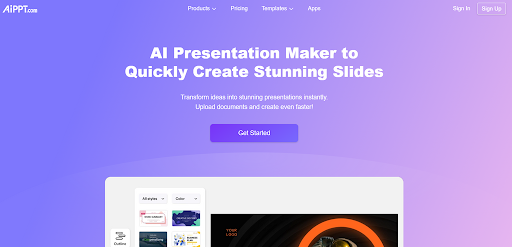
The first time I used an ai powerpoint generator, I didn’t expect much. I assumed it would just “format slides faster.”
What actually changed was earlier in the process.
Instead of starting with blank slides, I started with structure.
When I input raw notes, the system helped organize them into:
A clear problem narrative
A logical solution sequence
A simplified flow of value delivery
A more natural progression toward decision-making
It didn’t replace thinking. It reduced friction between thinking and expressing.
That distinction matters more than most people realize.
Step 1: Start With the Client’s Decision Environment
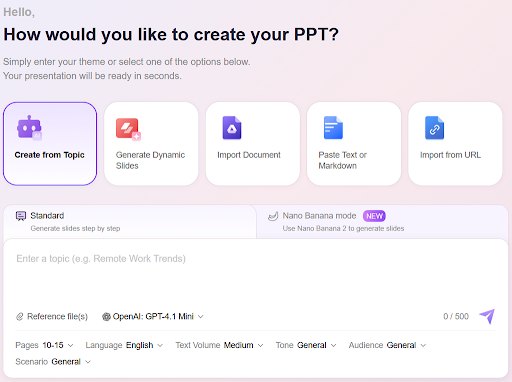
One of the most overlooked parts of presentation design is understanding how the client actually makes decisions.
Before building anything, I now ask:
What risk is the client trying to eliminate?
What internal justification do they need to move forward?
Who else influences the decision?
A CFO does not evaluate the same way as a product manager. A procurement team does not respond to the same messaging as a startup founder.
Without this clarity, even a well-designed deck becomes noise.
Step 2: Use AI to Structure, Not Just Generate Slides
A common misunderstanding is that AI is for “creating slides.”
In practice, the real value is structural.
When using an AI presentation generator for business decks, the strongest output comes from transformation of raw input into narrative logic.
For example:
Notes become storyline blocks
Feature lists become outcome-driven sections
Scattered ideas become structured arguments
This is especially important in client presentations where time is limited and attention is selective.
The goal is not more slides. The goal is fewer cognitive jumps for the audience.
Step 3: Reduce Cognitive Load Per Slide
One principle I now follow strictly:
If a slide requires explanation before it can be understood, it is too complex.
Clients do not evaluate decks like designers. They evaluate them like decision-makers under time pressure.
That means each slide should:
Express one core idea
Support that idea visually or structurally
Avoid mixing multiple messages
AI helps create the first version, but human refinement is what reduces cognitive overload.
Step 4: The Second Pass Is Where Quality Actually Appears
Most teams stop too early.
They generate a deck and assume it is “good enough.”
In reality, the first AI-generated version is just a structural draft.
The second pass is where real improvement happens:
Replacing vague statements with measurable outcomes
Removing redundant explanations
Strengthening logic between slides
Aligning tone with the client’s industry context
Example:
Before:
“Improve efficiency through automation tools”
After:
“Reduce manual reporting workload by 35% within 30 days of implementation”
This shift is not cosmetic. It changes how the message is interpreted.
Step 5: Personalization Without Rebuilding Everything
One of the biggest advantages of AI-assisted workflows is scalability.
In client-facing roles, you rarely deliver the same pitch twice in identical form.
You adjust for:
Industry
Company size
Decision priorities
Risk sensitivity
Without AI, this means rebuilding decks repeatedly.
With AI, you can maintain a stable structure while modifying:
Examples
Metrics
Use cases
Emphasis points
This reduces production time while improving relevance.
Step 6: Designing for Decision Flow, Not Information Delivery
A strong client presentation is not an information dump. It is a decision support system.
A well-structured flow typically looks like:
Problem clarity first
Context and urgency second
Solution credibility third
Evidence and proof fourth
Decision guidance last
When this structure is clear, clients do not need to “figure out” what matters. They are guided through it.
This is where AI-generated structure becomes especially useful—it helps enforce logical sequencing that is often missed in manual creation.
Step 7: Where AI Helps—and Where It Doesn’t
From experience, AI is strongest in:
Structuring raw information
Reducing time spent on formatting
Creating first drafts quickly
Supporting iteration across multiple versions
But it is weak when:
The core message is unclear
The business strategy is undefined
The audience is not well understood
AI accelerates execution, but it does not replace judgment.
Step 8: Evidence-Based Perspective on Workflow Automation
From a broader industry perspective, research on knowledge work automation (including studies published by McKinsey) consistently shows that AI improves productivity most in repetitive, structured tasks—especially those involving content transformation and documentation.
Presentation building fits directly into that category.
However, the same research also emphasizes something important: higher-quality outcomes still depend on human oversight, especially in communication-heavy domains.
That aligns closely with what I’ve observed in practice.
Step 9: A Practical Workflow You Can Apply Immediately
If you want a simple, repeatable approach:
Gather all raw content (notes, emails, transcripts)
Generate initial structure using AI
Review narrative flow, not just slides
Refine messaging for client context
Simplify and reduce cognitive load
Final review focused on clarity and decision alignment
This workflow reduces preparation time while improving consistency and message quality.
Final Perspective: What Actually Wins Client Presentations
After working across multiple client-facing projects, one conclusion has become clear:
Winning presentations are not the ones with the most information.
They are the ones with the least confusion.
AI helps remove structural friction. It helps teams move faster from raw thinking to clear storytelling.
But the responsibility of clarity still sits with the presenter.
And in client meetings, clarity is not just communication—it is trust.
HOW DO YOU FEEL ABOUT FASHION?
COMMENT OR TAKE OUR PAGE READER SURVEY
Featured




For many people, the end of the workday does not always mean the beginning of recovery.